

What this is
Amazon DSP is a programmatic advertising platform for buying display and video ads across Amazon-owned properties and third-party websites and apps. The Zeotap CDP integration sends audience identifiers — Zeotap Cookies for Amazon and Mobile Advertising IDs (MAIDs) — to an Amazon DSP advertiser account, where they surface as custom segments you can target inside Amazon Campaign Manager. This page walks through the one-time destination setup, how to link an audience to it, how to handle consent for EEA and UK users, and how to confirm the segment arrived on the Amazon DSP seat.Prerequisites
Before you configure this destination, gather:
- Your Advertiser Id — the Amazon DSP Ad Account ID that will receive the audience. This is the only Amazon-side detail required to establish the connection.
- The Currency of the Amazon DSP account.
- Access to the Destinations application in your Zeotap CDP workspace.
- If your audience includes users in the European Economic Area (EEA) or the United Kingdom (UK): a consent strategy that limits audience membership to users who have granted the Amazon Consent Signal. See Consent handling for EEA and UK users below.
Supported identifiers and actions
This integration supports Zeotap Cookies for Amazon and MAIDs as identifiers.
For the definition of each action, see the destination actions reference.
Consent handling for EEA and UK users
Effective 7 February 2025, Amazon requires a consent string or Amazon Consent Signal (amazonAdStorage, amazonUserData) for users in the EEA and the UK. Refer to the Amazon consent signal requirements for full details. Audience uploads without consent information are rejected.
Zeotap CDP transmits the GRANTED Amazon Consent Signal for every user who qualifies in an audience. The consent payload Zeotap sends per qualified user has the shape:
- Apply consent filters in Zeotap’s Consent Orchestration Tool within Protect.
- Apply consent filters while creating an audience.
Configure the Amazon DSP destination
1
Open the Destinations application
Log into the Zeotap CDP App and go to the DESTINATIONS application.
2
Start a new destination
Click + Create Destination.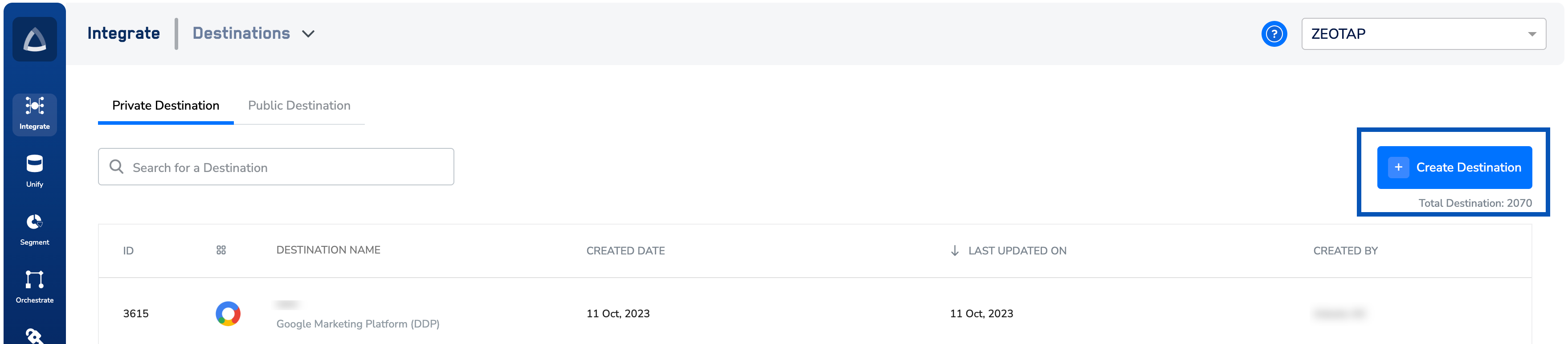
3
Locate Amazon DSP in the catalogue
Under All Destinations, search for Amazon DSP and click the tile.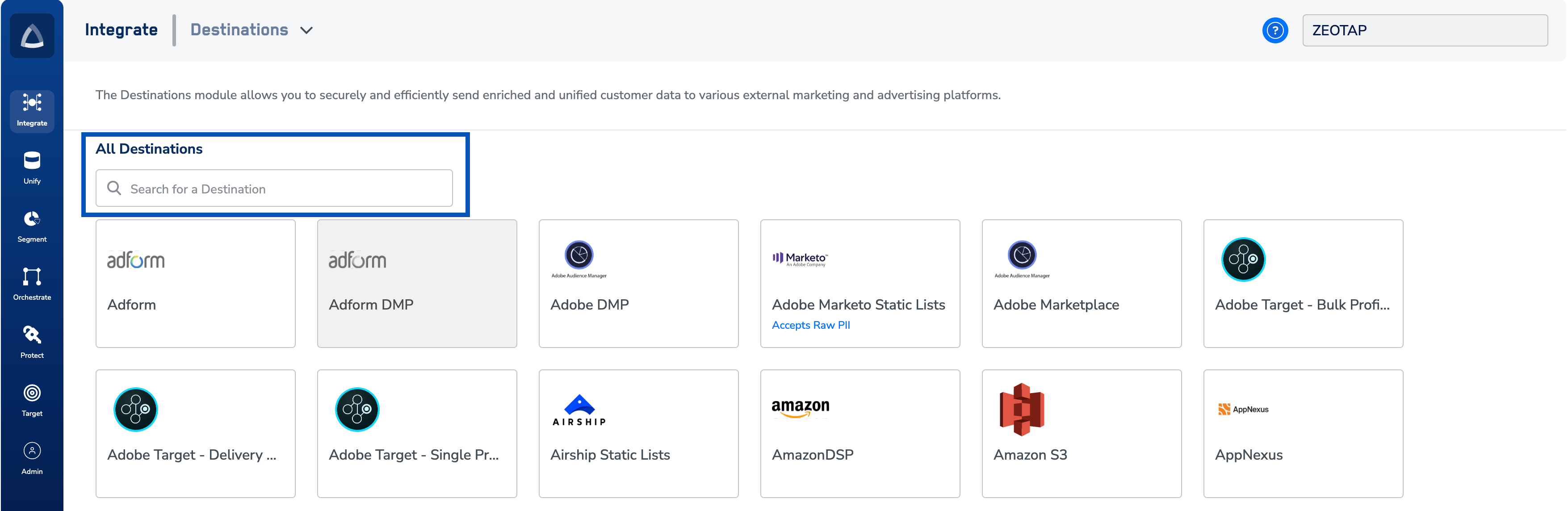
4
Enter the account details
On the destination configuration screen, fill in the right-hand form:a. Enter a name for the Destination.b. Enter the Advertiser Id — the Amazon DSP Ad Account ID on which the audience will be created.c. Choose the Currency from the drop-down menu.d. Click Next to proceed to mapping.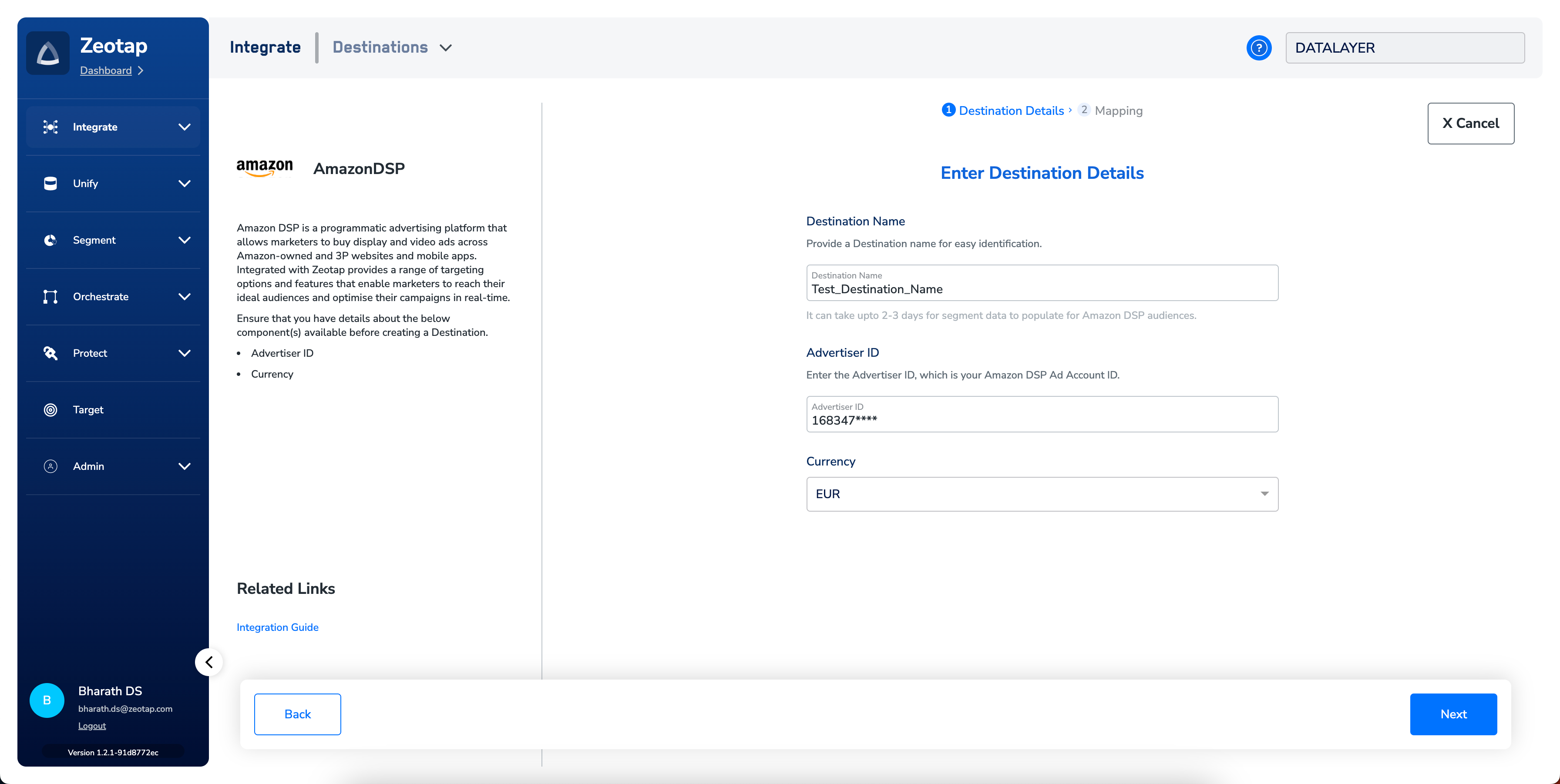
5
Map identifiers to the destination
On the Actions and Mapping screen:a. Under Choose your Action, select Send identifiers to Amazon DSP.b. Under Map the Fields, map the Zeotap catalogue identifiers you want to send (Zeotap Cookies for Amazon and MAIDs) to the corresponding Amazon DSP fields.c. Click Create Destination.
Link an audience and set the Data Source Country
After the destination exists, link it to an audience from the Audiences application. For the full linking flow, see Link an audience to the destination.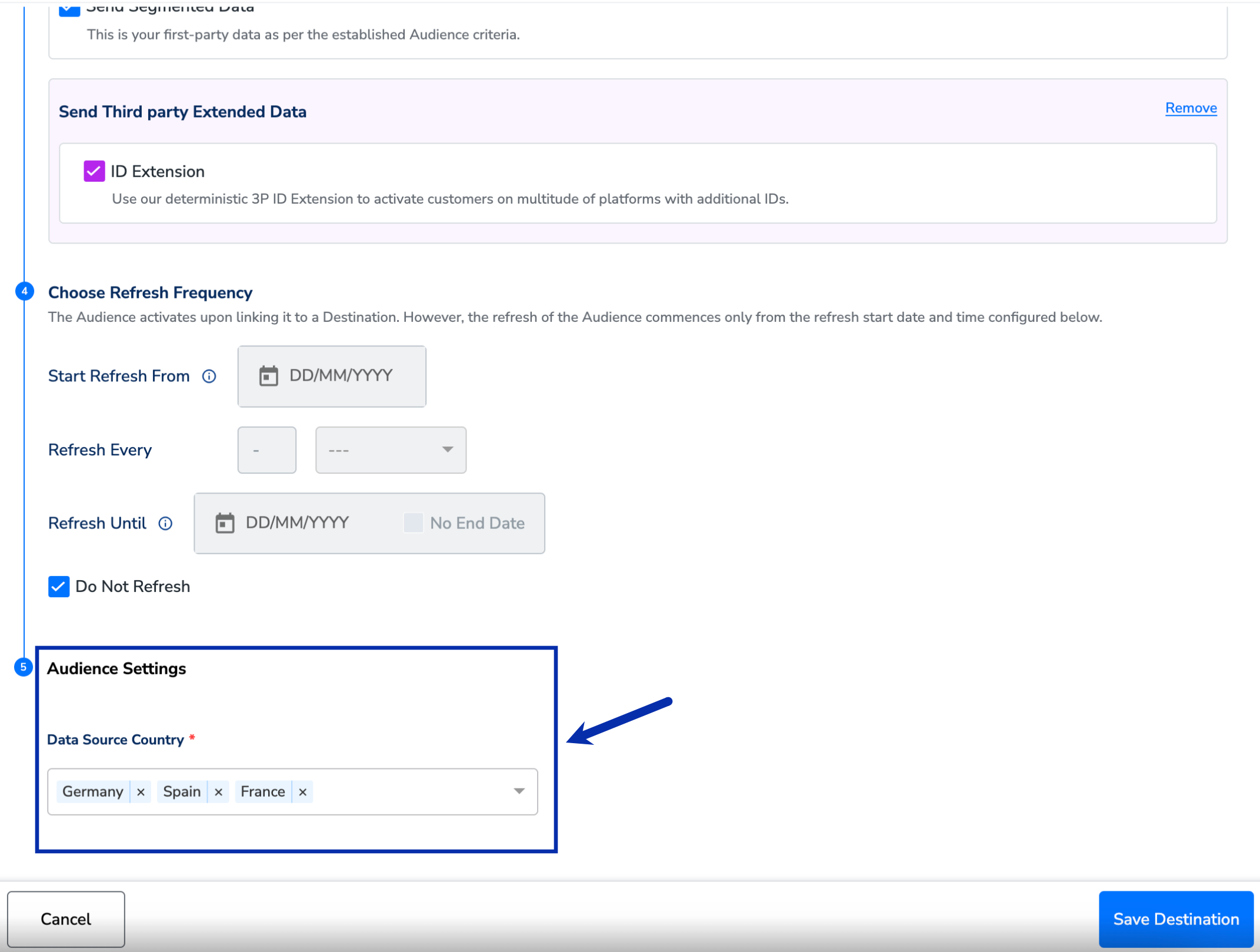
Verify the audience arrived in Amazon Campaign Manager
Audience data takes up to two to three days to populate at the Amazon DSP seat after linking. Once that window has elapsed, confirm delivery from the Amazon side.The following steps happen in Amazon Campaign Manager, outside Zeotap CDP.
1
Open Amazon Campaign Manager
Log in to Amazon Campaign Manager and open the Audiences tab.
2
Filter by source
Under OTHER SOURCES, select the checkboxes that match the type of segment you are looking for: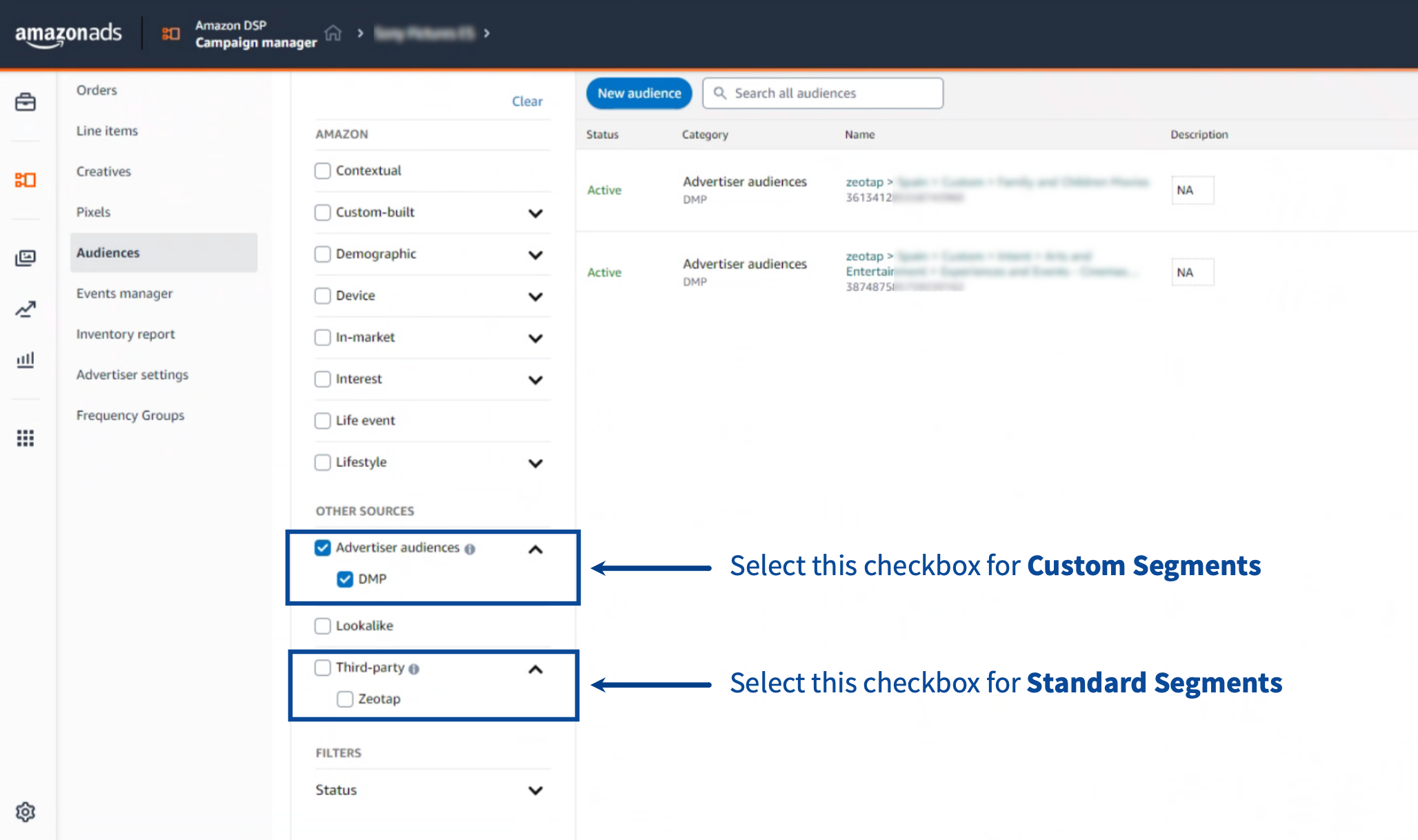
- Standard segments — select Third-party and Zeotap. These segments are pre-created by Zeotap and become available once third-party data access is enabled for your organisation. A standard segment contains a single attribute.
- Custom segments — select Advertiser audiences and DMP. These are the audiences you built in Zeotap CDP and linked to this destination; they can contain more than one attribute.
How you know it worked
The audience you linked in Zeotap CDP appears in Amazon Campaign Manager’s Audiences tab under Advertiser audiences / DMP within two to three days of linking. From there, attach it to a line item or campaign to start targeting.User disqualification from audiences
When a user stops meeting the audience criteria — because attributes changed, consent was withdrawn, or another condition is no longer satisfied — Zeotap CDP issues a user-deletion request on the next refresh cycle to every destination linked to that audience. Disqualified users are removed from the Amazon DSP segment on the refresh frequency configured for the audience. The process is automatic; no manual trigger is required.Troubleshooting
Common failure modes when sending audiences to Amazon DSP, and where to fix each one:
If the symptom you see is not in this table, or the fix above does not resolve it, contact your Zeotap customer success representative. Include in your request:
- The destination name and ID
- The audience ID
- The timestamp of the activation
- A description of what you see (or do not see) in Amazon Campaign Manager
FAQ
How long does audience data take to appear on the Amazon DSP seat?
How long does audience data take to appear on the Amazon DSP seat?
Up to two to three days after you link the audience to the destination. Wait for that window to elapse before treating an empty segment in Amazon Campaign Manager as an error.
Which identifiers can I send to Amazon DSP?
Which identifiers can I send to Amazon DSP?
Zeotap Cookies for Amazon and Mobile Advertising IDs (MAIDs). Map these under Map the Fields during destination setup.
Do I need to remove disqualified users from the audience manually?
Do I need to remove disqualified users from the audience manually?
No. When a user stops meeting the audience criteria, Zeotap CDP issues a deletion request to Amazon DSP on the next refresh cycle for that audience. The process runs automatically on the audience’s configured refresh frequency.
What happens if I skip the Data Source Country setting?
What happens if I skip the Data Source Country setting?
The audience will not be classified for regional targeting on Amazon DSP. Set the Data Source Country under Audience Settings on the Activation screen after linking the audience.
Next steps
- Explore Amazon DSP — DP Audience → for the OAuth-authenticated variant of this destination, which uses a direct sign-in with Amazon instead of an Advertiser Id alone.
- Explore Amazon Conversions API → to send server-to-server conversion events to Amazon DSP through Journeys.
- Explore Amazon Marketing Cloud → for privacy-safe clean-room analysis of your CDP segments alongside Amazon Ads signals.
- Explore linking an audience to a destination → for the full audience activation walkthrough.