

What Destinations are
Destinations are the activation layer of Zeotap CDP. After you ingest sources, unify customer profiles, and build an audience, a destination is where that audience is sent — a connected ad account, marketing platform, CRM, or warehouse that runs the campaign or stores the data. Each destination wraps three things you configure together: the platform (the external system such as Meta, Pinterest, Braze, Criteo, Google DV360, Amazon, Adform, or BigQuery), the action the destination performs on each delivery (for example, sending identifiers to a custom audience, syncing custom-event payloads, or upserting CRM records), and the mapping that controls which Catalogue fields and identifiers are sent for that action. A destination is not the same as a platform. A platform is the external product family; a destination is one specific ad account, workspace, or endpoint inside that platform. You can configure several destinations against the same platform — for example, one Meta destination per ad account, each scoped to a region or business unit — and reuse each one across audiences and journeys.Prerequisites
Before you activate an audience to a destination, complete the upstream setup:
- A source is connected and ingesting data — see creating a source.
- The ingested fields are mapped to the Catalogue so identifiers and attributes resolve correctly downstream.
- An audience is defined with the criteria for the cohort you want to activate.
- Your role grants destination edit rights on the organisation that owns the destination. For the role-to-permission matrix, see User Roles and Access.
- For the platform side: credentials (API keys, ad-account IDs) for the external destination, plus any platform-specific limits — for example, Meta caps each ad account at 500 custom audiences, after which new audience syncs to that account fail.
Key concepts
- Platform — the external marketing or advertising product Zeotap delivers to.
- Destination — a specific account or workspace inside a platform, configured once in Zeotap with credentials and reused across audiences and journeys.
- Action — the operation the destination performs on each delivery: sending identifiers to a custom audience, upserting a CRM record, sending a custom behavioural event, exporting rows to a warehouse table, and so on. Each platform exposes a defined set of actions.
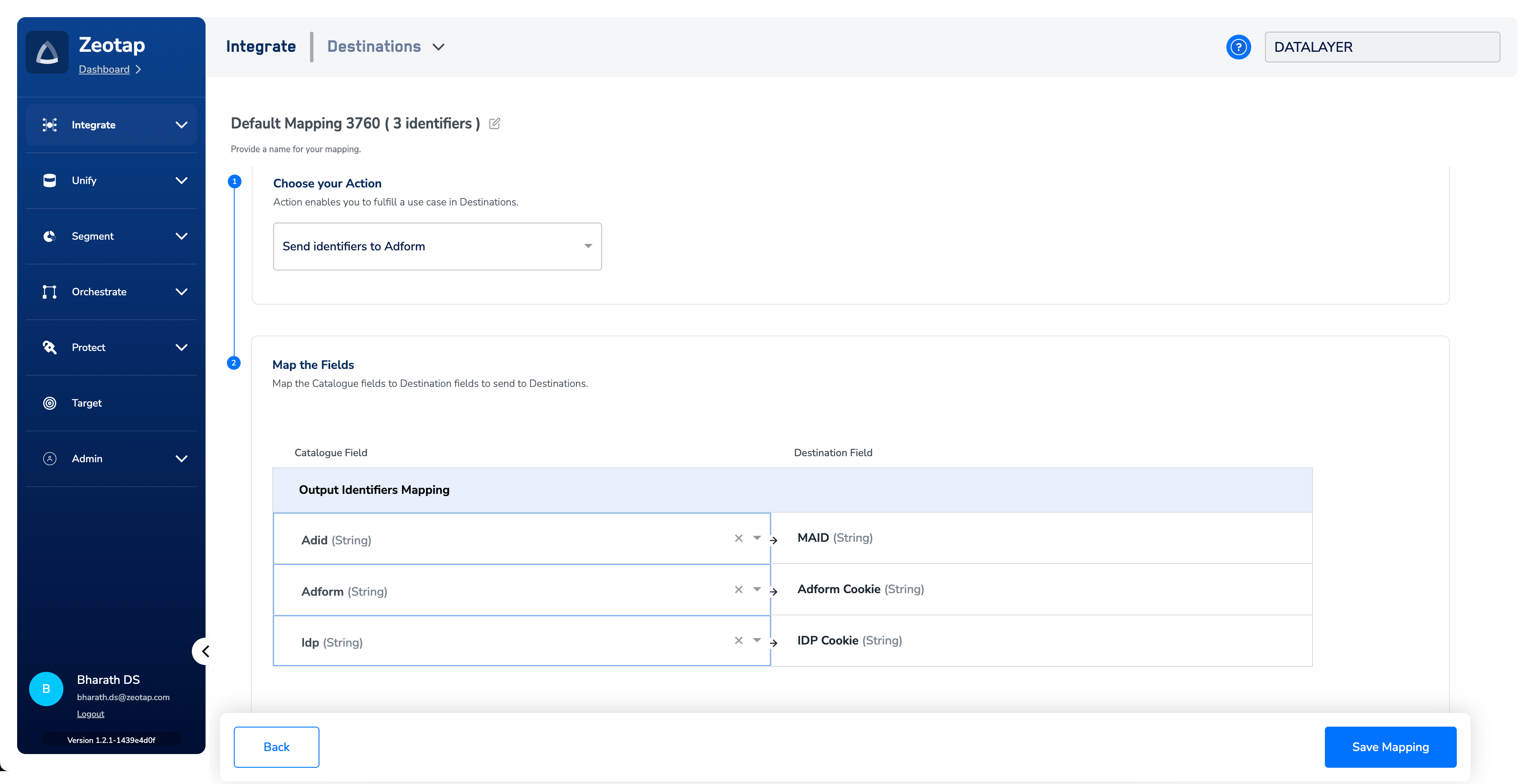
- Mapping — the per-action configuration that names which Catalogue fields and output identifiers (such as MAIDs, cookies, hashed email IDs, and custom user IDs) Zeotap sends, and how each field maps to the destination’s expected schema. A destination can carry several mappings, one per action.
Configure a destination
Destinations are configured in two places, and both create the same object:- From the Destinations module, when you want to set up the destination ahead of time and reuse it across audiences and journeys. See Create a Destination.
- From the Audience module while activating an audience, when you want to set up the destination inline at the moment of activation.
Define the mapping
The mapping is where you control exactly what leaves Zeotap. For each action, Zeotap pre-populates the output identifiers the platform accepts (MAIDs, cookies, hashed email IDs, custom user IDs, and similar). From there, refine the mapping by:- Selecting which identifiers to send — keep the defaults the platform accepts, or narrow the list so only specific identifiers are delivered.
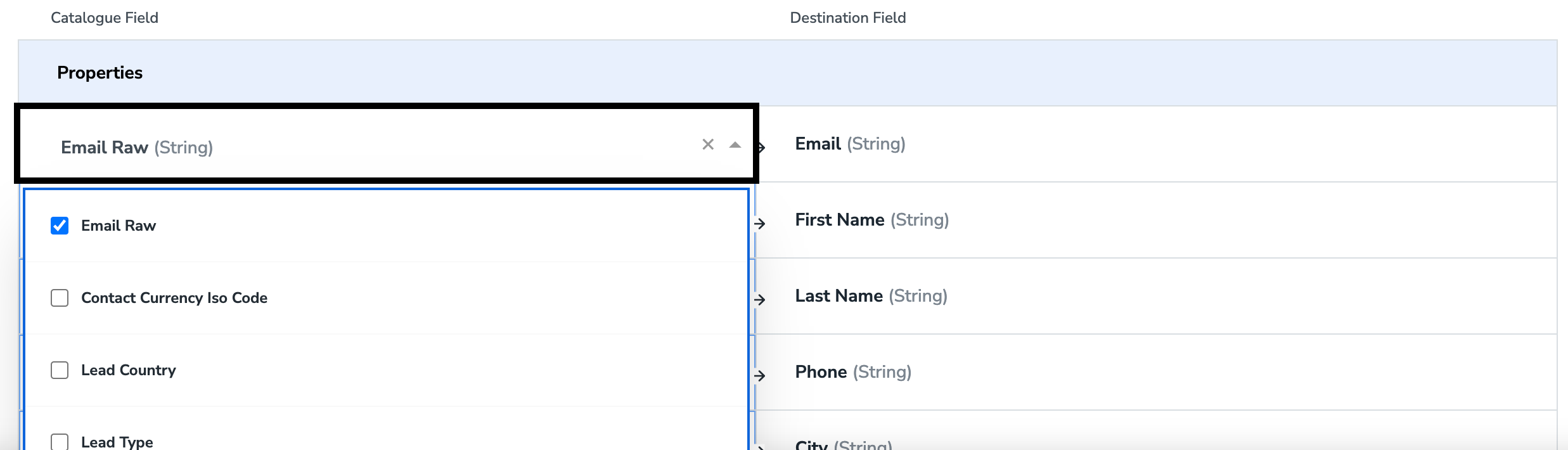
- Adding Catalogue fields — extend the mapping with additional Catalogue attributes the action supports, such as event timestamps, monetary values, or custom event properties.
- Removing fields — drop any field that is not required for the destination.
event_id and event_time, and the mapping is what guarantees they are populated:
Activate an audience to a destination
Once an audience is defined, you activate it to one or more destinations. You can activate immediately or schedule activation for later. At activation time you either pick a destination that already exists for your organisation or create a new one inline using the same configuration steps as the Destinations module.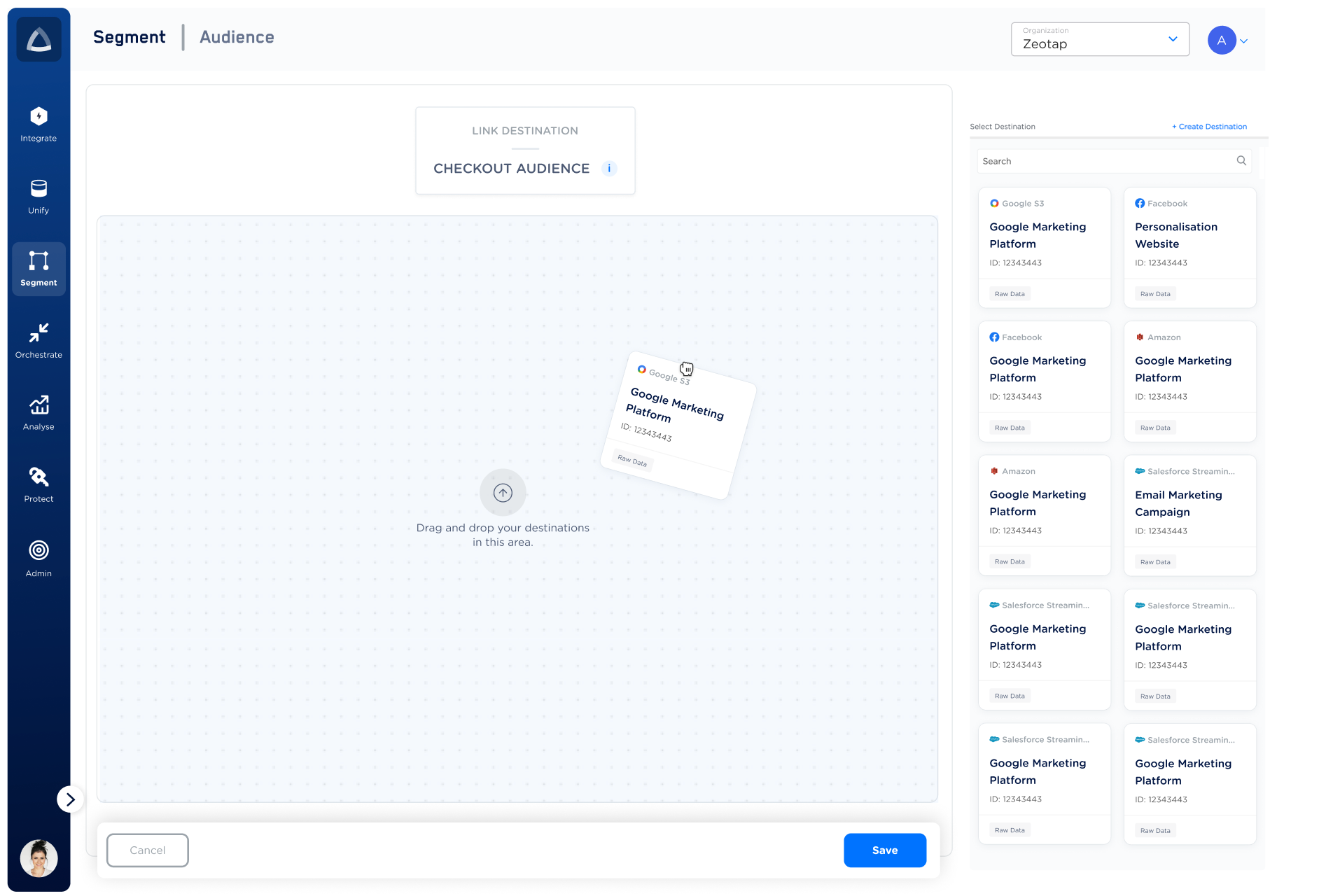

Verify the activation worked
After activating an audience to a destination, confirm delivery from two sides:- In Zeotap — open the affected destination and review its activity. A successful delivery records a run with a non-zero qualified count and a completed status. A run that fails records an error message you can use to diagnose the cause.
- In the destination platform — open the corresponding custom audience, list, or table in the platform itself (for example, the Meta ad account’s custom audiences page, the Braze segment, or the BigQuery table) and confirm the expected record count is present.
Why deliveries fail
A destination delivery can fail at several points: the audience can return zero qualifying customers at runtime, the platform can reject the payload, or the platform’s own account limits can be reached. The following errors surface on the audience–destination pair when this happens:
These are platform- and configuration-level errors you can act on directly. Errors that point to internal infrastructure require a support ticket.
When to contact support
Open a support ticket when:- The error on the audience–destination pair does not match any of the rows above, or it surfaces as a generic message with no platform-specific detail.
- The destination platform confirms it received zero events, but Zeotap reports a successful refresh with a non-zero qualified count.
- An audience–destination pair stays in an in-progress state for longer than the destination’s expected refresh window and there is no error recorded.
- A refresh that was previously running on schedule stops running entirely with no error recorded.
FAQ
Why does the audience estimator show users but the destination delivers zero?
Why does the audience estimator show users but the destination delivers zero?
The estimator queries the raw ingested tables directly, while activation runs against a unified store that is rebuilt on a fixed cadence. Data ingested between two unified-store refresh cycles is visible to the estimator but is not yet visible to activation, so a brand-new audience built on freshly ingested data can estimate non-zero and deliver zero on its first run. The next refresh, once the unified store has caught up, returns the expected count.
Can I configure the same platform more than once?
Can I configure the same platform more than once?
Yes. A destination is a single account inside a platform, not the platform itself. You can configure as many destinations as your organisation needs — for example, one Meta destination per ad account, or one BigQuery destination per target dataset — and activate any audience to any of them.
Why was my refresh terminated after 24 hours?
Why was my refresh terminated after 24 hours?
A destination workflow that records no progress for 24 hours is terminated and an automatic refresh is queued. This protects long-stuck deliveries from holding resources indefinitely. The next refresh runs against the latest unified-store data; persistent termination across runs is a signal to open a support ticket.
What happens when an Access Rule blocks a destination on my folder?
What happens when an Access Rule blocks a destination on my folder?
The destination does not appear in the activation list for that folder. Audiences and journeys already using the now-restricted destination keep running, but are flagged for review and cannot be republished until the conflict is resolved. See Destination Access Rules.