NoteFor information about the various roles available in the system with their descriptions, refer here.
Integrate - User Roles and Access
The following table summarises the roles and access levels available for various features on Integrations:
| Module | Access - Display Name | Campaign Admin | Campaign Manager | Campaign Viewer | CDP Admin | CDP Manager | CDP VIEWER | Destination Admin | Destination Viewer | Integrations Admin | Integrations Manager | Integrations Viewer | Zeotap Engineer | Zeotap Manager | ZEOTAP tester | ZEOTAP Viewer |
|---|
| Integrate > Sources | View Sources | Y | Y | Y | Y | Y | Y | N | N | Y | Y | Y | Y | N | Y | Y |
| Integrate > Sources | Create, Pause, Resume, and Archive Sources | N | N | N | Y | Y | N | N | N | Y | Y | N | Y | N | Y | N |
| Integrate > Sources | Rename Sources | N | N | N | Y | Y | N | N | N | Y | Y | N | Y | N | Y | N |
| Integrate > Sources | Read and write to GCS | N | N | N | Y | Y | N | N | N | Y | Y | N | N | N | Y | N |
| Integrate > Destinations | View Destinations | Y | Y | Y | Y | Y | Y | Y | Y | Y | Y | Y | Y | Y | Y | Y |
| Integrate > Destinations | Create and Edit Destinations | Y | Y | N | Y | Y | N | Y | N | Y | Y | N | Y | Y | Y | N |
Unify - User Roles and Access
The following table summarises the roles and access levels available for various features on Unify:
| Module | Access - Display Name | Campaign Admin | Campaign Manager | Campaign Viewer | CDP Admin | CDP Manager | CDP VIEWER | Destination Admin | Destination Viewer | Integrations Admin | Integrations Manager | Integrations Viewer | Zeotap Engineer | Zeotap Manager | Zeotap tester | ZEOTAP VIEWER |
|---|
| Unify > Catalogue | Create and Edit Catalogue | N | N | N | Y | Y | N | N | N | Y | Y | N | Y | Y | Y | N |
| Unify > Catalogue | View Catalogue | Y | Y | Y | Y | Y | Y | N | N | Y | Y | Y | Y | Y | Y | Y |
| Unify > Calculated Attributes | View Calculated Attributes | Y | Y | Y | Y | Y | Y | N | N | Y | Y | Y | Y | Y | Y | Y |
| Unify > Calculated Attributes | Create and Edit Calculated Attributes | N | N | N | Y | Y | N | N | N | Y | Y | N | Y | Y | Y | N |
| Unify > ID Strategy | View ID Strategy | Y | Y | Y | Y | Y | Y | N | N | Y | Y | Y | Y | Y | Y | Y |
| Unify > ID Strategy | Edit ID Strategy | N | N | N | Y | Y | N | N | N | Y | Y | N | Y | N | Y | N |
Segment - User Roles and Access
The following table summarises the roles and access levels available for various features on Segment:
| Module | Access - Display Name | Campaign Admin | Campaign Manager | Campaign Viewer | CDP Admin | CDP Manager | CDP VIEWER | Destination Admin | Destination Viewer | Integrations Admin | Integrations Manager | Integrations Viewer | Zeotap Engineer | Zeotap Manager | Zeotap Tester | ZEOTAP VIEWER |
|---|
| Segment > Audiences | View Audience | Y | Y | Y | Y | Y | Y | N | N | N | N | N | Y | Y | Y | Y |
| Segment > Audiences | Create, Edit, Pause, and Duplicate Audience | Y | Y | N | Y | Y | N | N | N | N | N | N | Y | Y | Y | N |
| Segment > Audiences | Archive Audience | Y | N | N | Y | N | N | N | N | N | N | N | Y | Y | Y | N |
| Segment > Audiences | Download Audience | Y | N | N | Y | N | N | N | N | N | N | N | Y | Y | Y | N |
| Segment > Audiences | Create Folder | Y | Y | N | Y | Y | N | N | N | N | N | N | Y | Y | Y | N |
| Segment > Audiences | Activate Audience | Y | Y | N | Y | Y | N | N | N | N | N | N | Y | Y | Y | N |
Orchestrate - User Roles and Access
The following table summarises the roles and access levels available for various features on Orchestrate:
| Module | Access - Display Name | Campaign Admin | Campaign Manager | Campaign Viewer | CDP Admin | CDP Manager | CDP VIEWER | Destination Admin | Destination Viewer | Integrations Admin | Integrations Manager | Integrations Viewer | Zeotap Engineer | Zeotap Manager | ZEOTAP TESTER | ZEOTAP VIEWER |
|---|
| Orchestrate > Journeys | View Journeys | Y | Y | Y | Y | Y | Y | N | N | N | N | N | Y | Y | Y | Y |
| Orchestrate > Journeys | Create, Edit, and Archive Journeys | Y | Y | N | Y | Y | N | N | N | N | N | N | Y | Y | Y | N |
| Orchestrate > Journeys | Delete Journeys | Y | Y | N | Y | Y | N | N | N | N | N | N | Y | N | Y | N |
| Orchestrate > Journeys | Pause Journeys | Y | Y | N | Y | Y | N | N | N | N | N | N | Y | N | Y | N |
| Orchestrate > Journeys | Resume Journeys | Y | Y | N | Y | Y | N | N | N | N | N | N | Y | Y | Y | N |
Protect - User Roles and Access
The following table summarises the roles and access levels available for various features on Protect:
| Module | Access - Display Name | Campaign Admin | Campaign Manager | Campaign Viewer | CDP Admin | CDP Manager | CDP VIEWER | Destination Admin | Destination Viewer | Integrations Admin | Integrations Manager | Integrations Viewer | Zeotap Engineer | Zeotap Manager | ZEOTAP TESTER | ZEOTAP VIEWER |
|---|
| Protect > Consent | View Consent | Y | Y | Y | Y | Y | Y | N | N | Y | Y | Y | Y | N | Y | Y |
| Protect > Consent | Set up and Edit Consent | N | N | N | Y | Y | N | N | N | Y | Y | N | Y | N | Y | N |
| Protect > Customer 360 | Search and View Users | N | N | N | Y | N | N | N | N | Y | N | N | Y | Y | Y | N |
| Protect > Customer 360 | Delete and Export Users | N | N | N | Y | N | N | N | N | Y | N | N | N | N | Y | N |
Admin - User Roles and Access
The following table summarises the roles and access levels available for various features on Admin:
| Module | Access - Display Name | Super Admin | Zeotap Admin | Zeotap cft | partner | admin | moderator | Viewer |
|---|
| Admin | View Organisations | Y | Y | Y | Y | Y | Y | Y |
| Admin | Create, Edit and Delete Organisations | Y | Y | N | N | Y | N | N |
| Admin | View Users | Y | Y | Y | Y | Y | Y | Y |
| Admin | Edit and Delete Users | Y | Y | N | Y | Y | N | N |
| Admin | Create User | Y | Y | N | Y | Y | Y | N |
| Admin | View Request Access Tab | Y | Y | Y | Y | Y | N | N |
| Admin | View Request Access Form | Y | Y | Y | N | N | N | N |
| Admin | View Request Access Requests | N | N | N | Y | Y | N | N |
| Admin | Edit Own Profile | Y | N | N | Y | Y | N | N |
Download Users
The Download Users feature enables administrators to export a CSV file containing all users and their detailed permission assignments, scoped by organization. This is useful for auditing, compliance reviews, and access management reporting.
Exporting User Permissions
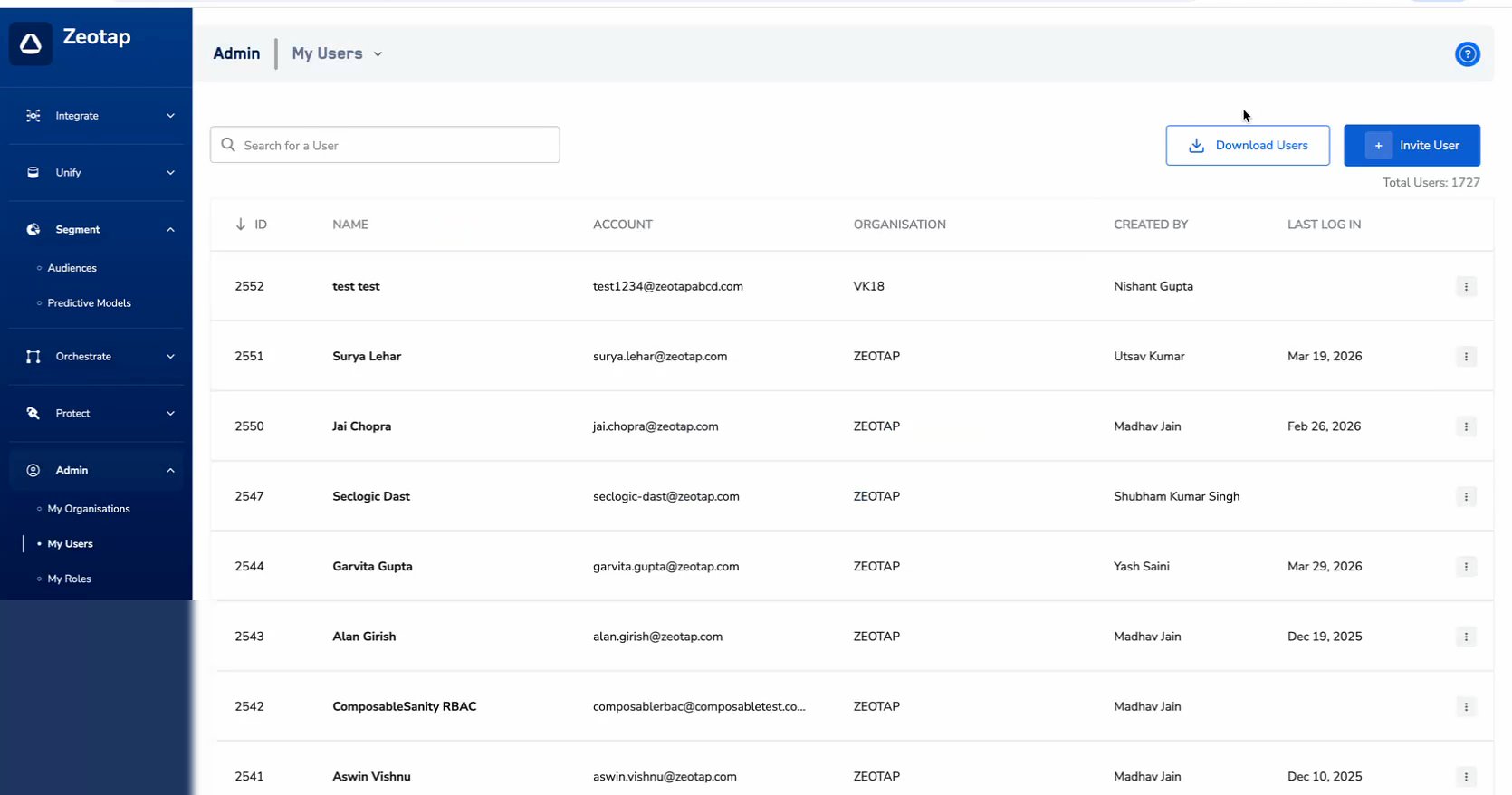
Navigate to Admin > My Users.
Click the Download Users button in the top-right area of the page. In the modal that appears, choose the export scope:
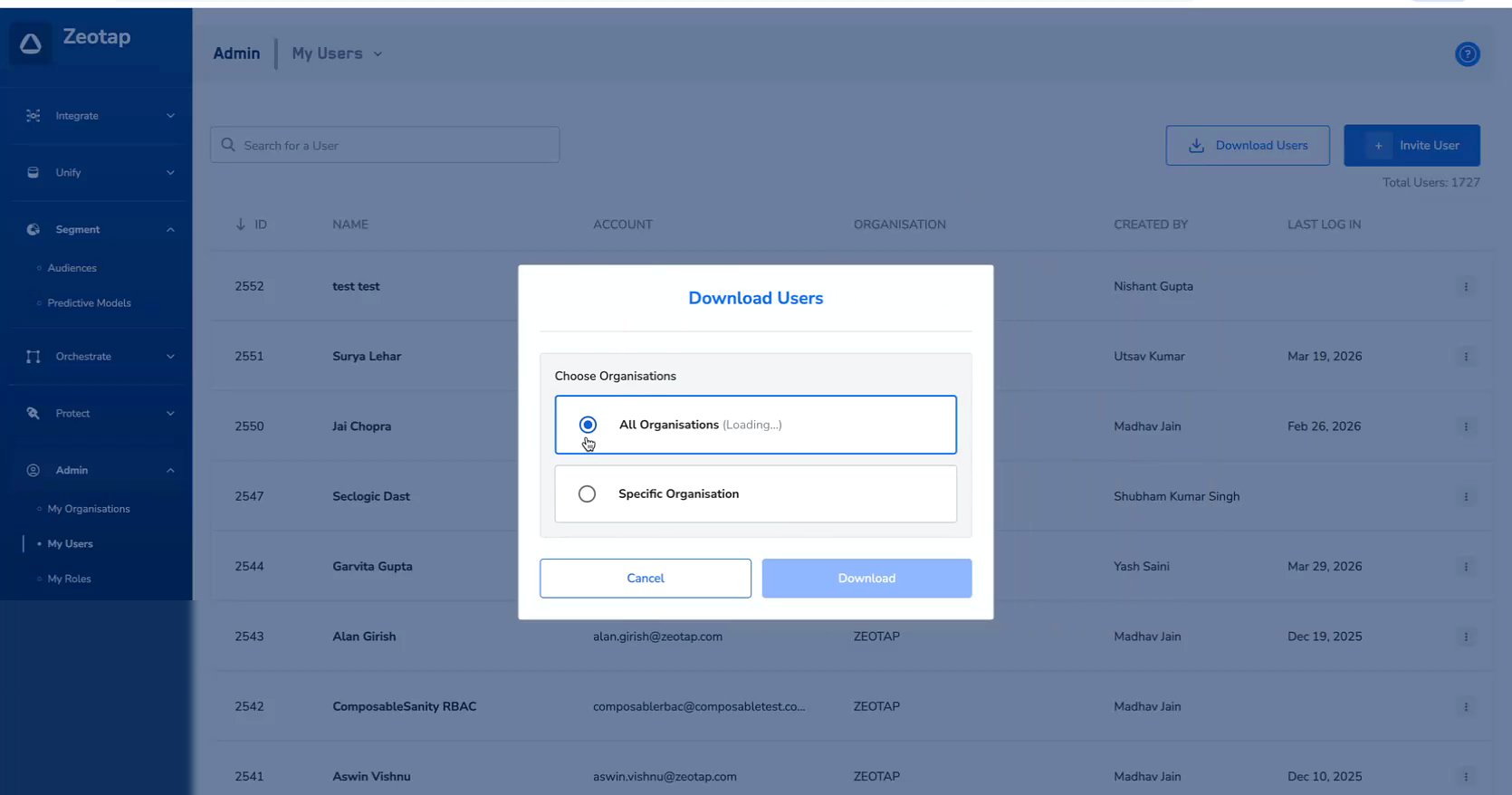
- All Organizations — Exports users from all organizations. Useful for global audits.
- Specific Organization — Exports users from a selected organization only. A searchable dropdown lets you pick the organization.
Click Download to generate and download the CSV file.
Exported File
The exported file follows the naming convention zeotap_users_export_YYYY-MM-DD (N).csv.
Data Structure
Each row in the CSV represents a user. The columns cover identity fields and permission states:
| Column Group | Fields |
|---|
| User Identity | User Name, Email ID, Admin Portal Access, Last Login Date, Organization |
| User Role | Role Name |
| Audience Permissions | View Audience, Create/Edit/Move/Duplicate, Archive Audience, Download Audience, Activate Audience, Allow User Deletion |
| Folder Permissions | Create Folder, Create Sub Folder, Delete Folder |
| Catalogue & Attributes | Catalogue Admin, Calculated Attributes, View Catalogue |
Permission values are displayed as TRUE or FALSE for each user.
Use conditional formatting in your spreadsheet tool to highlight TRUE values in green and FALSE values in red for a quick visual audit of permission coverage across users.
Best Practices
- Schedule regular exports — Download the user permissions CSV at a regular cadence (e.g., monthly) for compliance and audit purposes.
- Compare over time — Keep historical exports to track how permissions change over time and identify any unintended permission escalations.
- Use Specific Organization scoping — For multi-org deployments, export per organization to keep audit files focused and manageable.
- Automate reviews — Use spreadsheet formulas or scripts to flag users with unusual permission combinations (e.g., users with Delete permissions but not Create permissions).