

sum_order_value_90d > 500 — no SQL, no data-team ticket.
The six scenarios below are the canonical patterns. Each one shows the customer problem, the CA design (type, operator, window), how to plug it into activation, and the pitfall to avoid.
Lifetime Value tracking (retail)
A retailer takes orders on the web, in the app, and in stores. The revenue for one customer is scattered across dozens of purchase events, so the campaign team cannot answer the simplest question: how much has this person spent with us recently? Spend tiers, loyalty eligibility, and lookalike seeds all need that one number.
In the sentence builder this reads: For each user in my database, calculate a new attribute as: Sum of Order Value field, when they performed Purchase. If you also need the split by region or brand, add a Group By (batch only, up to 3 fields) — one value per country per customer instead of a single overall value per customer.
Plug it into activation: build a High Spenders audience with the rule
sum_order_value_90d > 500 and route it to a premium journey or a paid-media destination. For instant loyalty rewards, add a real-time variant — a Real-Time CA using Sum of Order Value over a short window — and trigger the reward the moment cumulative spend crosses €500. Real-Time CAs update as events arrive and are enabled per account — ask your Zeotap representative if the option is not visible in your workspace.
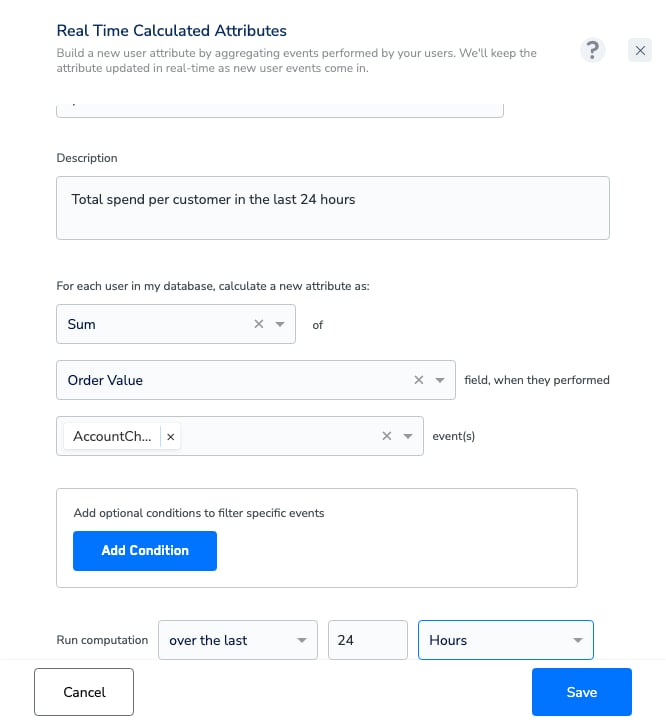
A fully configured Real-Time Calculated Attribute: Sum of Order Value over the last 24 Hours.
Churn / re-engagement signal (subscription)
A subscription service rarely sees churn announce itself — customers simply stop logging in weeks before they cancel. The retention team needs a signal that says “this account was active recently, but has gone quiet”, early enough for a win-back offer to land. The classic design uses two Count CAs over nested windows. Count aggregates the events themselves, so no field is needed:
In the sentence builder each reads: For each user in my database, calculate a new attribute as: Count, when they performed Session Start — once with a 60-day window and once with a 30-day window.
Plug it into activation: define a Lapsing audience with
sessions_60d Greater 0 AND sessions_30d Does Not Exist — active in the last two months, silent in the last one — and feed it into a win-back journey with an incentive. This is the same two-CA pattern Zeotap documents for monthly repurchase campaigns in retail.
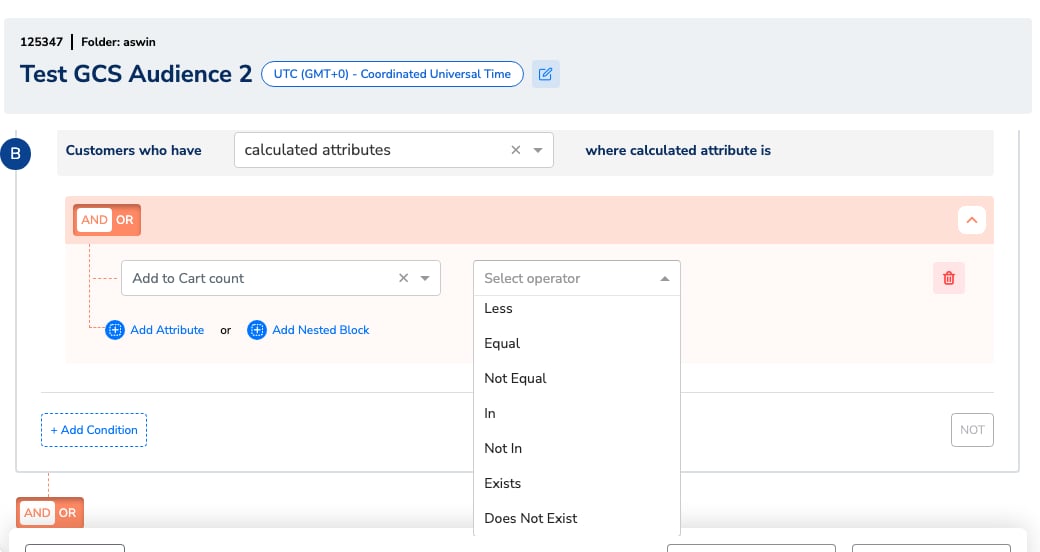
The audience builder: a rule on a calculated attribute, with the operator list including Exists and Does Not Exist.
Favourite category (retail/content)
A retailer wants the homepage, newsletter, and push notifications to lead with each customer’s favourite category — running gear for one shopper, home decor for another. The raw signal is there in purchase events; it just needs to be reduced to one value per profile.
In the sentence builder this reads: For each user in my database, calculate a new attribute as: Most frequent of Product Category field, when they performed Purchase. If several categories tie, a single value is returned deterministically. When you need the top 3 categories rather than a single winner, Standard mode can’t express it — switch the Definition Type to SQL (the SQL CA Editor is Beta and enabled per account on request; see Create a Batch Calculated Attribute) and use the top-N pattern from the in-product Help Guide:
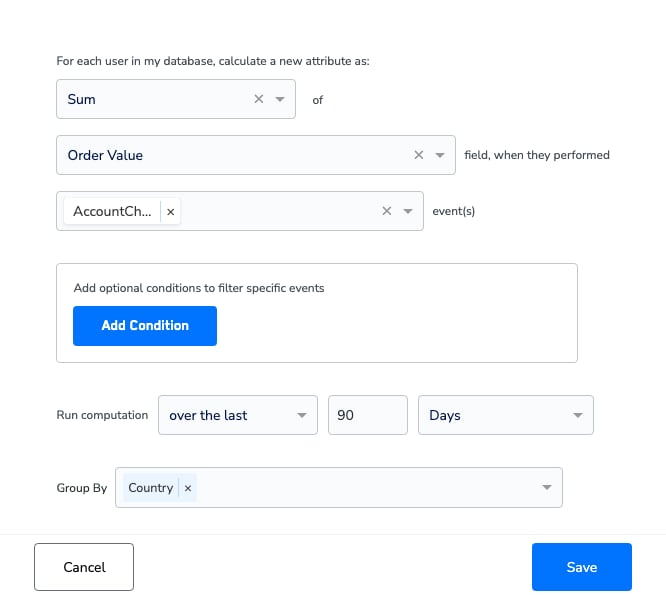
Group By splits one batch CA into one value per group — here Sum of Order Value grouped by Country.
favourite_category_90d = "Running" drives category-led newsletters and on-site personalisation.
Engagement scoring (media/publishing)
A media company needs to know which readers are engaged before deciding who sees the paywall, who gets the retention newsletter, and who is at risk of going dormant. Page views land as thousands of individual events; the editorial and CRM teams need simple engagement bands.
In the sentence builder the first reads: For each user in my database, calculate a new attribute as: Count, when they performed Page View. The second uses Unique Value Count of Content Section on the same event.
The first CA measures volume, the second breadth — a reader who visits daily but only reads one section behaves differently from one who roams the whole site.
Plug it into activation:
page_views_7d Less 5 OR page_views_7d Does Not Exist defines a Low Engagement audience for a re-engagement push — the second clause matters, because a reader with no page views at all carries no value for the CA and would slip past a < 5 rule on its own. page_views_7d >= 5 AND sections_read_30d >= 3 marks broad, habitual readers who are strong subscription-upsell candidates.
Real-time variant: to react while an engaged reader is still on the site — for example, surfacing a subscription offer mid-session — create a Real-Time CA using Count of Page View events over the last few Hours and trigger the moment a threshold is crossed.
Recency signals
Across industries, how long since the last action is one of the strongest predictors of churn — and one of the most useful suppression signals. A marketplace, for example, wants to stop paying to re-acquire someone who bought yesterday, and to nudge someone drifting past 60 days.
In the sentence builder this reads: For each user in my database, calculate a new attribute as: Last Timestamp of Purchase Timestamp field, when they performed Purchase.
Audience rules can work with timestamps directly (for example, last purchase within the last 14 days). If you want recency as a plain number of days — easier for banding and downstream tools — Standard mode can’t compute a difference, so use a SQL CA following the in-product days-since-last-event pattern (event timestamps are epoch milliseconds, hence the
TIMESTAMP_MILLIS() wrapper — the in-product Help Guide on Create a Batch Calculated Attribute covers the exact columns and functions):
days_since_last_purchase >= 30 AND days_since_last_purchase <= 90 feeds a win-back journey; last_purchase_ts within 14 days suppresses recent buyers from acquisition campaigns.
Real-time variant: batch recency lags by up to a day, so for same-day suppression add a Real-Time CA using Count of Purchase events over the last 24 Hours — suppress anyone where that attribute Exists (any purchase today), and keep the batch CAs for the longer-window bands.
B2B account activity
A B2B software provider has a mismatch: product activity (logins, orders, feature usage) happens at the account level, but marketing and CSM outreach targets individual contacts. The team wants each contact’s profile to carry usage signals so renewals and nurture flows can react to quiet accounts.
For account-level context, model accounts as a non-customer-entity (NCE) source joined to your contacts. In SQL mode, the in-product Help Guide exposes that data through the
%%NCE_STORE_<SOURCE_ID>%% macro table (replace <SOURCE_ID> with your actual source ID), letting a SQL CA combine event activity with account attributes. The exact fields depend on how your account source is mapped in the Catalogue.
CAs are computed per unified customer profile — the pattern here attaches activity and account context to each contact’s profile rather than rolling one value up across all contacts of an account. For account-level rollup requirements, contact your Zeotap representative.
logins_30d Does Not Exist (no logins recorded in the window — remember, no qualifying events means no value, not 0) at accounts flagged as in-renewal (from the joined account data) can trigger a CSM alert journey or a re-onboarding email sequence.