

What Segment Membership gives you
Segment Membership is a system-defined Calculated Attribute that tags each user with the audiences they have joined or left. Because those tags sit on the customer profile, you can use them like any other attribute.- Build audiences from other audiences. Reference an existing audience’s members when defining a new one, without duplicating its logic.
- Exclude users from a campaign. Suppress everyone already in another audience, even when that audience is not activated to a Destination.
- Understand user behaviour. When running campaigns in platforms like Adobe, you may want to know which segments a user belongs to. Requesting Segment Membership in your Profile API call returns that list for a given user.
- Drive Journeys. Use membership as an entry condition or re-entry criterion.
TerminologyThe terms Audiences and Segments are used interchangeably to refer to customer cohorts belonging to a specific category. An example of an audience/segment can be a specific group of customers who are over 18 years of age and have performed an
addToCart event within the last 30 days.When you need to Enable Membership
Any audience with an active refresh schedule contributes to Segment Membership. Whether you need to do anything depends on how that audience gets its schedule.Enable Membership is not a switch that turns tagging on. Tagging follows the refresh schedule. Enable Membership gives a destination-less audience a refresh schedule so that tagging happens at all. This is the main reason the feature exists.
Before you begin
1
Segment Membership must be provisioned for your organisation
Go to Unify → Calculated Attributes and look for Segment Membership in the Batch Attributes list. Its Created By value will be 
System.2
Check the refresh schedule of any audience you plan to reference
An audience only contributes membership data while it is actively refreshing. If an audience has neither a Destination nor membership enabled, or its schedule has become inactive, it contributes nothing even though the audience itself still opens normally.
Enable membership on an audience
On a new audience
1
Build and save your audience
Define your audience criteria as normal, then select Save.
2
Choose Enable Membership
On saving, you are asked how you would like to proceed.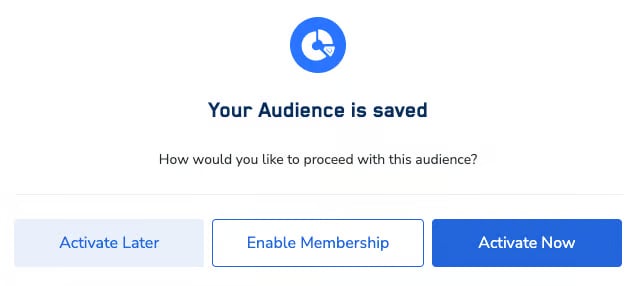
- Enable Membership gives the audience its own refresh schedule, so its users are tagged. Use this when the audience is not going to a Destination.
- Activate Now sends the audience to a Destination immediately. It will refresh on the Destination’s schedule, so its users are tagged without enabling membership.
- Activate Later saves the audience without activating it. It has no refresh schedule yet, so it contributes no membership data until it gets one.
On an existing audience
Membership is calculated for all audiences by default, so there is nothing to switch on for an audience you have already saved.Use Segment Membership in Audiences
1
Add a calculated attribute condition
In the audience builder, under Let’s define the Audience criteria, set Customers who have to
calculated attributes.2
Select the attribute and operator
Choose Segment Membership as the attribute, then Contains Any as the operator.
3
Select the audience IDs
Choose one or more audience IDs from the dropdown. The list is searchable and supports high-cardinality values.
4
Check your estimate
Select Check Estimates to confirm the condition returns the population you expect before saving.
What Contains Any matchesContains Any checks only whether a user is part of the referenced audience. It does not re-run that audience’s own filters.
Worked example: excluding an audience that has no Destination
Say you want to exclude the members of an existing audience from a new campaign, but that audience is not activated to any Destination. Because it has no Destination, it has no refresh schedule, so it is not contributing membership data and referencing it would return nothing.- Open the audience you want to exclude and select Enable Membership. It now has a refresh schedule, and its members start being tagged.
- Wait for one refresh to complete.
- In your new audience, add a Segment Membership condition referencing that audience ID, and negate it so those users are excluded.
- Select Check Estimates to confirm the exclusion has taken effect.
Retrieve Segment Membership via the Profile API
Requestsegment_membership inside the calc_attributes object of your fetch block. The Profile API requires mTLS, so supply your client certificate and key:
Refresh cadence
Segment Membership is recomputed when the contributing audiences refresh, so membership runs roughly 24 hours behind. The Last Successful Refresh and Next Refresh Date columns on the Calculated Attributes screen show the last completed run and the next scheduled start. For general Calculated Attribute refresh timing and latency, see Calculated Attributes: Guardrails & Limits.Troubleshooting
Segment Membership is empty for a user I expect to be in an audience
Segment Membership is empty for a user I expect to be in an audience
Work through these in order:
- Does the audience have an active refresh schedule? It needs one either from a Destination or from Enable Membership. Without a schedule the audience contributes nothing. This is the most common cause.
- Has a refresh completed since the user qualified? Check Last Successful Refresh on the Calculated Attributes screen. Newly ingested profiles do not appear until a refresh cycle covering them has completed.
- Has the schedule become inactive? A schedule can stop running without an obvious signal, including on audiences that are linked to a Destination.
- Has the user requalified recently? Membership is designed to lapse if a user does not requalify within 30 days.
An audience referencing another audience returns 0 users
An audience referencing another audience returns 0 users
Usually because the referenced audience has no active refresh schedule, either because it has no Destination and membership was never enabled, or because its schedule has stopped. Open the referenced audience, confirm it is refreshing, and wait for one cycle to complete before re-checking your estimate.A referenced audience showing a healthy count when opened directly does not tell you whether its membership data is populated. These are computed separately.
Combining several membership conditions returns 0 users
Combining several membership conditions returns 0 users
Conditions that each return results individually can return zero when combined. If you hit this, raise a support ticket with the audience IDs and the combinations you have tried, rather than assuming the logic is wrong.
The Next Refresh Date appears to have already passed
The Next Refresh Date appears to have already passed
Next Refresh Date shows the scheduled start time of the batch run, not the time fresh data becomes available. A run can take some hours to complete, so the displayed timestamp can sit in the past while the run is still in progress.Known limitations of this display: there is no run-state indicator distinguishing scheduled, in-progress and completed, and the time is shown without an AM/PM marker or timezone. A past-dated timestamp does not by itself mean the refresh has failed.
Users still show membership of an audience they no longer qualify for
Users still show membership of an audience they no longer qualify for
After changing audience criteria, allow at least one full refresh cycle for membership to be recomputed.If stale membership persists well beyond that, raise a support ticket and include the audience ID, the organisation, and the expected versus actual counts. Do not rely on the attribute for suppression or Journey targeting until it is confirmed accurate.
Segment ID search does not work in Customer 360
Segment ID search does not work in Customer 360
Searching for a segment ID under Customer 360 → Traits → Calculated Attributes is a known issue. Verify membership through the Profile API or the audience builder estimate instead.