

Overview
A catalogue field’s data type decides what the field can store, how incoming values are merged into the profile, and which operators the field offers in the activation modules such as Audiences and Journeys. Choose it when you add the field: mapping a source field to a catalogue field of a different type can cause those records, or the whole file, to fail ingestion. The Catalogue supports these data types:String
Integer
Double
Timestamp
List (Array) of String, Integer or Double
Object
List (Array) of Objects
Scalar types
String
You can use the ‘String’ data type in the Zeotap Catalogue to represent text, numbers and alpha-numeric values like Firstname, Lastname as per your use case. Note that the operations available in the activation/downstream modules like Audiences and Journeys depend on the data type selected when adding the catalogue field. In the below image, you can see the illustration of an example of a Catalogue field added as a String, along with the associated operations available for that specific field in Audience.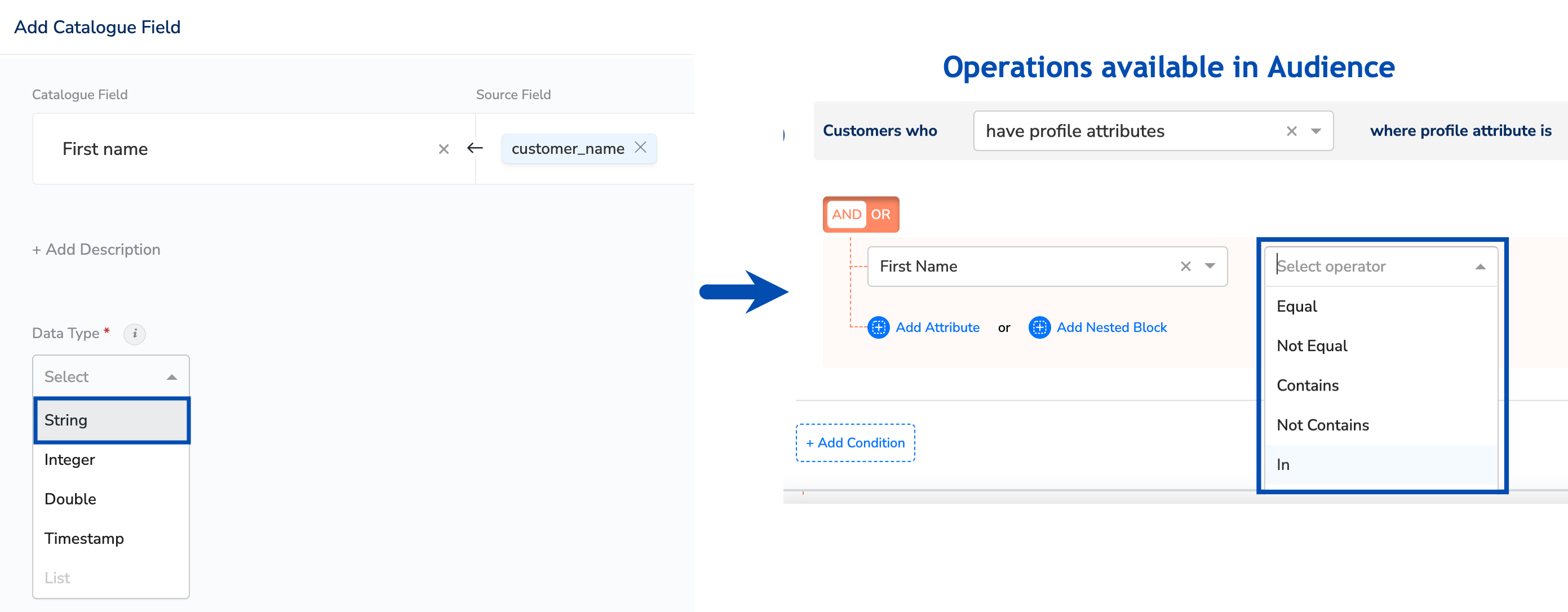
Integer
You can use the ‘Integer’ data type in the Zeotap Catalogue to represent whole numbers like Age, Customer ID. Ensure that you map any incoming field of integer values to a Catalogue field of the integer type only. Otherwise, you may encounter ingestion failures for those records or for the file. Note that the operations available in the activation/downstream modules like Audiences and Journeys depend on the data type selected when adding the catalogue field. In the below image, you can see the illustration of an example of a Catalogue field added as an Integer, along with the associated operations available for that specific field in Audience.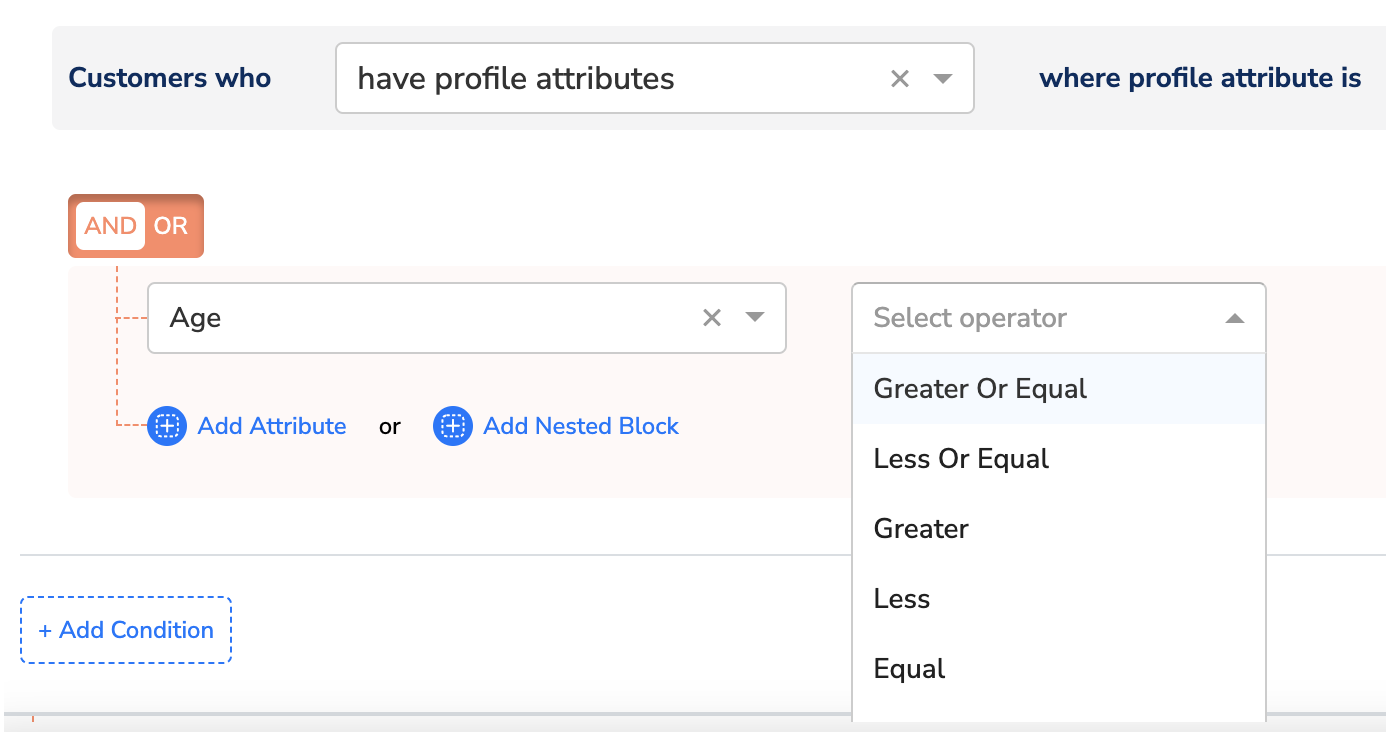
Double
You can use the ‘Double’ data type in the Zeotap Catalogue to represent decimal/floating numbers such as cart_value, car_price. Ensure that you map any incoming field of type double to a Catalogue field of the double type only. Otherwise, you may encounter ingestion failures for those records or for the file. Note that the operations available in the activation/downstream modules like Audiences and Journeys depend on the data type selected when adding the catalogue field. In the below image, you can see the illustration of an example of a Catalogue field added as a Double, along with the associated operations available for that specific field in Audience.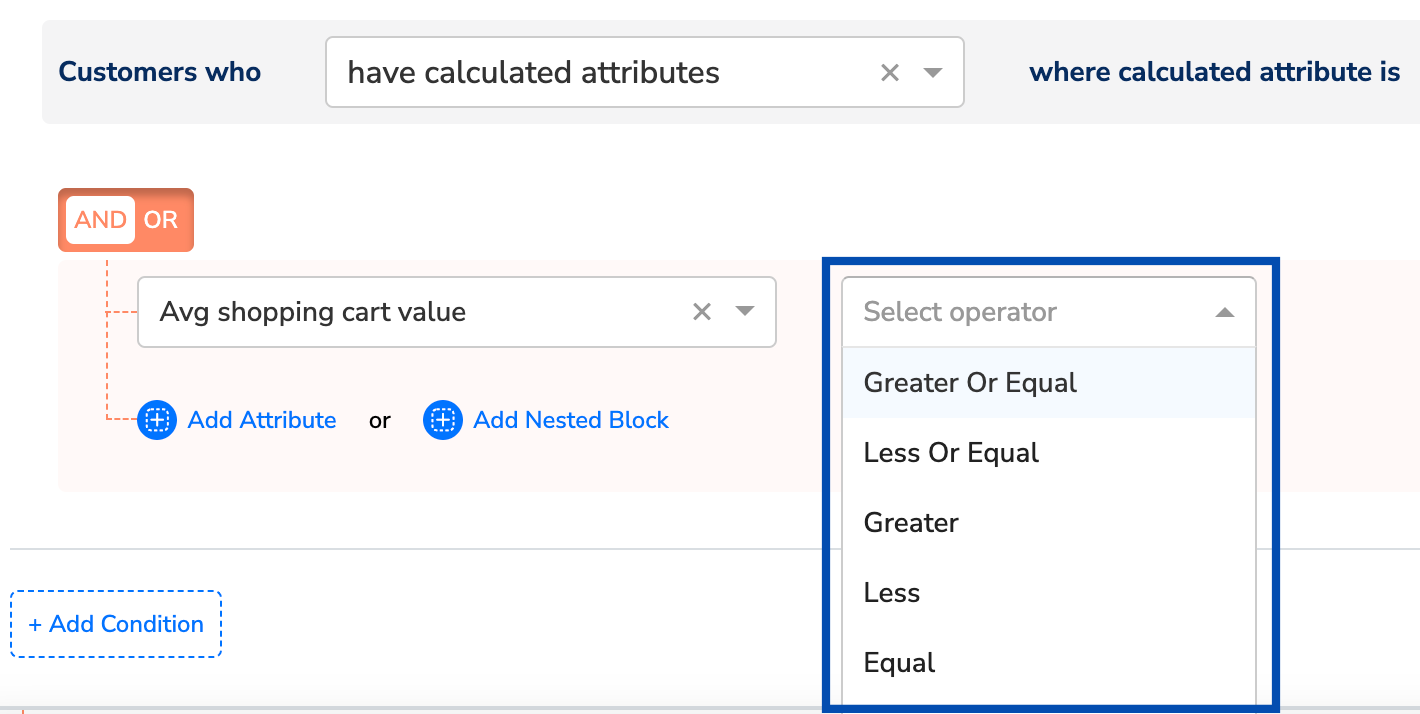
NoteWhen you opt for European notation of decimal, which is using comma, you need to apply the necessary custom transformation before storing the value. Otherwise, it may lead to ingestion error. Ensure to find and replace custom transformer for such fields at the time of mapping the source. For more information about how to use the custom transformation enricher while mapping the source, refer here, and for a worked example see Transformation of currency data using a custom transformer.
Timestamp
You can use the Timestamp data type in the Zeotap Catalogue to denote a specific point in time, typically recording when an event occurred. In other words, it refers to a precise date and time combination, stored in a format that enables chronological sorting and calculations between different time instances. For Example, 2023-11-30 15:45:00 - This timestamp represents November 30, 2023, at 3:45 PM. Note that the operations available in the activation/downstream modules like Audiences and Journeys depend on the data type selected when adding the catalogue field. In the below image, you can see the illustration of an example of a Catalogue field added as a Timestamp, along with the associated operations available for that specific field in Audience.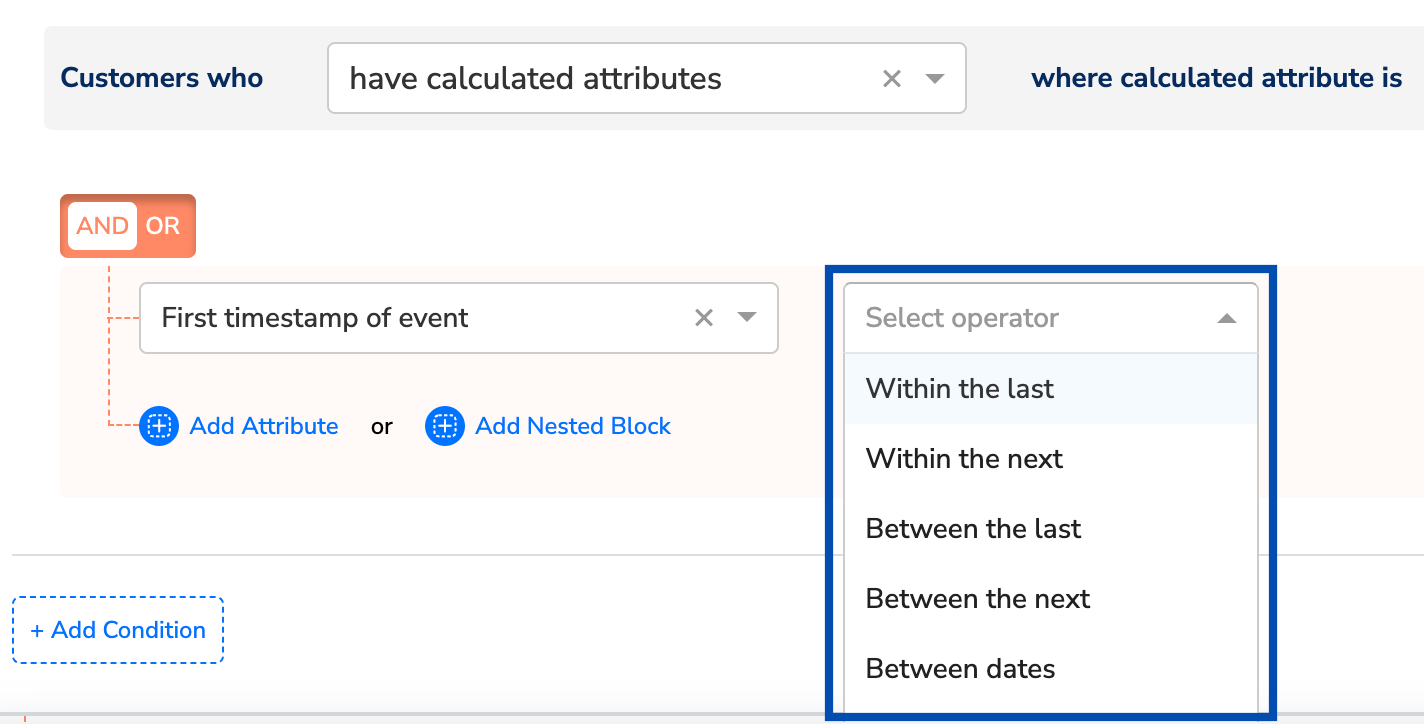
NoteFor information about the different formats that can be selected for Timestamp, refer here.
The Catalogue does not offer a Boolean data type. Model true/false values as a String (for example,
true and false, or yes and no) and keep the incoming values consistent, so that audience rules can match them reliably.Container types
List (Array) of String, Integer or Double
This represents a type of attribute in the Zeotap catalogue which can hold any incoming data that is of the type string, integer or double, or a List of string, integer or double. This incoming data is stored as a list of values against a user profile. For instance, you can map a list of incoming source data ofcars or productcode to List type catalogue fields. That is, the values for car is mapped to List of strings and values for the productcode is mapped to List of integers and the result is as shown below.
List of String
cars:["Ford", "BMW", "Fiat"]
List of Integer
Productcode:[1102,1105,1456]
Note that you can also map a single value string, integer and double and store it as a List in Zeotap. Let’s consider an example to understand this better. Imagine you have incoming data of Cars for the UserID: U1 as shown in the table below.
In this case, if you map the incoming cars data as a
List of Strings within the Zeotap Catalogue, then it organises these individual car entries into a unified list format as shown below.
cars:["Ford", "BMW", "Fiat"]
Note:Ensure that you consider the following points while selecting the
List Data Type:- You can map both
Listand single-value source fields to theListtype catalogue field. Therefore, when a single value source field comes into the system for this Category, then the new data is upserted (update+insert) on the existing data without overwriting it. For example, if the source field is a single value field like “Product Name” and it is mapped toProdNamefield of the data typeListin the Catalogue, then any new value that comes into the system for the product name will append to the existing one in the format, {p1, p2, p3…}, preserving the previous entries. - You can only map a source field of the data type
Listto a catalogue field of the data typeList. For example, if the source field is of type List of String, then you can map it to only List type attributes in the Catalogue field drop-down of the source mapping screen. - When sharing source data containing
Listtype information, ensure that you use the correct format and avoid null values. Otherwise, it might lead to mapping issues or data being dropped during the data ingestion process. If your source sends several values in one delimited string, split them with a custom transformer first — see Transformation of array using a custom transformer. - The
Object,ListandList of Objectdata types are only supported for the categories–User trait, Product, Event and Campaign. Raw personally identifiable information (PII) is not supported for these data types. Hence, refrain from mapping PII information to these types.
How values are merged and trimmed
ForList of String/Integer/Double under the User trait or Product category, values from the older record are appended after values from the newer record (determined by the group _ts). If the configured limit is exceeded, values are trimmed from the end. Since primitive values do not carry individual timestamps, ordering reflects merge order, not event recency, and late-arriving values may be dropped even if they are logically newer.
Example (limit = 3):
"D" is dropped even though it belongs to a newer event sequence than "A".
Object
Object represents a type of attribute in Zeotap Catalogue that can hold a JSON object that contains one or more key-value pairs, also called properties. In the following example, productItem is an object in a user profile with properties, ProductName, price and photo as shown below.Code
Note:Ensure that you consider the following points while mapping the
Object data fields:- We recommend you to share the
objecttype data in the following format only:- Enclose the data within curly braces {}. For example,
Code- Separate each key-value pair with a comma. Note that the order of key-value pairs is irrelevant.
- A key-value pair consists of a key and a value, separated by a colon ( : ).
- The
Object,ListandList of Objectdata types are only supported for the categories–User trait, Product, Event and Campaign. Raw personally identifiable information (PII) is not supported for these data types. Hence, refrain from mapping PII information to these types.
Scenarios of using the ‘Object’ Data Type
Scenario 1: Let’s say, there is an existingproductItem object in a user profile with the properties shown above. Whenever there is an incoming record for the productItem object, it replaces the object stored in the user profile as shown below.
Code
Code
emailcan be mapped to the Email raw attribute of typeID.hasclickedcan be mapped to the hasclicked attribute of typeevent.hasclickedtimecan be mapped to the timestamp attribute of typeevent.
Object data among the two profiles will be retained against the profile.
List (Array) of Objects
List of Object represents a type of attribute in the Zeotap catalogue that can hold a list of JSON objects that contains one or morekey-value pairs, also called properties. It can be used to store an object or List of object from source data as a List of object type attribute in the Zeotap catalogue.
A List of Objects attribute uses one of its properties as the Primary Key, alongside the properties themselves. The Primary Key is what lets the system keep a unique set of objects in the list when it performs an upsert.
For example, imagine you are a TV broadcasting company that serves three customers: Viewer A, Viewer B and Viewer C. Each has unique preferences (properties) for a TV package (object) — subscription name, renewal date, engagement scores and package cost. These details are subject to change with time. Here, by configuring the incoming data as List of Objects and choosing the subscription name as the Primary Key, you establish a crucial link between records that allows the system to update and insert the data for the properties renewal date, engagement scores and package cost, whenever new data arrives for the respective fields. Based on the result obtained, you can plan your marketing strategies accordingly. Note that without this designated Primary Key, incoming data would merely accumulate without ensuring the accuracy of your customer records.
Note:Ensure that you consider the following points while selecting the
List of Objects Data Type:- For
List of Objectunder the User trait or Product category, FIFO logic is applied after reaching the limit for new value ingestion. - The
Object,ListandList of Objectdata types are only supported for the categories–User trait, Product, Event and Campaign. Raw personally identifiable information (PII) is not supported for these data types. Hence, refrain from mapping PII information to these types.
Sample JSON Structure for “List of Objects”
Code
Data-type limits
The following limits apply by default. Reach out to your Zeotap POC for any specific requirements about the system limit.
Scalar fields (String, Integer, Double and Timestamp) have no limit of their own — how many values a profile keeps for them follows the field’s category, described in Categories for adding Catalogue fields.
Two further constraints apply to the container types:
- They are available only for the User trait, Product, Event and Campaign categories, and must not carry Raw PII.
- An object’s properties can be String, Double, Integer, or a List of String/Integer/Double — a property cannot itself be an object.