

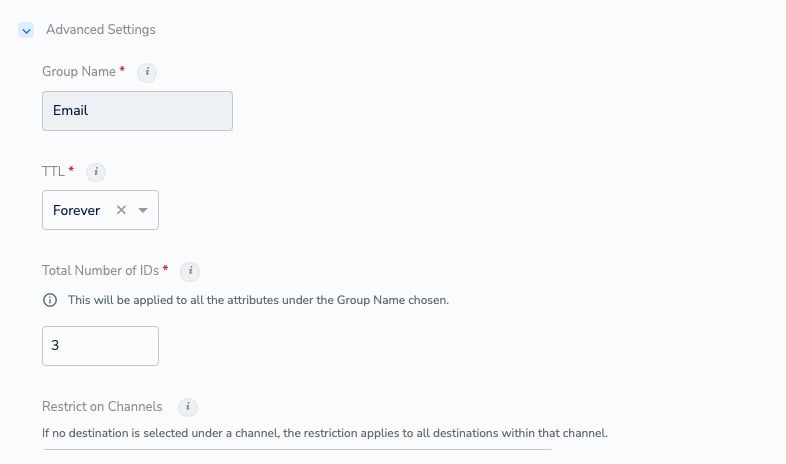
Advanced Settings on a saved catalogue field, opened with the three dots and EDIT: Email Raw belongs to the group Email, and Group Name is greyed out because the field already exists.
What Group Name does
A group is a set of catalogue fields that represent the same piece of information. When a record updates one field in the group, Zeotap updates the other fields in that group at the same time, so the group never holds a mix of old and new values. The clearest example is email.Email Raw, Email SHA256 Lowercase, Email SHA256 Uppercase, Email MD5 Lowercase, and Email MD5 Uppercase all sit in the group Email. When a record changes the raw email address for a customer, the hashed fields in the group are updated with it — so you never activate a hash of the customer’s previous address.
Two things follow from that:
- A group is about consistency, not storage. Grouping fields does not merge them into one attribute — each field remains its own catalogue field, usable on its own in audiences and mappings.
- A group belongs to your organisation’s Catalogue, so the groups offered in the drop-down are the ones already in use across your catalogue fields.
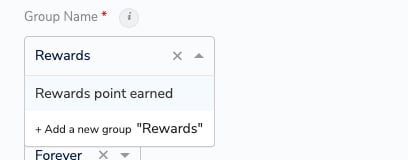
Adding a catalogue field: search the existing groups, or add a new group from the same drop-down.
When to use it
Use a group when two or more identifier fields must never disagree with each other.
Do not group identifiers just because they are thematically related. Fields in a group are updated as a set, and — as the next section explains — a group also widens what a deletion rule picks up.
Downstream effects
The group you choose affects more than the field itself.- Values are updated as a set. A record that updates one field updates the other fields in its group at the same time. This is the whole point of the setting, and it is why a raw identifier and its hashes stay aligned.
- Total Number of IDs applies to the whole group. For fields in the ID category, the number of values a profile keeps is set once for the group: the field form states that the value will be applied to all the attributes under the Group Name chosen. Raise it on one identifier in the group and every identifier in that group stores the same number of values. (This setting is listed as No. of ID on Understand the Advance Fields.)
- Channel restrictions cover the whole ID group. Restrict on Channels works at group level for identifiers: restricting one identifier safeguards every identifier that shares its Group Name, so an identifier you add to the group later is governed with the rest.
- ID Metadata and ID Consent attach through the group. An ID Metadata or ID Consent field is linked to its identifier by sharing the identifier’s Group Name. If you pick the wrong group, the metadata or consent is stored against the wrong identifier — and because Group Name cannot be edited after the field is added, correcting it means creating the field again.
- Deletion rules act on the whole group. In a Data Lifecycle deletion rule, selecting an identifier or a profile trait also selects every attribute in that attribute’s group for deletion. Hover over the selected group in the rule to expand it and see exactly what is included. See Create a Deletion Rule for Customer Data.
- TTL is set per field, not per group. How long an identifier’s value is retained is governed by that field’s own TTL value, which stays editable after the field is added. Two identifiers in one group can carry different TTLs. See Time-to-Live.
Examples
Example 1 — a raw identifier and its hashes. You map your customer email toEmail Raw. Zeotap creates the four email hashes for you, and all five fields sit in the group Email:
A record arrives with a new email address for an existing customer. Because the five fields share a group, the profile’s hashes are updated alongside the raw value, and a destination that accepts only SHA256 receives a hash of the customer’s current address.
Example 2 — an identifier with its metadata and consent. You add a loyalty identifier and two fields that describe it:
All three share the group
Loyalty Id, so the status and the consent are linked to that identifier. If Loyalty Id Status were created in a different group, Zeotap would have no way to tell which identifier the status belongs to.
Example 3 — the group as a governance boundary. Your account holds two identifiers for the same programme in the group Loyalty Id, and the agreement behind them allows activation on your own channels only. Restricting one of them on the outside channels covers the whole group, and a third identifier you add to Loyalty Id later inherits the same protection — one decision instead of three.