

Overview
Every Calculated Attribute (CA) is computed per user across the unified profiles in your account — batch CAs are recomputed on each daily refresh, and real-time CAs update incrementally as qualifying events arrive. This page consolidates the limits and guardrails that apply to Calculated Attributes. Limits fall into two groups: fixed product behaviour, which applies to every account, and package-governed limits, which depend on your contract and can be adjusted with your Zeotap representative or CSM.Fixed product behaviour
These limits apply to all accounts.Package-governed limits
These depend on your contract — check your current values with your Zeotap representative or CSM before designing around them.How many CAs you can create
There is no universal hard cap on the number of Calculated Attributes per account. Your allowance is governed by your pricing package and contract — if you need more, contact your CSM to extend it. The practical guardrail is CA proliferation. Because a CA’s time window is fixed at creation, teams commonly create parallel variants of the same attribute per timeframe (for example 30-, 60-, and 90-day versions of order value) — and every variant consumes your contractual allowance.Builder limits
The Standard (sentence-builder) definition puts a few deliberate bounds on complexity:- Conditions — you can add up to 10 optional conditions to filter the events a CA aggregates, combined with AND / OR.
- High-cardinality value pickers — when a condition targets a field with more than roughly 500 distinct values, the value dropdown is hidden and you type the value instead.
- Group By — batch CAs only; select up to 3 fields to split one CA into one value per group (for example, order value by country). Only attributes at the same level as the aggregation field are offered.
Input data types per operator
Which fields the builder offers depends on the operator you choose:
Real-time CAs support Count, Sum, and Unique List, with the same input types.
The builder only offers fields compatible with the operator you pick. If a field you expect is missing for an operator, confirm current type support with your Zeotap representative.
Time windows
Every CA computes over a time window you set in the Run computation section, with three modes: over the last N units, over entire data, or from a fixed start date.Refresh & freshness
Active batch CAs refresh once every day; in the CA list you can see this as the Last Successful Refresh and Next Refresh Date columns sitting 24 hours apart. Paused CAs are not refreshed — and a paused CA keeps its last computed values only until the account’s next refresh, when they are cleared (set to null). Only Active CAs can be used in workflows such as audiences and journeys. Refresh timing. All of an account’s CAs refresh together, once a day, in a single computation. The Next Refresh Date column in your CA list shows exactly when your account’s next refresh is due — schedule campaigns around that timestamp. If a refresh fails. Because the refresh is a single account-wide computation, a failure affects every CA in the account for that cycle: values hold at the last successful computation and the Last Successful Refresh column stops advancing. If that column falls more than a day behind, or an attribute you rely on is not in the Active state, contact your Zeotap representative. The end-to-end delay between a user performing an event and that event being reflected in a batch CA is longer than the refresh interval alone, because two stages stack:- Event processing — an incoming event can take up to 24–48 hours to be processed, though it is typically much faster.
- Daily refresh cycle — the next CA refresh after that adds up to 24 hours.
Users with no qualifying events
A user with no qualifying events in a CA’s window does not carry a0 — they carry no value at all for that attribute. Only users with at least one meaningful value hold the attribute on their profile. This is the single most common audience-rule pitfall: a rule like sessions_30d = 0 matches nobody, because no profile ever stores a zero for “no activity”.
The audience builder accounts for this: the operator list for calculated attributes is Greater Or Equal, Less Or Equal, Greater, Less, Equal, Not Equal, In, Not In, Exists, Does Not Exist. Write suppression and lapsing rules with Does Not Exist (and require presence with Exists):
- Lapsing subscribers:
sessions_60dGreater0ANDsessions_30dDoes Not Exist. - Low-engagement readers (including fully dormant):
page_views_7dLess5ORpage_views_7dDoes Not Exist.
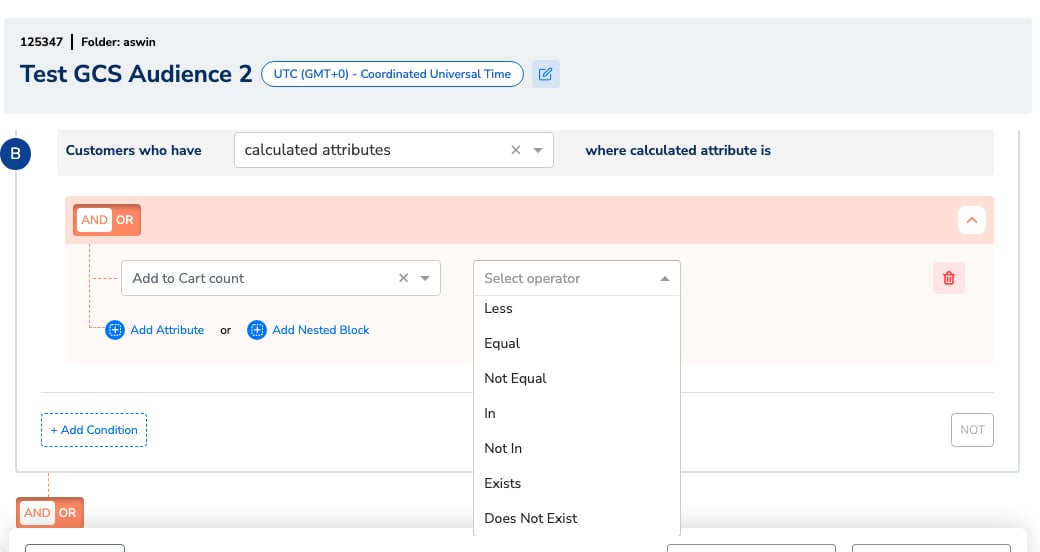
The audience builder's operator dropdown on a calculated attribute rule.
Editing, pausing, and deleting
How the lifecycle behaves:- Creating a CA triggers a first full computation over the configured window; the CA appears as In Progress, then Active once the first computation completes.
- Each daily refresh recomputes the batch CA’s value in full.
- Real-time CAs update incrementally per event as qualifying events arrive.
- Pausing stops refreshes; the paused CA’s values are cleared (set to null) at the account’s next daily refresh, so audiences and journeys referencing it stop matching.
- You cannot edit, rename, or delete a CA yourself in the UI today. Plan definitions and names carefully before saving.
- You can pause a CA yourself — pausing is the standard way to retire an attribute that no audience or journey still references.
- Zeotap can update a definition on request — contact your Zeotap representative to change a CA’s logic. Because every batch refresh is a full recompute, an updated definition takes effect from the next daily refresh.
- If a change is urgent or complex, the practical self-service route is to create a new attribute with the corrected definition and pause the old one.
- When a CA is deleted (via Zeotap), it disappears from the audience and journey builders — but any existing audience or journey that still references it fails silently. Remove the CA from every query that references it before it is deleted.
- Before retiring a CA that live audiences or journeys still reference, check the impact with your Zeotap representative.
Identity resolution behaviour
CAs are aggregated per unified customer profile (ucid), so they operate on the merged view of a user’s events — each daily refresh recomputes batch values against the profile state at that moment.
How existing CA values behave on profile merges, splits, or data-subject erasure propagating into computed values is account-relevant behaviour: contact your Zeotap representative if your identity strategy involves frequent merges and splits, or if you need erasure guarantees documented for compliance.
Data-type limits on CA inputs
CAs aggregate Catalogue fields, so the Catalogue’s container limits bound what a CA can consume:
See Data Types in Catalogue for the full reference. For the input types each operator accepts, see the Input data types per operator table above.
SQL CA rules
The full how-to for SQL Calculated Attributes lives on Create a Batch Calculated Attribute — this section is the reference copy of the rules. The SQL CA Editor is Beta and enabled per account on request (raise a support ticket, as for real-time CAs); it applies to batch CAs only. Unlike the form-based builder, a SQL CA can aggregate attributes beyond event data. Every query must follow these structural rules — use the Test Query button to validate against sample data before saving:- Top-level SQL must have only
ucidin theGROUP BYclause. - The query must have exactly two columns:
ucidand one aggregated column with an alias (the alias becomes the CA name). - CTEs (
WITHclause) are not allowed. LIMITandORDER BYclauses are not allowed in the top-level query.- Subqueries are allowed.
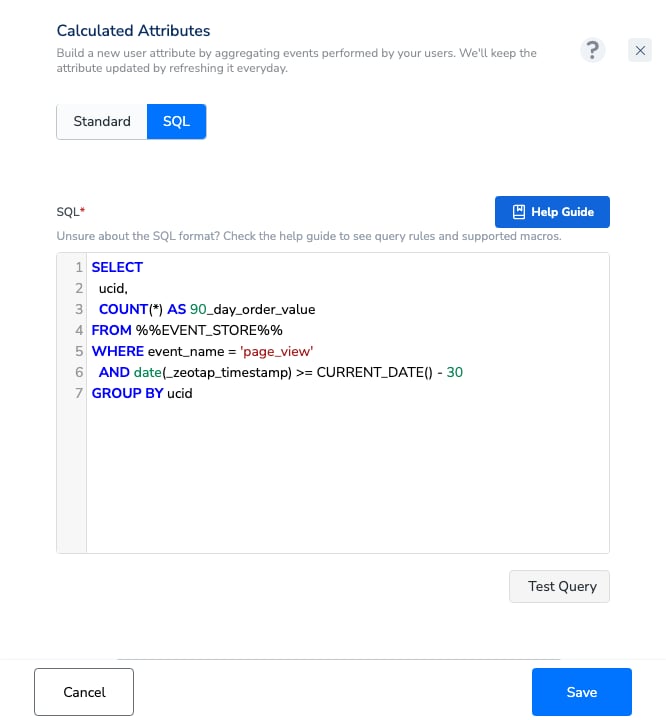
The SQL definition editor with the in-product Help Guide and Test Query validation.
Timestamp fields such as
event_timestamp and created_ts are epoch milliseconds — wrap them with TIMESTAMP_MILLIS() before using date functions. Queries that would scan very large volumes of data are rejected at validation as a cost guardrail — if a valid query is rejected, contact Zeotap.Segment Membership CA constraints
The system-defined Segment Membership CA is not enabled by default — request it via your Zeotap point of contact. Once enabled, it reflects membership based on each segment’s latest run, and is usable in Audiences and Journeys. See Segment Membership Calculated Attribute.Validation & visibility
CA values are not currently listed per user for sanity-checking inside the CDP UI. To verify that a CA is producing the values you expect:- Test audiences — build a small audience with a rule on the CA (for example a threshold you know some customers cross, or an Exists rule) and check whether the resulting customer count matches your expectation.
- Compare rule variants — the count difference between two rule variants (such as
= 0vs Does Not Exist) tells you how a boundary behaves for your data. - Ask Zeotap — your Zeotap representative can check specific per-user values for you if a count looks wrong.
Operational guardrails & best practices
The guardrails below appear in context throughout this page; here they are in one place:- Use only Active CAs in workflows — a CA must reach Active status before audiences or journeys can use it. A newly created CA computes first (In Progress → Active), so plan campaign timing accordingly.
- Plan for the refresh lag — don’t promise same-day reactions from a batch CA (usually 24–36 hours end to end, up to ~72 hours in the worst case). Use a real-time CA for instant triggers.
- Remember: no qualifying events means no value, not zero — write suppression and lapsing rules with Does Not Exist, never
= 0; see Users with no qualifying events above. - Control CA proliferation — per-timeframe variants multiply and consume your contractual allowance; use a naming convention such as
sum_order_value_90d. - Know what pausing does — a paused CA stops refreshing and its values are cleared at the next daily refresh, so workflows referencing it stop matching. Pause only CAs that no audience or journey still references.