

What this is
On the Let’s define who your users are screen, each condition block starts by naming an attribute type. That choice decides which attributes the Select Attribute list offers you and which operators apply to them, so it is the first decision in every block — not a formality. The types map onto different questions about the customer: who they are (profile), what they have done (events), what their behaviour adds up to over time (calculated), what they have agreed to (consent and marketing preference), how you can reach them (identifiers), and what is attached to them (objects and Non-Customer Entity data). A single definition usually mixes several. Targeting customers over 18 who abandoned a cart but browsed a different category, for example, needs a profile attribute for age and two event conditions for the browsing behaviour.Before you begin
Have these in place before you open the builder:
- The attributes you want to filter on are mapped in your catalogue. The builder only lists what the catalogue already holds.
- Any calculated attribute you plan to use is already defined — you cannot create one from inside the audience builder. See Calculated Attributes.
- For Non-Customer Entity (NCE) attributes, the NCE source is mapped to a Join Key in your customer catalogue. See Map the Catalogue for Non-Customer Entity Data.
Attribute types at a glance
Profile attributes [#profile-attributes]
Profile attributes describe the customer and stay constant between updates. Both user traits (gender, age, location, budget) and product traits (brand, product category, size, colour, price) are modelled as profile attributes. Each stores a single value, so a new value overrides the previous one after ID resolution — a profile attribute tells you the customer’s current state, not their history.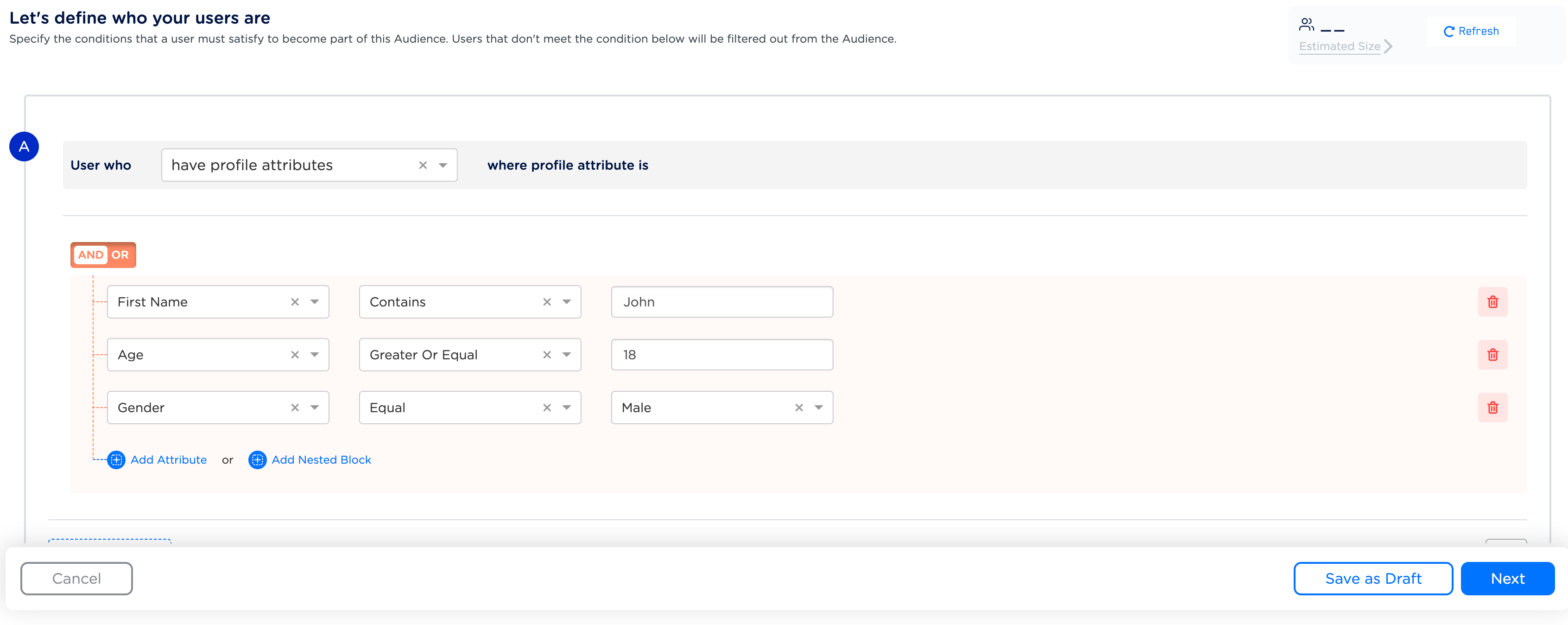
Calculated attributes [#calculated-attributes]
A calculated attribute derives a user-level insight by aggregating a customer’s isolated actions over a defined time period. Reach for one when the condition cannot be expressed as a single stored value — total cart value across a fortnight, say, rather than the value of one basket. Example. To find customers whose First timestamp falls within the last 14 days, whose summed shopping-cart value is 5000 or more, and whose maximum closer time is 15 or less, select the calculated attribute and add each property as its own row. Rows can be nested, so a tighter sub-condition sits inside the broader one.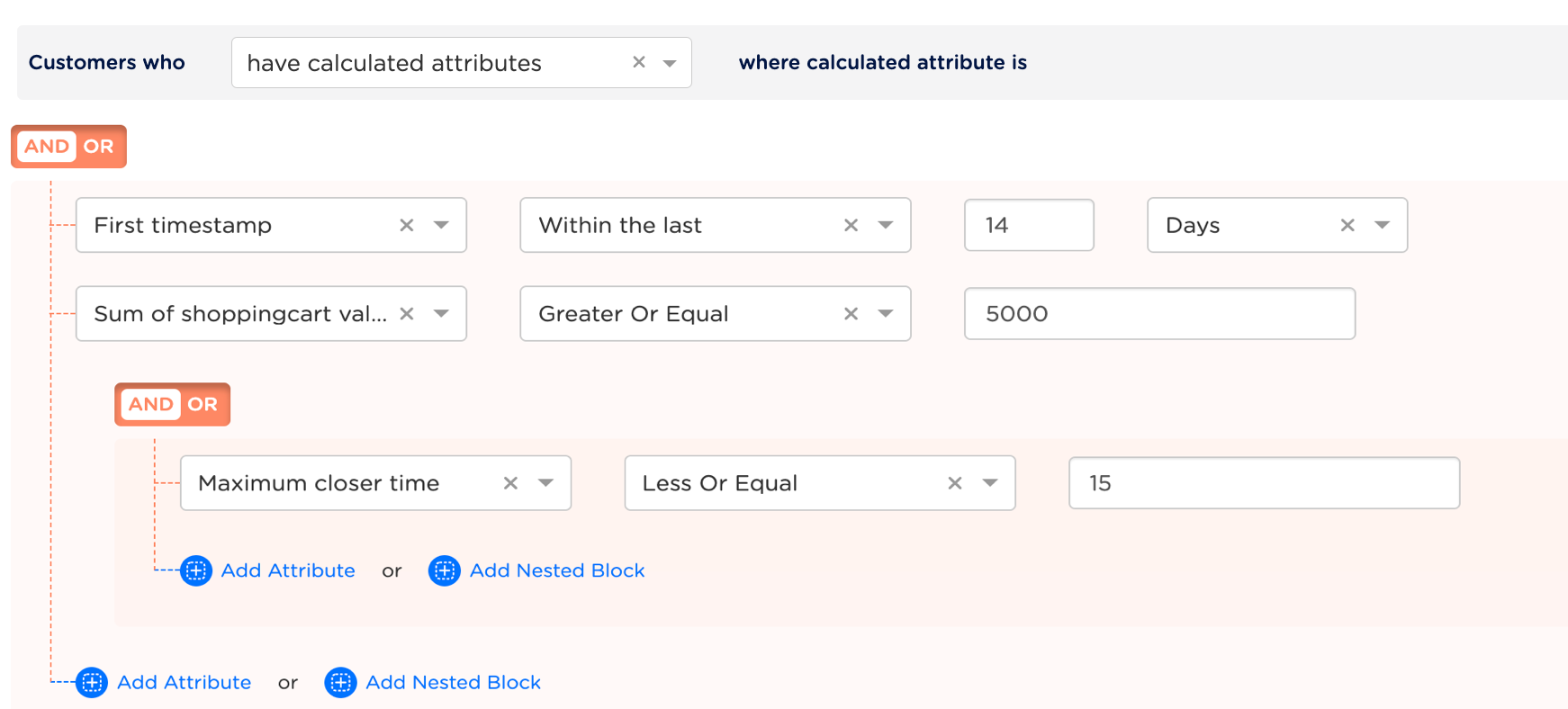
Events [#events]
Events capture what a customer did. Each one is captured throughevent_name and event_timestamp, both mapped in the catalogue when the source is ingested, and the builder filters on them in that order: you pick the event name first, then bound it in time. Event data is time-series, so each occurrence is appended to the profile after ID resolution rather than replacing the last one — so an event condition asks whether something happened inside a window, not what the latest value is.
Example. To reach customers who showed recent interest and then real purchase intent, combine two event conditions:
page_viewwithin the last 10 days — active interest.addtocartwithin the last 2 days — purchase intent.
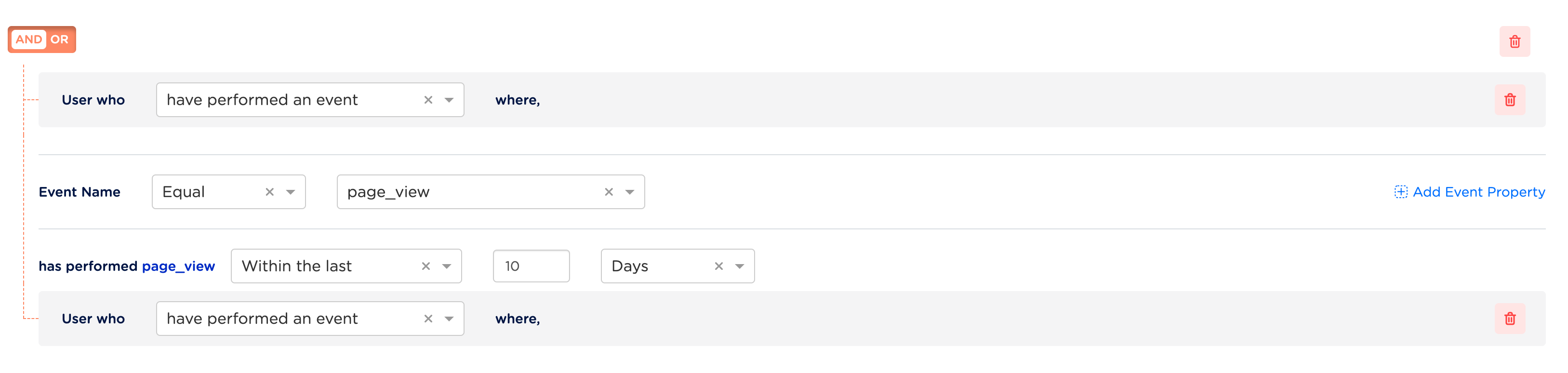
addtocart condition keeps the audience to higher-value baskets.

Marketing preference [#marketing-preference]
Marketing preference attributes store what a customer has said about the communications they want. Each stores one value, so a new value overrides the existing one after ID resolution. Three states are distinguishable: Preference given; Preference not given, which covers a customer who opted out and one who simply never subscribed; and Information not present, where no preference was ever collected. Choose deliberately between the last two — they are different audiences. Example. To target customers who have agreed to marketing, who have not opted in on social, and who accept ads on your website, combine the three preferences in one block.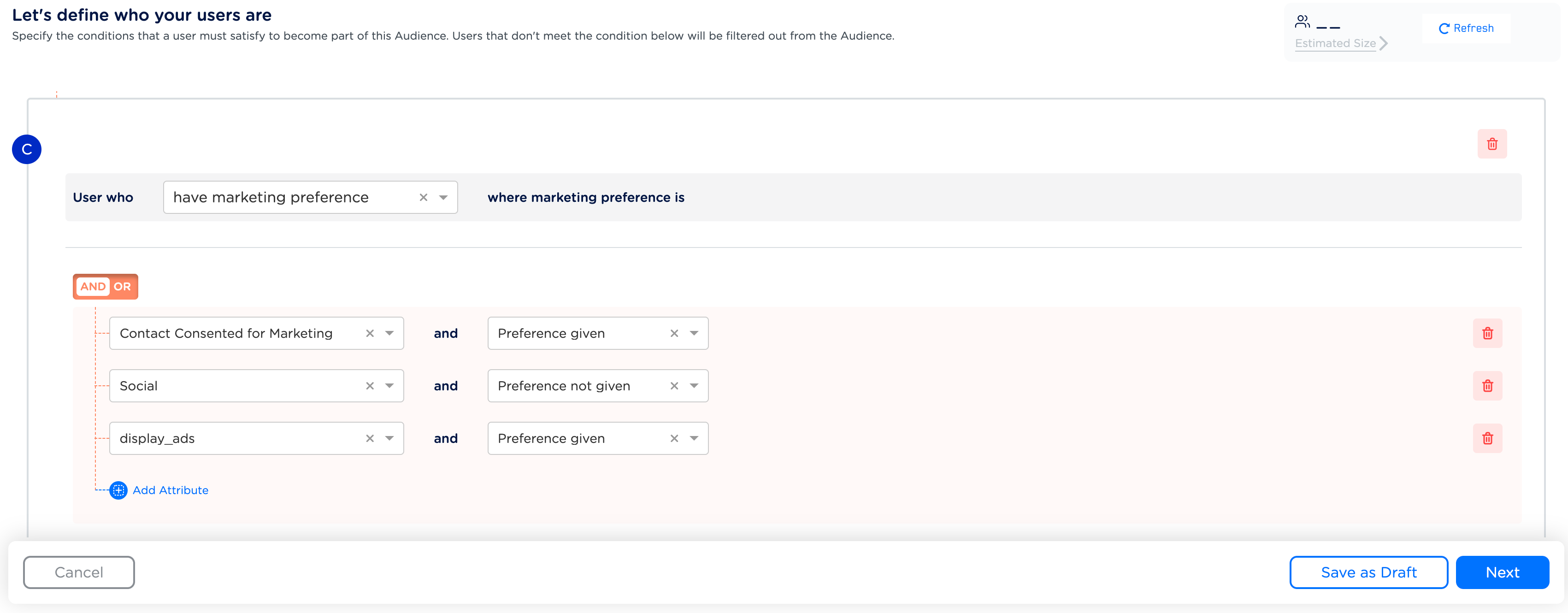
Identifiers [#identifiers]
Identifier conditions filter on whether a customer record carries a given ID — email address, cellphone number, MAID, cookie and so on — rather than on the ID’s value. Use them to keep an audience to profiles you can actually reach on the channel you intend to activate. An identifier stores one value per ID, with one exception: where the catalogue’s No. of IDs setting allows it, a profile keeps several values for that identifier. For how that allowance is configured, see Understand the Advance Fields.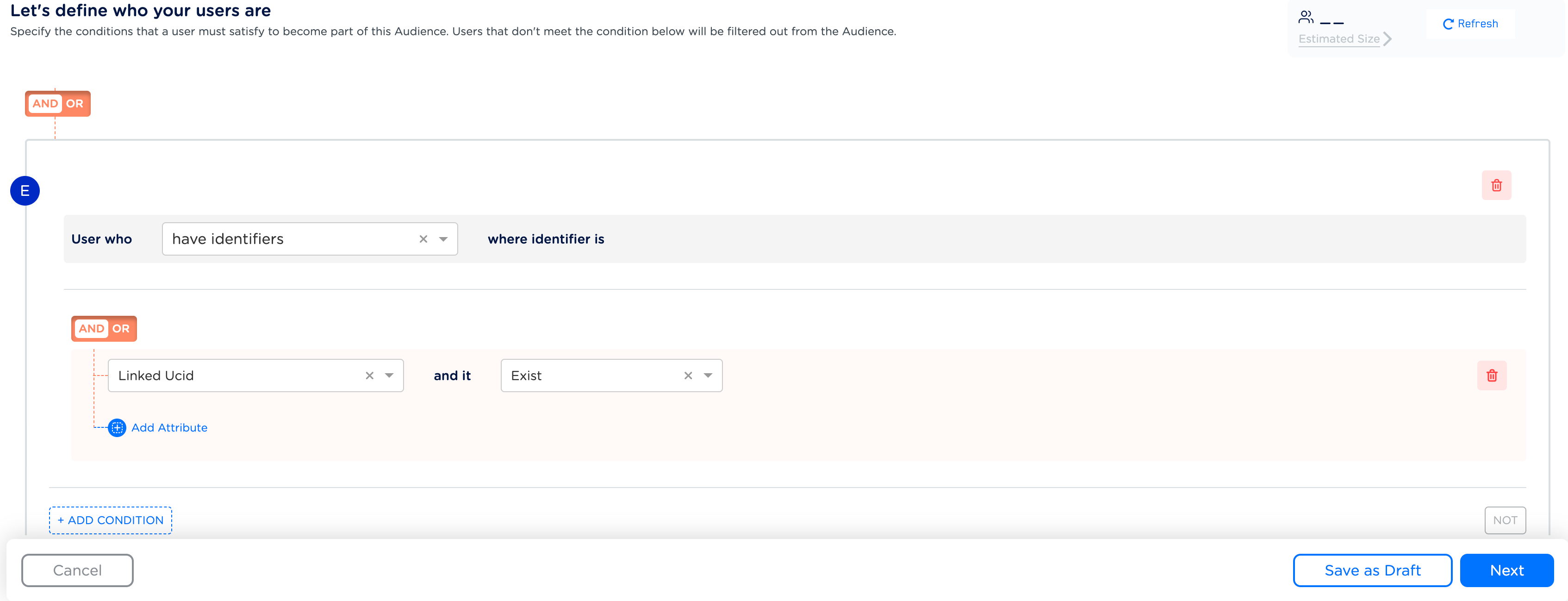
Filtering on absence is not always the same as filtering with NOT. Before you build an exclusion, read NOT Logic vs. Does Not Exist — the two produce different counts.
Consent [#consent]
Consent attributes record what a customer has permitted for data processing under GDPR, CCPA and similar regulations. You choose the regulation first, then the purpose within it. Each attribute stores one value, so a new value overrides the existing one after ID resolution. Example. To build an audience of customers who granted consent for personalised advertising under GDPR, set the purpose to the personalised-ads flag and the value to consent given. Anyone whose flag is unset or revoked falls outside the audience.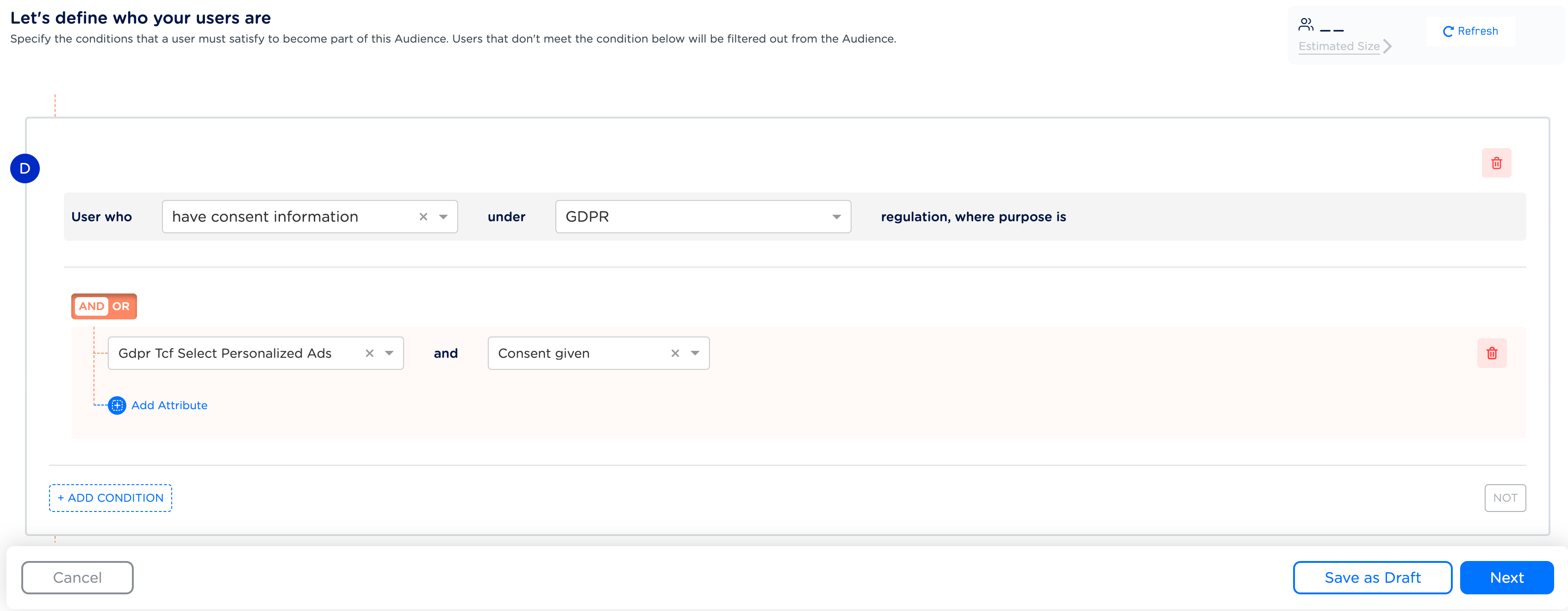
Objects and lists of objects [#objects-and-list-of-objects]
Object and List (Array) of Objects are catalogue attribute types that hold one or more JSON key-value pairs, called properties, under a single attribute. Use them when several fields only make sense together — a customer’s bank details, or the items in their purchase history. For what these types can hold and the limits on them, see Data Types in Catalogue.
In the builder, the two types behave differently in one respect that matters: an Object holds a single set of properties, so you filter those properties directly; a List of Objects holds many sets, so you must first say whether ANY of them or ALL of them need to match.
Objects and Lists of Objects are available for profile attributes and event attributes only. They are not offered for marketing preference, identifier or consent conditions.
Configure an Object attribute
An Object holds one set of properties. A customer’s bank details, for instance:1
In the condition block, choose profile attributes from the attribute-type drop-down.
2
Open Select Attribute and find the Object attribute — 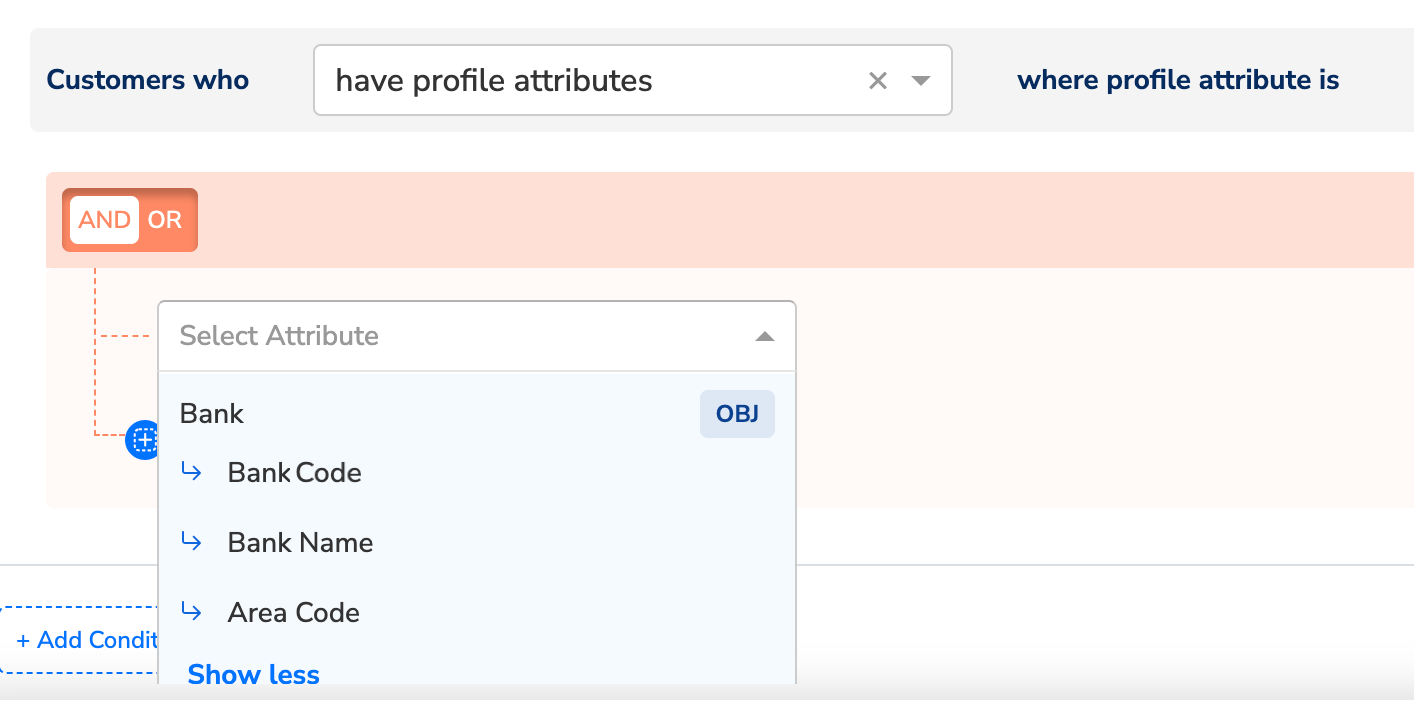
Bank in this example. It is marked with an OBJ tag, and its properties are listed beneath it.3
Configure the properties you want to filter on, and set the AND / OR toggle above them. Under AND, a customer qualifies only if their object matches every property; under OR, matching one is enough.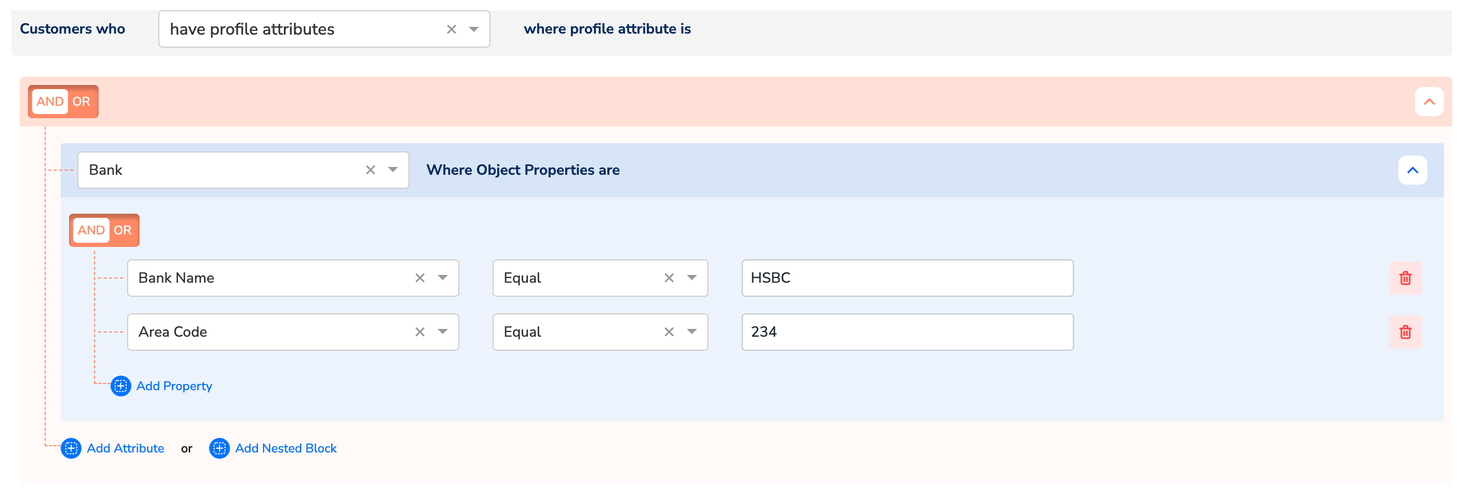
Configure a List of Objects attribute [#list-of-objects]
A List of Objects holds an array of objects that share the same properties — for example, every brand item a customer has interacted with:1
In the condition block, choose profile attributes from the attribute-type drop-down.
2
Open Select Attribute and find the List of Objects attribute — 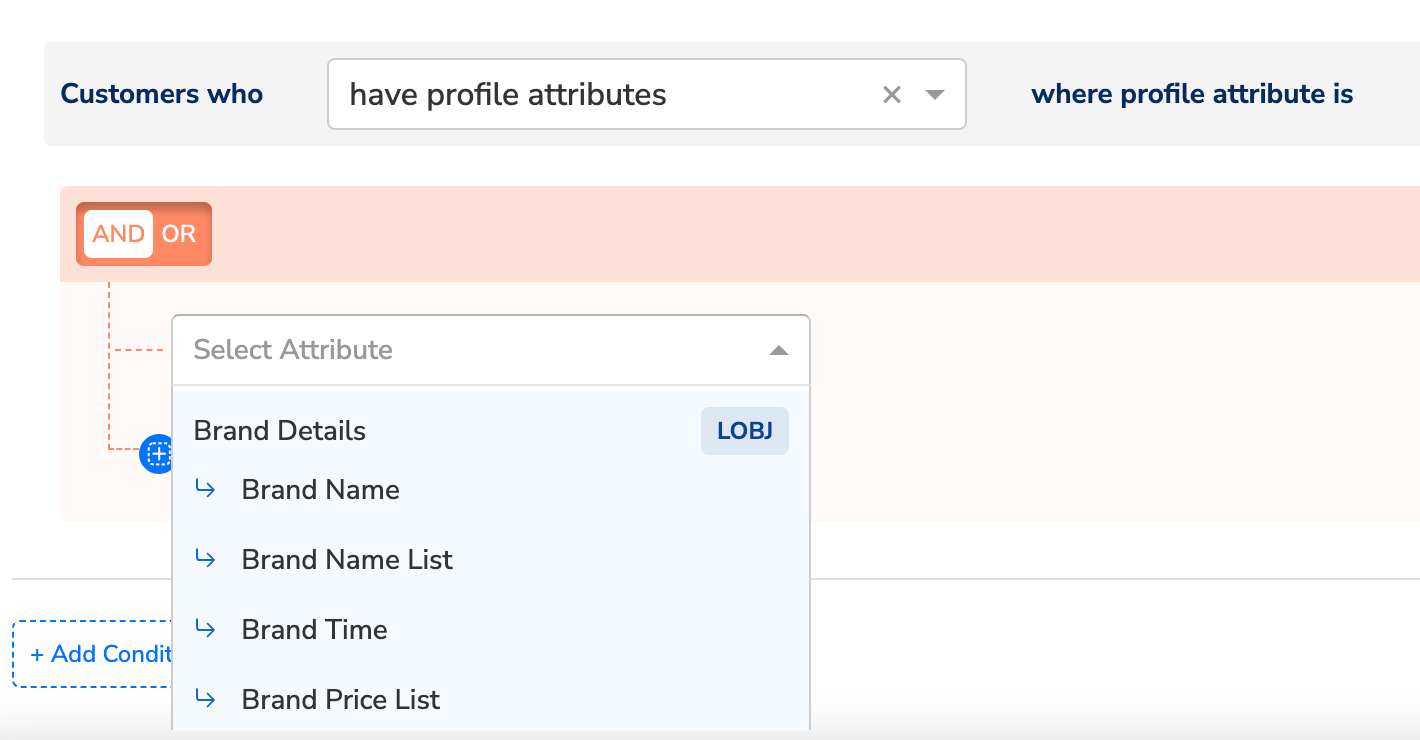
Brand Details in this example. It is marked with a LOBJ tag, and its properties are listed beneath it.3
Set the operator to ANY or ALL before you configure the properties:
- ANY — the customer qualifies if at least one object in the list meets the conditions.
- ALL — the customer qualifies only if every object in the list meets them.
Worked example: ANY compared with ALL [#any-vs-all]
Take two profiles, UCID 1 and UCID 2, with these purchase histories. UCID 1BrandName = NIKE AND price >= $50:
- With ANY, both qualify — each has at least one object that matches.
- With ALL, only UCID 2 qualifies. UCID 1 fails because its ADIDAS row does not match, even though its NIKE row does.
The ANY / ALL selector also appears when you use a Non-Customer Entity (NCE) catalogue joined with a list-type customer catalogue.
Non-Customer Entity (NCE) attributes [#nce-attributes]
Non-Customer Entity Data describes something other than the customer — the books they borrowed, the policies on their account, the products in a feed — joined to the profile on a Join Key. NCE attributes are available inside profile attribute, event and identifier conditions. In Select Attribute, NCE attributes are nested under the Join Key of the customer attribute they join to and carry an NCE tag, with the NCE source name shown beneath. In the example below,Books is the Join Key, Demo NCE Source is the NCE source, and Book_price is the NCE attribute.

Combine conditions into one definition
Any of the attribute types above can be combined into nested conditional blocks with the AND, OR and NOT operators. For what each operator does to each data type, see Work with operators; for a worked example of how several blocks resolve against real users, see How do conditional blocks work.Verify the audience definition
Before you move on from the builder, check the following on screen:- Every condition block names the attribute type you intended, and each attribute carries the tag you expect where one applies — OBJ, LOBJ or NCE.
- Every List of Objects condition, and every NCE condition joined to a list-type attribute, has ANY or ALL set. On a List of Objects, set it before you configure the properties; on an NCE attribute joined to a list-type customer attribute, set it before you choose the attribute to filter on.
- Estimated Size returns a count in the range you expected after you select Refresh. That control is offered for batch audiences only — a real-time audience gives you no estimate, so read its blocks back instead. See Create an audience.
Troubleshoot attribute conditions
If an attribute you know is mapped still never appears, contact Zeotap Support. Include the audience name, the attribute name as it appears in your catalogue, and the attribute type you selected in the block.
FAQ
Which attributes keep more than one value per customer?
Which attributes keep more than one value per customer?
Events do — they are time-series, so each occurrence is appended rather than overwriting the last. Profile, marketing preference and consent attributes keep one value each, overridden on the next update after ID resolution. Identifiers keep one value per ID unless the catalogue’s No. of IDs setting allows more.
Where do NCE attributes appear in the attribute list?
Where do NCE attributes appear in the attribute list?
Nested under the Join Key of the customer attribute they join to, tagged NCE, with the NCE source name shown beneath the attribute.
Can I create a calculated attribute from inside the audience builder?
Can I create a calculated attribute from inside the audience builder?
No. Calculated attributes are defined separately and only appear in the builder once they exist in the catalogue. See Calculated Attributes.