

Overview
When a Journey execution fails at a destination node, the system assigns a Failure Status Code. Each code categorizes the failure type and indicates whether it requires manual intervention or will auto-resolve with retries.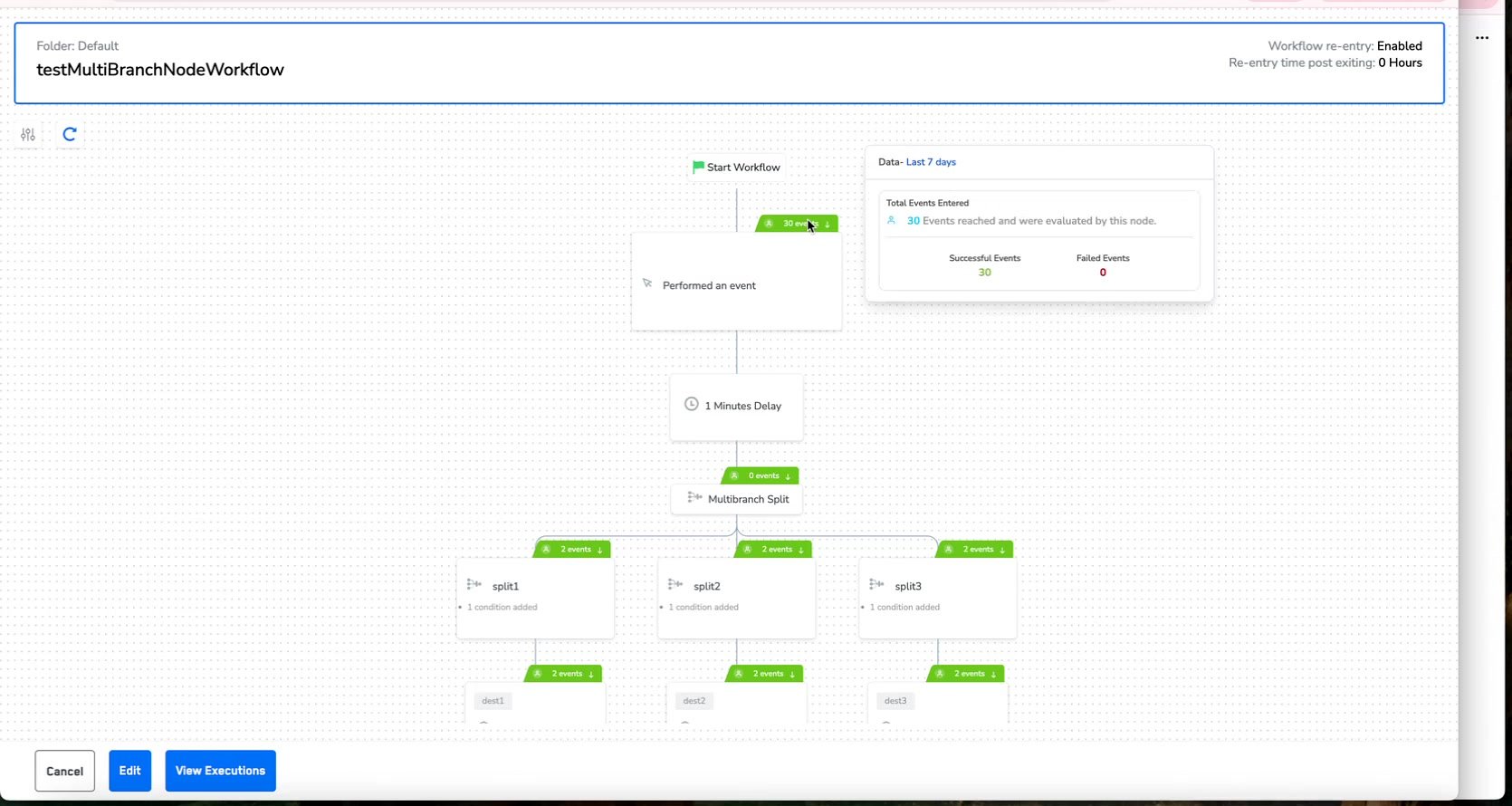
Journey canvas showing the View Executions panel with Total Events Entered, Successful Events, and Failed Events counts for a workflow node
Quick Reference
Transient errors (
SERVER_ERROR, SERVICE_UNAVAILABLE, RATE_LIMIT) often resolve on their own with automatic retries. Persistent errors (CONSENT_NOT_PROVIDED, BAD_REQUEST, AUTHENTICATION_ERROR, ENDPOINT_NOT_FOUND) require manual intervention to fix the underlying configuration issue.Where Error Codes Appear
Error codes are displayed on the Journey canvas at the node level. Destination nodes with failures show red error count badges, while successful deliveries show green indicators. Click on any node to view the execution detail panel with the specific error code and affected record count.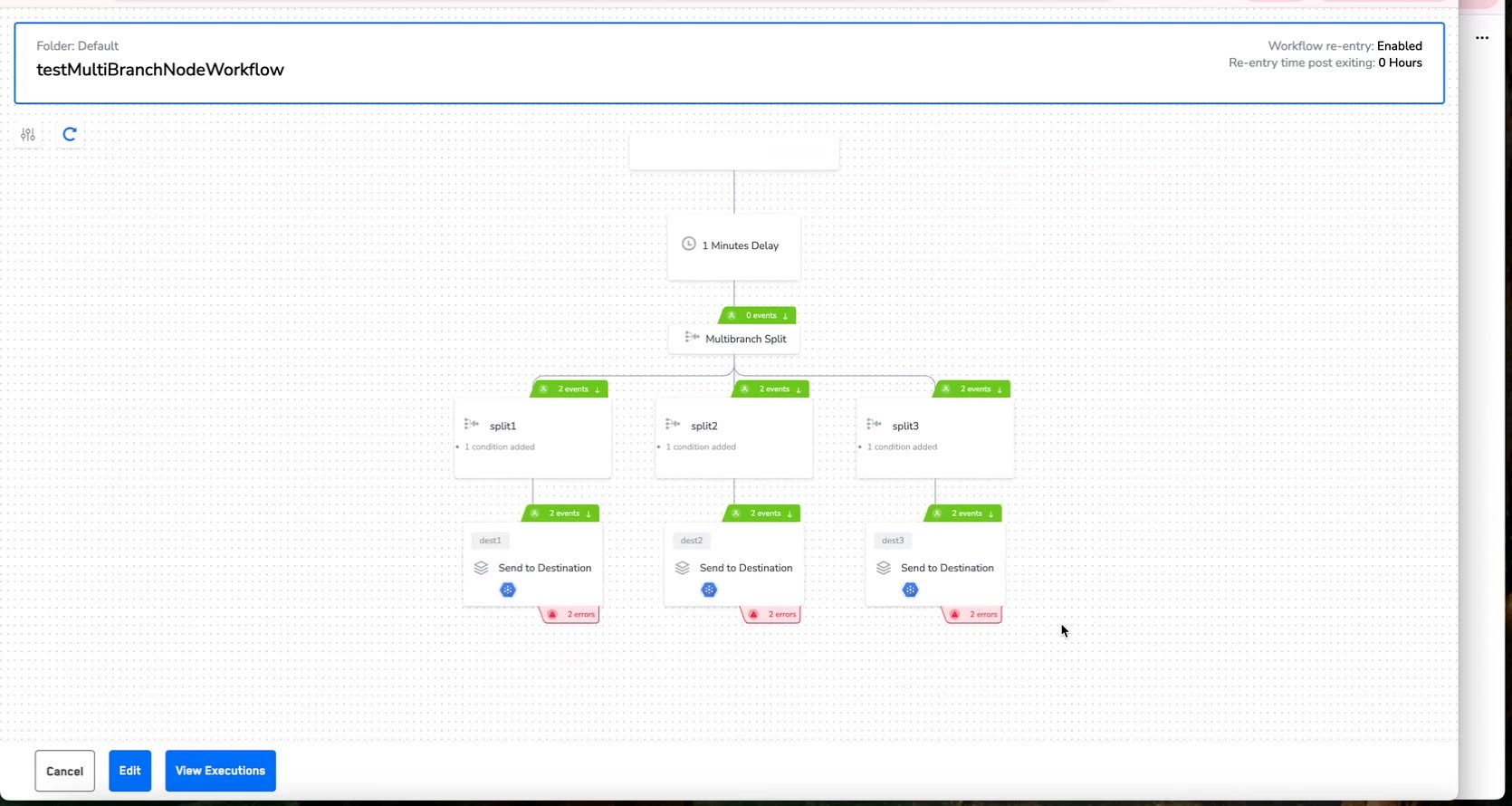
Workflow canvas showing Send to Destination nodes with success and error count indicators on each branch
CONSENT_NOT_PROVIDED
What it Means: The user or event was blocked due to missing or insufficient consent permissions for the target destination.
Root Causes:
- Users have not opted in to the specific communication channel
- Consent data is missing from the user profile entirely
- Consent mapping between Zeotap and the destination is misconfigured
- GDPR/CCPA consent requirements are not being met
- Navigate to Data > Unified Profiles and verify that affected users have consent attributes populated.
- Check the destination configuration to ensure consent field mappings are correctly defined.
- Review the journey’s audience segment to confirm it filters for users with valid consent.
- If using a custom consent framework, verify that the consent taxonomy aligns between Zeotap and the destination.
EVENT_PARSING_FAILED
What it Means: The event data could not be processed into the required format before sending to the destination.
Resolution Steps:
- Review the Map Your Fields logic for syntax errors or null values.
- Validate transformation logic and ensure data types align with destination requirements.
- Re-trigger the event after fixing the payload.
BAD_REQUEST
What it Means: The request payload sent to the destination is invalid or incomplete.
Resolution Steps:
- Cross-reference destination API requirements with your field mapping.
- Ensure your Primary Identifier (e.g.,
external_idoremail) is not null.
90% of
BAD_REQUEST errors originate from a null primary ID. Validate this mapping first before investigating other causes.AUTHENTICATION_ERROR
What it Means: The destination rejected the request due to authentication issues such as expired tokens, invalid credentials, or insufficient permissions.
Root Causes:
- API token or OAuth access token has expired
- API credentials were rotated on the destination side without updating Zeotap
- Insufficient API permissions or scope on the destination account
- IP whitelisting changes on the destination firewall
- Navigate to Integrate > Destinations and locate the affected destination.
- Re-authenticate the connection by refreshing OAuth tokens or entering updated API keys.
- Verify the API permissions on the destination side — ensure the token has write access.
- Test the connection using the destination’s Test Connection feature before re-running the journey.
RATE_LIMIT
What it Means: Too many requests were sent to the destination within a short period of time. Zeotap automatically retries rate-limited requests with exponential backoff.
Resolution Steps:
- Reduce Batch Size — Configure smaller batch sizes in the destination settings to spread requests over a longer period.
- Add Delays — Introduce wait nodes in the journey to stagger audience delivery.
- Request Higher Limits — Contact the destination provider to increase your API rate limit allocation.
- Monitor subsequent executions to confirm resolution.
SERVER_ERROR
What it Means: The destination server encountered an internal issue while processing the request. This is typically a transient error.
Resolution Steps:
- Check the status page of the destination (e.g., Salesforce, Braze, Slack).
- Wait until the external service is confirmed stable before any manual intervention.
SERVICE_UNAVAILABLE
What it Means: The destination service could not process the request due to temporary downtime or overload.
Resolution Steps:
- Wait for the destination service to recover — the system retries automatically.
- Monitor the destination’s status page.
- Replay failed events once the service is confirmed back online.
ENDPOINT_NOT_FOUND
What it Means: The configured API endpoint is incorrect or no longer available.
Resolution Steps:
- Verify the destination endpoint URL in your Journey configuration.
- Check if the endpoint has been changed or deprecated.
- Update the URL to the correct active endpoint and re-test the connection.
MISC_ERROR
What it Means: The destination returned an unexpected error not categorized under standard error types.
Resolution Steps:
- Contact the Support Engineering Team at support@zeotap.com.
- Provide the Request ID from the Execution Details panel.
- Include the Journey execution ID, error timestamp, and destination name.
If you encounter an error code not listed above, or if the issue persists after following the resolution steps, include the journey name, execution ID, and exact error message in your support request for fastest resolution.
Error Rate Thresholds
Use the following thresholds to determine the appropriate response for error rates in your journey executions:Related Topics
- To learn how to visually identify errors in the Journey Canvas, refer to Identify Journey Errors.
- For the error reference matrix and severity guide, refer to Resolve Journey Errors.