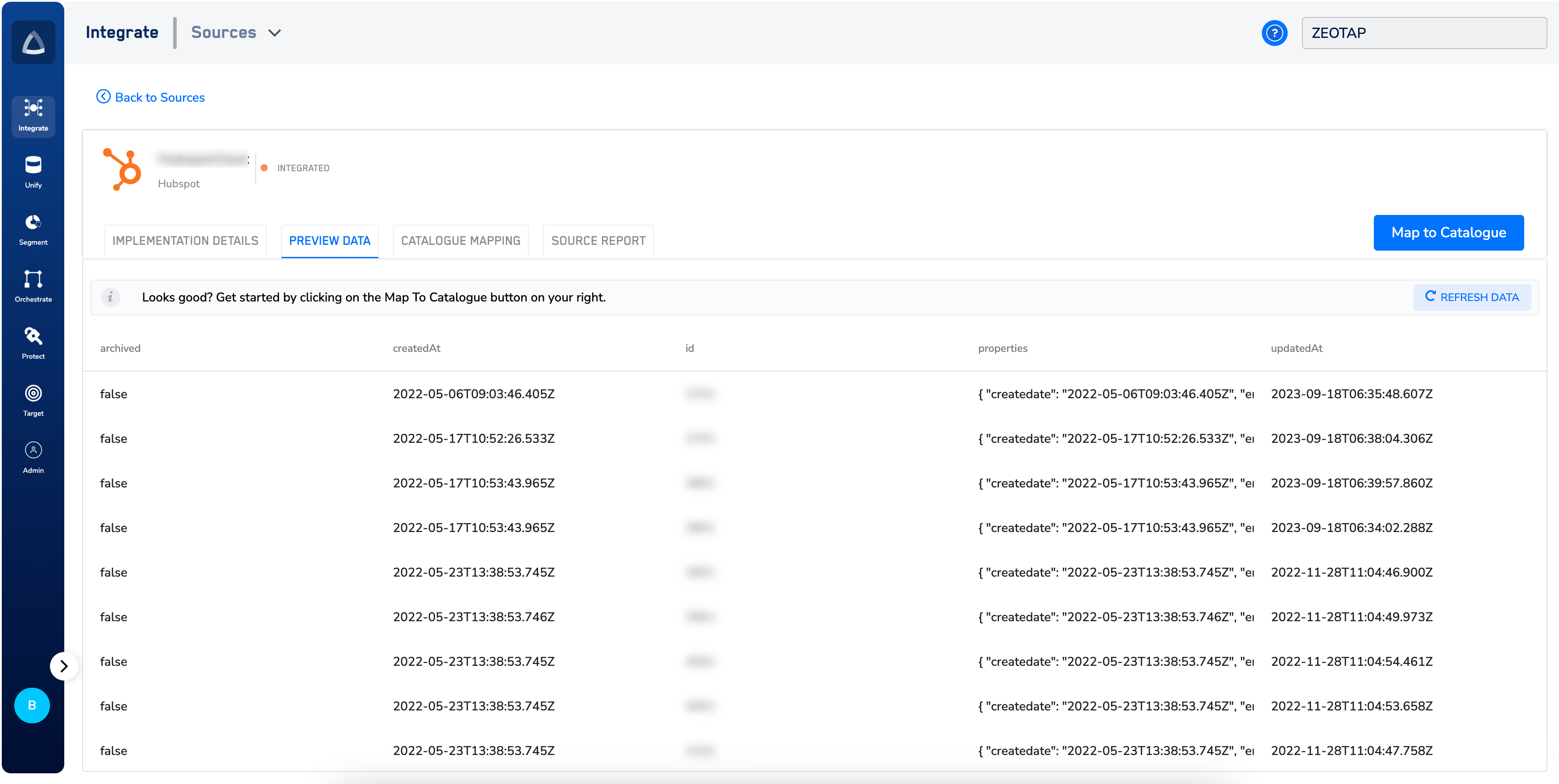
After successfully implementing the source, you can examine the data that has been received into the system under the PREVIEW DATA tab. Note that once the data starts flowing into the system, the status of the source changes to Integrated.
If no data is ingested, then a message stating “We haven’t received any data yet. please check again later and ensure that thesource is implemented correctly. In case of any issues, contact support@zeotap.com” message appears on the screen.
Last modified on February 26, 2026
Was this page helpful?
{"docsConfig":{"theme":"mint","$schema":"https://mintlify.com/docs.json","name":"Zeotap docs","colors":{"primary":"#174efb","light":"#174efb","dark":"#174efb"},"logo":{"light":"https://mintcdn.com/zeotap/pbiFRnrYXBNUsbba/logo/light.svg?fit=max\u0026auto=format\u0026n=pbiFRnrYXBNUsbba\u0026q=85\u0026s=c566b5af653699d3bcf4d8efb4f678d1","dark":"https://mintcdn.com/zeotap/pbiFRnrYXBNUsbba/logo/dark.svg?fit=max\u0026auto=format\u0026n=pbiFRnrYXBNUsbba\u0026q=85\u0026s=ae6e1d27d3d2e409f9e86c089b64e224","href":"https://zeotap.com/"},"favicon":"https://mintcdn.com/zeotap/Tg-jPUQrcrgXsHVA/favicon.svg?fit=max\u0026auto=format\u0026n=Tg-jPUQrcrgXsHVA\u0026q=85\u0026s=f5b2731a91bf6cad0fe370680ebae4fe","appearance":{"default":"light"},"background":{"decoration":"gradient","color":{"light":"#eaf0fe"}},"navbar":{"links":[{"href":"https://login.zeotap.com/","label":"Login"}],"primary":{"type":"button","label":"Book a Demo","href":"https://zeotap.com/demo/"}},"footer":{"socials":{"linkedin":"https://www.linkedin.com/company/zeotap"}},"seo":{"indexing":"all"},"integrations":{"ga4":{"measurementId":"G-XXXXXXXXXX"}},"banner":{"content":"New: [Support \u0026 Diagnostics](/articles/support-diagnostics-customer/support-diagnostics) troubleshooting guides are now live.","dismissible":true},"contextual":{"options":["copy","view","chatgpt","claude","perplexity","mcp","cursor","vscode"],"display":"header"},"metadata":{"timestamp":true},"styling":{"latex":true},"navigation":{"global":{},"pages":[]}},"deployment":{"deploymentMetadataValue":{"subdomain":"zeotap","hasAudioNarration":false,"actualSubdomain":"zeotap","customDomains":["docs.zeotap.com"],"gitSource":{"type":"github","owner":"zeotap","repo":"zeotap-docs","deployBranch":"main","contentDirectory":"","isPrivate":true,"mountPath":"","label":""},"feedback":{"thumbs":true},"entitlements":{"AI_CHAT":{"status":"ENABLED"},"WEB_MCP":{"status":"ENABLED"},"NARRATION":{"status":"ENABLED"}},"buildId":"6b004eb51e592fb6624ecdaa","clientVersion":"0.0.4271","searchFilterCounts":[{"language":"default","tag":"Products","count":358},{"language":"default","tag":"Integrate","count":215},{"language":"default","tag":"SDKs","count":157},{"language":"default","tag":"Destinations","count":150},{"language":"default","tag":"Batch Integrations","count":97},{"language":"default","tag":"Sources","count":65},{"language":"default","tag":"Unify","count":65},{"language":"default","tag":"Source Integrations (Batch+Real-Time)","count":54},{"language":"default","tag":"Release Notes","count":54},{"language":"default","tag":"Catalogue","count":48}]},"assistantConfig":{"enableAskAiButton":false,"enableStarterQuestions":false,"enableAskAiSearchBar":true},"basePath":"","hasChatPermissions":true,"hasWebMcpPermissions":true,"toggles":[{"name":"kill-isr","enabled":true,"variant":{"name":"disabled","enabled":false,"feature_enabled":true},"impressionData":false},{"name":"custom-rbac-roles","enabled":true,"variant":{"name":"disabled","enabled":false,"feature_enabled":true},"impressionData":false},{"name":"agent-mintlify-slack","enabled":true,"variant":{"name":"disabled","enabled":false,"feature_enabled":true},"impressionData":false},{"name":"agent-integrations-settings","enabled":true,"variant":{"name":"disabled","enabled":false,"feature_enabled":true},"impressionData":false},{"name":"rbac-expansion","enabled":true,"variant":{"name":"disabled","enabled":false,"feature_enabled":true},"impressionData":false},{"name":"automations-pr-grouping","enabled":true,"variant":{"name":"disabled","enabled":false,"feature_enabled":true},"impressionData":false},{"name":"custom-prefix","enabled":true,"variant":{"name":"disabled","enabled":false,"feature_enabled":true},"impressionData":false},{"name":"analytics-v7","enabled":true,"variant":{"name":"disabled","enabled":false,"feature_enabled":true},"impressionData":false},{"name":"user-flows-analytics","enabled":true,"variant":{"name":"disabled","enabled":false,"feature_enabled":true},"impressionData":false},{"name":"no-publish-flow","enabled":true,"variant":{"name":"disabled","enabled":false,"feature_enabled":true},"impressionData":false},{"name":"workos-onboarding","enabled":true,"variant":{"name":"disabled","enabled":false,"feature_enabled":true},"impressionData":false},{"name":"snapshot-serving-live","enabled":true,"variant":{"name":"disabled","enabled":false,"feature_enabled":true},"impressionData":false},{"name":"stripTemperatureMiddleware","enabled":true,"variant":{"name":"disabled","enabled":false,"feature_enabled":true},"impressionData":false},{"name":"support-platform-pylon-zendesk","enabled":true,"variant":{"name":"disabled","enabled":false,"feature_enabled":true},"impressionData":false},{"name":"snapshot-serving","enabled":true,"variant":{"name":"disabled","enabled":false,"feature_enabled":true},"impressionData":false},{"name":"instant-rollback","enabled":true,"variant":{"name":"disabled","enabled":false,"feature_enabled":true},"impressionData":false},{"name":"granular-notifications-server","enabled":true,"variant":{"name":"disabled","enabled":false,"feature_enabled":true},"impressionData":false},{"name":"granular-notifications","enabled":true,"variant":{"name":"disabled","enabled":false,"feature_enabled":true},"impressionData":false},{"name":"automations-fable","enabled":true,"variant":{"name":"disabled","enabled":false,"feature_enabled":true},"impressionData":false},{"name":"fixed-ai-action-pricing","enabled":true,"variant":{"name":"disabled","enabled":false,"feature_enabled":true},"impressionData":false},{"name":"site-roles","enabled":true,"variant":{"name":"disabled","enabled":false,"feature_enabled":true},"impressionData":false},{"name":"automation-resolve-merge-conflict","enabled":true,"variant":{"name":"disabled","enabled":false,"feature_enabled":true},"impressionData":false},{"name":"scoped-publishing","enabled":true,"variant":{"name":"disabled","enabled":false,"feature_enabled":true},"impressionData":false},{"name":"mintql","enabled":true,"variant":{"name":"disabled","enabled":false,"feature_enabled":true},"impressionData":false},{"name":"page-level-analytics","enabled":true,"variant":{"name":"disabled","enabled":false,"feature_enabled":true},"impressionData":false},{"name":"editor-version-history-v2","enabled":true,"variant":{"name":"disabled","enabled":false,"feature_enabled":true},"impressionData":false},{"name":"billing-page-v2","enabled":true,"variant":{"name":"disabled","enabled":false,"feature_enabled":true},"impressionData":false},{"name":"full-page-search","enabled":true,"variant":{"name":"disabled","enabled":false,"feature_enabled":true},"impressionData":false},{"name":"workspace-projects","enabled":true,"variant":{"name":"disabled","enabled":false,"feature_enabled":true},"impressionData":false},{"name":"assistant-v5","enabled":true,"variant":{"name":"disabled","enabled":false,"feature_enabled":true},"impressionData":false},{"name":"fork-pr-previews","enabled":true,"variant":{"name":"disabled","enabled":false,"feature_enabled":true},"impressionData":false},{"name":"revalidation-jwt","enabled":true,"variant":{"name":"disabled","enabled":false,"feature_enabled":true},"impressionData":false},{"name":"workos-sso-scim","enabled":true,"variant":{"name":"disabled","enabled":false,"feature_enabled":true},"impressionData":false},{"name":"hobby-abuse-scan","enabled":true,"variant":{"name":"disabled","enabled":false,"feature_enabled":true},"impressionData":false},{"name":"dashboard-inbox","enabled":true,"variant":{"name":"disabled","enabled":false,"feature_enabled":true},"impressionData":false},{"name":"workos-signup","enabled":true,"variant":{"name":"disabled","enabled":false,"feature_enabled":true},"impressionData":false},{"name":"turbopuffer-dual-write","enabled":true,"variant":{"name":"disabled","enabled":false,"feature_enabled":true},"impressionData":false},{"name":"workos-enabled","enabled":true,"variant":{"name":"disabled","enabled":false,"feature_enabled":true},"impressionData":false},{"name":"approve-review-flow","enabled":true,"variant":{"name":"disabled","enabled":false,"feature_enabled":true},"impressionData":false},{"name":"editor-metadata","enabled":true,"variant":{"name":"disabled","enabled":false,"feature_enabled":true},"impressionData":false},{"name":"sso-setup-deadline-banner","enabled":true,"variant":{"name":"disabled","enabled":false,"feature_enabled":true},"impressionData":false},{"name":"turbopuffer-serve","enabled":true,"variant":{"name":"disabled","enabled":false,"feature_enabled":true},"impressionData":false},{"name":"live-agents","enabled":true,"variant":{"name":"disabled","enabled":false,"feature_enabled":true},"impressionData":false},{"name":"starter-pricing","enabled":true,"variant":{"name":"treatment","enabled":true,"payload":{"type":"string","value":"treatment"},"feature_enabled":true},"impressionData":false},{"name":"llms-txt-v2","enabled":true,"variant":{"name":"disabled","enabled":false,"feature_enabled":true},"impressionData":false},{"name":"wildcard-email-auth","enabled":true,"variant":{"name":"disabled","enabled":false,"feature_enabled":true},"impressionData":false}],"googleFontsInlined":false},"customCss":[]}
{"page":{"pagePath":"articles/get-started-guide/preview-data","slug":"/articles/get-started-guide/preview-data","pageMetadata":{"title":"Preview Data","description":"After successfully implementing the source, you can examine the data that has been received into the system under the PREVIEW DATA tab. Note that once the data starts flowing into the system, the status of the source changes to *Integrated*.","href":"/articles/get-started-guide/preview-data","hidden":true},"description":{"compiledSource":"\"use strict\";\nconst {jsx: _jsx, jsxs: _jsxs} = arguments[0];\nconst {useMDXComponents: _provideComponents} = arguments[0];\nfunction _createMdxContent(props) {\n const _components = {\n em: \"em\",\n p: \"p\",\n ..._provideComponents(),\n ...props.components\n };\n return _jsxs(_components.p, {\n children: [\"After successfully implementing the source, you can examine the data that has been received into the system under the PREVIEW DATA tab. Note that once the data starts flowing into the system, the status of the source changes to \", _jsx(_components.em, {\n children: \"Integrated\"\n }), \".\"]\n });\n}\nfunction MDXContent(props = {}) {\n const {wrapper: MDXLayout} = {\n ..._provideComponents(),\n ...props.components\n };\n return MDXLayout ? _jsx(MDXLayout, {\n ...props,\n children: _jsx(_createMdxContent, {\n ...props\n })\n }) : _createMdxContent(props);\n}\nreturn {\n default: MDXContent\n};\n","frontmatter":{},"scope":{}},"pageType":"default","mdx":{"mdxSource":{"compiledSource":"\"use strict\";const{Fragment:_Fragment,jsx:_jsx,jsxs:_jsxs}=arguments[0];const{useMDXComponents:_provideComponents}=arguments[0];function _createMdxContent(props){const _components={a:`a`,em:`em`,p:`p`,..._provideComponents(),...props.components},{Frame,Info,OptimizedImage}=_components;if(!Frame)_missingMdxReference(`Frame`,true);if(!Info)_missingMdxReference(`Info`,true);if(!OptimizedImage)_missingMdxReference(`OptimizedImage`,true);return _jsxs(_Fragment,{children:[_jsx(Info,{children:_jsxs(_components.p,{children:[`If no data is ingested, then a message stating “`,_jsxs(_components.em,{children:[`We haven’t received any data yet. please check again later and ensure that thesource is implemented correctly.\\xA0In case of any issues,\\xA0contact\\xA0`,_jsx(_components.a,{href:`mailto:support@zeotap.com`,children:`support@zeotap.com`}),`” message appears on the screen.`]})]})}),`\n`,_jsx(Frame,{children:_jsx(OptimizedImage,{src:`https://mintcdn.com/zeotap/rwzlL6tHGA5Q4kOq/articles/get-started-guide/Storage/get-started-guide/how-zeotap-cdp-works/how-zeotap-cdp-works-2024-02-03-1.png?fit=max\u0026auto=format\u0026n=rwzlL6tHGA5Q4kOq\u0026q=85\u0026s=77c9de4971ac6a46b73c172f987f7eea`,alt:``,\"data-og-width\":`3494`,width:`3494`,\"data-og-height\":`1758`,height:`1758`,\"data-path\":`articles/get-started-guide/Storage/get-started-guide/how-zeotap-cdp-works/how-zeotap-cdp-works-2024-02-03-1.png`,\"data-optimize\":`true`,\"data-opv\":`3`,srcset:`https://mintcdn.com/zeotap/rwzlL6tHGA5Q4kOq/articles/get-started-guide/Storage/get-started-guide/how-zeotap-cdp-works/how-zeotap-cdp-works-2024-02-03-1.png?w=280\u0026fit=max\u0026auto=format\u0026n=rwzlL6tHGA5Q4kOq\u0026q=85\u0026s=b026e2c4c2d10a2e8f6e5e4135b329a9 280w, https://mintcdn.com/zeotap/rwzlL6tHGA5Q4kOq/articles/get-started-guide/Storage/get-started-guide/how-zeotap-cdp-works/how-zeotap-cdp-works-2024-02-03-1.png?w=560\u0026fit=max\u0026auto=format\u0026n=rwzlL6tHGA5Q4kOq\u0026q=85\u0026s=124f30a12ac9c3cc48c7e3f80fd35b14 560w, https://mintcdn.com/zeotap/rwzlL6tHGA5Q4kOq/articles/get-started-guide/Storage/get-started-guide/how-zeotap-cdp-works/how-zeotap-cdp-works-2024-02-03-1.png?w=840\u0026fit=max\u0026auto=format\u0026n=rwzlL6tHGA5Q4kOq\u0026q=85\u0026s=83085fc018e40b38c46876e0fd135136 840w, https://mintcdn.com/zeotap/rwzlL6tHGA5Q4kOq/articles/get-started-guide/Storage/get-started-guide/how-zeotap-cdp-works/how-zeotap-cdp-works-2024-02-03-1.png?w=1100\u0026fit=max\u0026auto=format\u0026n=rwzlL6tHGA5Q4kOq\u0026q=85\u0026s=6c0238072749aad7ded13a9b68ba5c6b 1100w, https://mintcdn.com/zeotap/rwzlL6tHGA5Q4kOq/articles/get-started-guide/Storage/get-started-guide/how-zeotap-cdp-works/how-zeotap-cdp-works-2024-02-03-1.png?w=1650\u0026fit=max\u0026auto=format\u0026n=rwzlL6tHGA5Q4kOq\u0026q=85\u0026s=06988bfac632d4b034dd902f7095b272 1650w, https://mintcdn.com/zeotap/rwzlL6tHGA5Q4kOq/articles/get-started-guide/Storage/get-started-guide/how-zeotap-cdp-works/how-zeotap-cdp-works-2024-02-03-1.png?w=2500\u0026fit=max\u0026auto=format\u0026n=rwzlL6tHGA5Q4kOq\u0026q=85\u0026s=0260ab0c3fd1c797b941670245badd3a 2500w`})})]})}function MDXContent(props={}){const{wrapper:MDXLayout}={..._provideComponents(),...props.components};return MDXLayout?_jsx(MDXLayout,{...props,children:_jsx(_createMdxContent,{...props})}):_createMdxContent(props)}return{default:MDXContent};function _missingMdxReference(id,component){throw new Error(`Expected `+(component?`component`:`object`)+\" `\"+id+\"` to be defined: you likely forgot to import, pass, or provide it.\")}","frontmatter":{},"scope":{"config":{},"pageMetadata":{"title":"Preview Data","description":"After successfully implementing the source, you can examine the data that has been received into the system under the PREVIEW DATA tab. Note that once the data starts flowing into the system, the status of the source changes to *Integrated*.","href":"/articles/get-started-guide/preview-data","hidden":true}}},"mdxSourceWithNoJs":null},"mdxExtracts":{"tableOfContents":[],"codeExamples":{}},"jsLinks":["/_mintlify/custom/zeotap/8d1f66bf8eed64a4/scripts/convert-to-mdx.js"],"subdomain":"zeotap","siteName":"Zeotap docs","title":"Preview Data - Zeotap docs","navMaps":{"firstHrefInVersion":{},"firstHrefInLanguage":{}},"lastModified":"2026-02-26T17:03:26.455Z","gitLastModified":"2026-02-26T08:14:06.000Z","originalFileLocation":"articles/get-started-guide/preview-data.mdx"},"headHtml":"\u003cscript data-mint-head>(function(){var d=document.documentElement,p=null;if(!p){try{p=localStorage.getItem(\"isDarkMode\")}catch(e){}if(p==='true')p='dark';else if(p==='false')p='light';if(p!=='light'\u0026\u0026p!=='dark'\u0026\u0026p!=='system')p=\"light\"}var r=p==='system'?(matchMedia(\"(prefers-color-scheme: dark)\").matches?'dark':'light'):p;d.classList.remove(r==='dark'?'light':'dark');d.classList.add(r);d.setAttribute(\"data-theme-preference\",p)})();\u003c/script>\u003cmeta data-mint-head name=\"description\" content=\"After successfully implementing the source, you can examine the data that has been received into the system under the PREVIEW DATA tab. Note that once the data starts flowing into the system, the status of the source changes to Integrated.\">\u003cmeta data-mint-head name=\"application-name\" content=\"Zeotap docs\">\u003cmeta data-mint-head name=\"generator\" content=\"Mintlify\">\u003clink data-mint-head rel=\"icon\" type=\"image/png\" sizes=\"192x192\" href=\"/mintlify-assets/_mintlify/favicons/zeotap/dSUuokAmJ7V-SYpL/_generated/favicon/android-chrome-192x192.png\" media=\"(prefers-color-scheme: light)\">\u003clink data-mint-head rel=\"apple-touch-icon\" type=\"image/png\" sizes=\"180x180\" href=\"/mintlify-assets/_mintlify/favicons/zeotap/dSUuokAmJ7V-SYpL/_generated/favicon/apple-touch-icon.png\">\u003clink data-mint-head rel=\"icon\" type=\"image/png\" sizes=\"16x16\" href=\"/mintlify-assets/_mintlify/favicons/zeotap/dSUuokAmJ7V-SYpL/_generated/favicon/favicon-16x16.png\" media=\"(prefers-color-scheme: light)\">\u003clink data-mint-head rel=\"icon\" type=\"image/png\" sizes=\"32x32\" href=\"/mintlify-assets/_mintlify/favicons/zeotap/dSUuokAmJ7V-SYpL/_generated/favicon/favicon-32x32.png\" media=\"(prefers-color-scheme: light)\">\u003clink data-mint-head rel=\"shortcut icon\" type=\"image/x-icon\" href=\"/mintlify-assets/_mintlify/favicons/zeotap/dSUuokAmJ7V-SYpL/_generated/favicon/favicon.ico\" media=\"(prefers-color-scheme: light)\">\u003clink data-mint-head rel=\"icon\" type=\"image/png\" sizes=\"192x192\" href=\"/mintlify-assets/_mintlify/favicons/zeotap/dSUuokAmJ7V-SYpL/_generated/favicon-dark/android-chrome-192x192.png\" media=\"(prefers-color-scheme: dark)\">\u003clink data-mint-head rel=\"icon\" type=\"image/png\" sizes=\"16x16\" href=\"/mintlify-assets/_mintlify/favicons/zeotap/dSUuokAmJ7V-SYpL/_generated/favicon-dark/favicon-16x16.png\" media=\"(prefers-color-scheme: dark)\">\u003clink data-mint-head rel=\"icon\" type=\"image/png\" sizes=\"32x32\" href=\"/mintlify-assets/_mintlify/favicons/zeotap/dSUuokAmJ7V-SYpL/_generated/favicon-dark/favicon-32x32.png\" media=\"(prefers-color-scheme: dark)\">\u003clink data-mint-head rel=\"shortcut icon\" type=\"image/x-icon\" href=\"/mintlify-assets/_mintlify/favicons/zeotap/dSUuokAmJ7V-SYpL/_generated/favicon-dark/favicon.ico\" media=\"(prefers-color-scheme: dark)\">\u003cmeta data-mint-head property=\"og:title\" content=\"Preview Data - Zeotap docs\">\u003cmeta data-mint-head property=\"og:description\" content=\"After successfully implementing the source, you can examine the data that has been received into the system under the PREVIEW DATA tab. Note that once the data starts flowing into the system, the status of the source changes to Integrated.\">\u003cmeta data-mint-head property=\"og:site_name\" content=\"Zeotap docs\">\u003cmeta data-mint-head property=\"og:url\" content=\"https://docs.zeotap.com/articles/get-started-guide/preview-data\">\u003cmeta data-mint-head property=\"og:type\" content=\"website\">\u003cmeta data-mint-head property=\"og:image\" content=\"https://zeotap.mintlify.site/_mintlify/api/og/v2?division=How+Zeotap+CDP+Works\u0026amp;title=Preview+Data\u0026amp;description=After+successfully+implementing+the+source%2C+you+can+examine+the+data+that+has+been+received+into+the+system+under+the+PREVIEW+DATA+tab.+Note+that+once+the+data+\u0026amp;theme=93bf95acd4691f2b4bc4d35f\u0026amp;signature=56dd6d28a84e5c16f96f47d94f3aefa0af65627b403342022d780f8f5d17a321\">\u003cmeta data-mint-head property=\"og:image:width\" content=\"1200\">\u003cmeta data-mint-head property=\"og:image:height\" content=\"630\">\u003cmeta data-mint-head name=\"twitter:card\" content=\"summary_large_image\">\u003cmeta data-mint-head name=\"twitter:title\" content=\"Preview Data - Zeotap docs\">\u003cmeta data-mint-head name=\"twitter:description\" content=\"After successfully implementing the source, you can examine the data that has been received into the system under the PREVIEW DATA tab. Note that once the data starts flowing into the system, the status of the source changes to Integrated.\">\u003cmeta data-mint-head name=\"twitter:image\" content=\"https://zeotap.mintlify.site/_mintlify/api/og/v2?division=How+Zeotap+CDP+Works\u0026amp;title=Preview+Data\u0026amp;description=After+successfully+implementing+the+source%2C+you+can+examine+the+data+that+has+been+received+into+the+system+under+the+PREVIEW+DATA+tab.+Note+that+once+the+data+\u0026amp;theme=93bf95acd4691f2b4bc4d35f\u0026amp;signature=56dd6d28a84e5c16f96f47d94f3aefa0af65627b403342022d780f8f5d17a321\">\u003cmeta data-mint-head name=\"twitter:image:width\" content=\"1200\">\u003cmeta data-mint-head name=\"twitter:image:height\" content=\"630\">\u003cmeta data-mint-head name=\"msapplication-config\" content=\"/mintlify-assets/_mintlify/favicons/zeotap/dSUuokAmJ7V-SYpL/_generated/favicon/browserconfig.xml\">\u003cmeta data-mint-head name=\"apple-mobile-web-app-title\" content=\"Zeotap docs\">\u003cmeta data-mint-head name=\"msapplication-TileColor\" content=\"#174efb\">\u003clink data-mint-head rel=\"canonical\" href=\"https://docs.zeotap.com/articles/get-started-guide/preview-data\">\u003clink data-mint-head rel=\"alternate\" type=\"application/xml\" href=\"/sitemap.xml\">\u003clink data-mint-head rel=\"alternate\" type=\"text/markdown\" href=\"/articles/get-started-guide/preview-data.md\">\u003cscript data-mint-head type=\"application/ld+json\">{\"@context\":\"https://schema.org\",\"@graph\":[{\"@type\":\"Organization\",\"@id\":\"https://docs.zeotap.com/#organization\",\"name\":\"Zeotap docs\",\"url\":\"https://docs.zeotap.com\",\"logo\":{\"@type\":\"ImageObject\",\"url\":\"https://mintcdn.com/zeotap/pbiFRnrYXBNUsbba/logo/light.svg?fit=max\u0026auto=format\u0026n=pbiFRnrYXBNUsbba\u0026q=85\u0026s=c566b5af653699d3bcf4d8efb4f678d1\"}},{\"@type\":\"WebSite\",\"@id\":\"https://docs.zeotap.com#website\",\"name\":\"Zeotap docs\",\"url\":\"https://docs.zeotap.com\",\"publisher\":{\"@id\":\"https://docs.zeotap.com/#organization\"}},{\"@type\":\"WebPage\",\"@id\":\"https://docs.zeotap.com/articles/get-started-guide/preview-data#webpage\",\"url\":\"https://docs.zeotap.com/articles/get-started-guide/preview-data\",\"name\":\"Preview Data\",\"description\":\"After successfully implementing the source, you can examine the data that has been received into the system under the PREVIEW DATA tab. Note that once the data starts flowing into the system, the status of the source changes to Integrated.\",\"dateModified\":\"2026-02-26T08:14:06.000Z\",\"isPartOf\":{\"@id\":\"https://docs.zeotap.com#website\"},\"breadcrumb\":{\"@id\":\"https://docs.zeotap.com/articles/get-started-guide/preview-data#breadcrumb\"}},{\"@type\":\"BreadcrumbList\",\"@id\":\"https://docs.zeotap.com/articles/get-started-guide/preview-data#breadcrumb\",\"itemListElement\":[{\"@type\":\"ListItem\",\"position\":1,\"name\":\"Get Started with Zeotap CDP\",\"item\":\"https://docs.zeotap.com/articles/get-started-guide/getting-started\"},{\"@type\":\"ListItem\",\"position\":2,\"name\":\"How Zeotap CDP Works\",\"item\":\"https://docs.zeotap.com/articles/get-started-guide/how-zeotap-cdp-works\"},{\"@type\":\"ListItem\",\"position\":3,\"name\":\"Preview Data\",\"item\":\"https://docs.zeotap.com/articles/get-started-guide/preview-data\"}]},{\"@type\":[\"Article\",\"TechArticle\"],\"@id\":\"https://docs.zeotap.com/articles/get-started-guide/preview-data#article\",\"headline\":\"Preview Data\",\"name\":\"Preview Data\",\"description\":\"After successfully implementing the source, you can examine the data that has been received into the system under the PREVIEW DATA tab. Note that once the data starts flowing into the system, the status of the source changes to Integrated.\",\"url\":\"https://docs.zeotap.com/articles/get-started-guide/preview-data\",\"mainEntityOfPage\":{\"@id\":\"https://docs.zeotap.com/articles/get-started-guide/preview-data#webpage\"},\"dateModified\":\"2026-02-26T08:14:06.000Z\",\"publisher\":{\"@id\":\"https://docs.zeotap.com/#organization\"},\"isPartOf\":{\"@id\":\"https://docs.zeotap.com#website\"}}]}\u003c/script>\u003cscript data-mint-head type=\"application/ld+json\">{\"@context\":\"https://schema.org\",\"@type\":\"WebSite\",\"name\":\"Zeotap docs\",\"publisher\":{\"@type\":\"Organization\",\"name\":\"Zeotap docs\"},\"provider\":{\"@type\":\"Organization\",\"name\":\"Mintlify\",\"url\":\"https://mintlify.com\"}}\u003c/script>","agentPointerHref":"/articles/get-started-guide/preview-data.md","siteName":"Zeotap docs","nav":{"global":{},"tabs":[{"tab":"Home","icon":"house","pages":[{"title":"Home","href":""}]},{"tab":"Products","icon":"grid-2","pages":[{"title":"Products","href":"/articles/integrate-customer/integrate"}]},{"tab":"SDKs","icon":"code","pages":[{"title":"SDKs","href":"/articles/sdks/overview"}]},{"tab":"Status","icon":"signal","href":"https://status.zeotap.com/"},{"tab":"Profile API","icon":"square-terminal","pages":[{"title":"Profile API","href":"/profile-api/profileapi"}]},{"tab":"Get Started","icon":"rocket","hidden":true,"groups":[{"group":"Get Started with Zeotap CDP","icon":"book-open","root":{"title":"Get Started with Zeotap CDP","description":"Welcome to Zeotap CDP, your gateway to a user-friendly Customer Data Platform that streamlines data integration, enriches customer profiles, enables precise segmentation and facilitates personalised marketing across multiple platforms.","href":"/articles/get-started-guide/getting-started"},"expanded":true,"pages":[{"title":"Introduction","description":null,"href":"/articles/get-started-guide/introduction"},{"group":"Before you Begin","root":{"title":"Before your Begin","description":null,"href":"/articles/get-started-guide/prerequisites"},"expanded":true,"pages":[{"title":"Discovery","description":"In the Discovery phase, you can start by defining your use cases and understanding your customers' requirements.","href":"/articles/get-started-guide/discovery"},{"title":"Data or Catalogue Definition","description":"In this stage, you need to define the incoming fields and map it to the respective Zeotap Catalogue field, specify the sensitivity of the data, define consent and more.","href":"/articles/get-started-guide/data-or-catalogue-definition"},{"title":"ID Strategy Setup","description":"Ensure that you prepare the source-specific data dictionary (listing attributes from each source) and a data model (illustrating the relationships between each source and their respective identifiers) before proceeding with the configuration of the ID strategy.","href":"/articles/get-started-guide/id-strategy-setup"}]},{"group":"How Zeotap CDP Works","root":{"title":"How Zeotap CDP Works","description":null,"href":"/articles/get-started-guide/how-zeotap-cdp-works"},"expanded":true,"pages":[{"title":"Create a Source","description":"To get started with Zeotap CDP, begin by creating a new source to bring Data to Zeotap CDP. You must also select a source category that align with your specific needs and create the source accordingly.","href":"/articles/get-started-guide/create-source"},{"title":"Implement the Source","description":"Once the source is created, proceed with its implementation. Refer to the step-by-step instructions provided in the Implementation guide tailored to the chosen Source Type. You can download this document from the IMPLEMENTATION DETAILS tab of the source that you created.","href":"/articles/get-started-guide/implement-source"},{"title":"Preview Data","href":"/articles/get-started-guide/preview-data"},{"title":"Map the Catalogue","description":"This is the stage in which you can standardise the incoming data to a single organisational-level catalogue by mapping and applying the required [data transformations](/articles/unify-customer/enrichers).","href":"/articles/get-started-guide/map-catalogue"},{"title":"Create Calculated Attributes","description":"This step allows you to derive user-level insights by aggregating your users' isolated actions. You can then use this data to create more powerful customer cohorts.","href":"/articles/get-started-guide/create-calculated-attributes"},{"title":"Create Audience","description":"The following are the steps involved in creation of Audiences in Zeotap CDP.","href":"/articles/get-started-guide/create-your-audience"},{"title":"Activate Audience on Destinations","description":"Activation is the process of linking the cohort of customers to various advertising platforms, such as Facebook, Adform, Twitter and more. This allows you to implement focused marketing strategies that align with the criteria established for the target cohort.","href":"/articles/get-started-guide/activate-audience-on-destinations"}]},{"title":"What's Next","description":"You are just getting started with Zeotap CDP, but there’s so much more to explore!","href":"/articles/get-started-guide/what-next"}]},{"group":"Best Practices for using Zeotap CDP","icon":"handshake","root":{"title":"Best Practices for Using Zeotap CDP","description":null,"href":"/articles/get-started-guide/best-practices-for-using-zeotap-cdp"},"expanded":true,"pages":[{"title":"Validating Data before Onboarding","description":null,"href":"/articles/get-started-guide/validating-data-before-onboarding"},{"title":"Setting Up Organisation and User","description":null,"href":"/articles/get-started-guide/setting-up-organisation-and-user"},{"title":"Setting Up Sources","description":null,"href":"/articles/get-started-guide/setting-up-sources"},{"title":"Setting Up Predictive Audience","description":null,"href":"/articles/get-started-guide/setting-up-predictive-audience"},{"title":"Setting Up Journeys","description":null,"href":"/articles/get-started-guide/setting-up-journeys"},{"title":"Setting Up Consent Orchestration","description":"All the consent and marketing preference attribute should be mapped to relevant consent and marketing preference attributes in the Zeotap catalogue to ensure visibility in Consent Orchestration rules. For more information on Consent Orchestration, refer[here](/articles/protect-customer/consent-orchestration-2830401643).","href":"/articles/get-started-guide/setting-up-consent-orchestration"},{"title":"Setting Up Profile API","description":null,"href":"/articles/get-started-guide/setting-up-profile-api"}]}]},{"tab":"What's New?","icon":"calendar-days","pages":[{"title":"What's New?","href":"/articles/product-release-notes/2026/q3-2026"}]},{"tab":"Composable CDP","href":"https://composable-docs.zeotap.com/"},{"tab":"ID+","icon":"fingerprint","hidden":true,"pages":[{"title":"ID+","href":"/articles/id-publication/basic-integration-guide_v2"}]},{"tab":"Support","icon":"headset","hidden":true,"pages":[{"title":"Support","href":"/articles/support/clear-your-cache-and-cookies"}]}]},"basePath":"","title":"Preview Data - Zeotap docs","deploymentId":"dpl_Em2U4NQQ2N2DE3HPbPUJVZLnAtvc","buildId":"dpl_Em2U4NQQ2N2DE3HPbPUJVZLnAtvc","dynamics":["10e4515597","07c022d89b","a74be98ba7"],"chunks":["BannerMarkdown-CVKwuln2.js","dist-CXMB3QQU.js","lib-DMeTj1gb.js","lib-B8HbPgcC.js","katex-Dbtb6Wk7.js","html-void-elements-mCSPHezU.js","marked.esm-CZWythHk.js","Frame-DMn5ZJp6.js","DynamicMarkdown-5yMTCLas.js","zoom-image-lightbox-BUkqX3JF.js","lightbox-handle-r17bVUz3.js"]}