> ## Documentation Index
> Fetch the complete documentation index at: https://docs.zeotap.com/llms.txt
> Use this file to discover all available pages before exploring further.
# Scenario 3: Extraction of Object Data Using a Custom Transformer
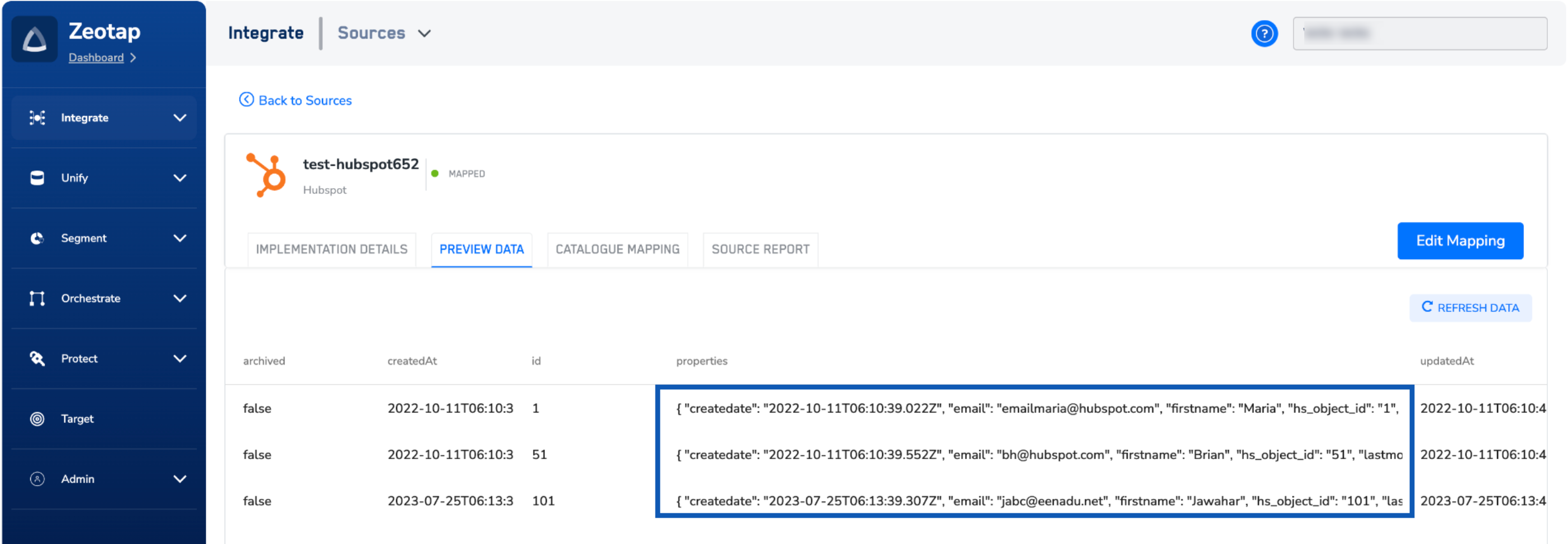
To extract a particular property from the incoming List (Array) of Objects as a separate field in your Catalogue, you can utilise this transformation. In the below example, under the **properties** column, you can observe that objects with properties such as create date, email, first name and more are ingested. To extract and identify a particular property like first name as an individual field in the catalogue, you can utilise this custom transformation. Here, you need to use the directive, `JSON-Path` for your requirement.
 **Syntax**
`json-path `
* `` specifies the column in the record that should be considered as the "root member object" or "\$"
* `` is the name of the output column in the record where the results of the expression will be stored
* `` is a JSON path expression; see *Usage Notes* below for details
An expression always refers to a JSON structure in the same way that an XPath expression is used in combination with an XML document. The "root member object" is always referred to as \$ regardless if it is an object or an array.
### Use Case: Extracting First Name from Ingested Object Data in Zeotap CDP
Assume that you have ingested an “Object” type data into Zeotap CDP that has a property, *First name*, which needs to be extracted as a new field in your Catalogue. Here, you can use the directive JSON Path to extract the required field as mentioned below.
#### Directives for Data Transformation
```bash Code theme={null}
set-column dataFields json:Parse(dataFields)
json-path dataFields firstName '$[?(@.key == "firstName")].value'
flatten :firstName
```
**Note:**
For more information on this directive, JSON Path. refer [here](https://github.com/data-integrations/wrangler/blob/develop/wrangler-docs/directives/json-path.md).
Below are details of how each directive functions:
| **Directive** | **Description** |
| :------------------------------------------------------------------ | :------------------------------------------------------------------------------------------------------------------------------- |
| `set-column dataFields json:Parse(dataFields)` | Parses the `dataFields` column into a JSON format, facilitating easier manipulation and extraction of data. |
| `json-path dataFields firstName '$[?(@.key == "firstName")].value'` | Uses JSON Path to locate the `firstName` key within the `dataFields` JSON object and extracts its corresponding value. |
| `flatten :firstName` | Ensures that the `firstName` field is flattened into a simple, single-level structure, ready for further processing or analysis. |
**Syntax**
`json-path `
* `` specifies the column in the record that should be considered as the "root member object" or "\$"
* `` is the name of the output column in the record where the results of the expression will be stored
* `` is a JSON path expression; see *Usage Notes* below for details
An expression always refers to a JSON structure in the same way that an XPath expression is used in combination with an XML document. The "root member object" is always referred to as \$ regardless if it is an object or an array.
### Use Case: Extracting First Name from Ingested Object Data in Zeotap CDP
Assume that you have ingested an “Object” type data into Zeotap CDP that has a property, *First name*, which needs to be extracted as a new field in your Catalogue. Here, you can use the directive JSON Path to extract the required field as mentioned below.
#### Directives for Data Transformation
```bash Code theme={null}
set-column dataFields json:Parse(dataFields)
json-path dataFields firstName '$[?(@.key == "firstName")].value'
flatten :firstName
```
**Note:**
For more information on this directive, JSON Path. refer [here](https://github.com/data-integrations/wrangler/blob/develop/wrangler-docs/directives/json-path.md).
Below are details of how each directive functions:
| **Directive** | **Description** |
| :------------------------------------------------------------------ | :------------------------------------------------------------------------------------------------------------------------------- |
| `set-column dataFields json:Parse(dataFields)` | Parses the `dataFields` column into a JSON format, facilitating easier manipulation and extraction of data. |
| `json-path dataFields firstName '$[?(@.key == "firstName")].value'` | Uses JSON Path to locate the `firstName` key within the `dataFields` JSON object and extracts its corresponding value. |
| `flatten :firstName` | Ensures that the `firstName` field is flattened into a simple, single-level structure, ready for further processing or analysis. |