> ## Documentation Index
> Fetch the complete documentation index at: https://docs.zeotap.com/llms.txt
> Use this file to discover all available pages before exploring further.
# How to use NCE
Zeotap CDP enables you to enrich user profiles by linking your Non-Customer Entity (NCE) data to the existing customer data. To achieve this, you need to map the **Join ID** from the customer dataset to the **Primary field** of the NCE dataset. You can also use Composite Key, which is an additional column from your NCE dataset to enrich the user profiles with non-customer data.
## Understand NCE With An Example
The following sample datasets of customer data and non-customer data illustrate the concept of joining for better understanding:
### Customer Dataset (CE)
| **CRM ID (Join ID)** | **Name** | **Email** | **Phone Number** |
| :------------------- | :--------- | :-------------------------------------------------- | :--------------- |
| 12345 | Jane Doe | [jane.doe@email.com](mailto:jane.doe@email.com) | 555-1234 |
| 67890 | John Smith | [john.smith@email.com](mailto:john.smith@email.com) | 555-5678 |
### Non-Customer Entity Dataset (NCE)
| **CRM ID (Primary Key**) | **Order ID** | **Order Date** | **Total Amount** |
| :----------------------- | :----------- | :------------- | :--------------- |
| 12345 | ORD001 | 2024-01-01 | \$250 |
| 67890 | ORD002 | 2024-01-15 | \$400 |
### Connect the Datasets Using the Join Key
In the above scenario, ensure that you map the **CRM ID** (common attribute) from both the Customer Dataset (CE) and Non-Customer Entity Dataset (NCE) to the respective Zeotap Catalogue fields.
In the mapping screen of the NCE source, under the **Join ID** section, perform the following steps:
 * Select **Add Enricher** and choose **Join Key Enricher** as the enrichment type.
* Under **Select User Attributes to Enrich**, choose the **crmid** from your Catalogue, which is your Join ID from the customer data. To learn how to select the Join ID from the customer data, refer [here](/articles/unify-customer/join-key-enricher#how-to-identify-the-join-id-and-primary-key).
* Use the **Enable Composite Key** toggle to select an additional column from the NCE dataset along with the **Primary Key** (of your NCE dataset) to enrich the customer profile with the non-customer data. Use this option to append data to a user profile instead of upserting it with a new value. For more information about how the Composite Key works, refer [here](/articles/unify-customer/using-composite-key-in-nce).
* Select **Add Enricher** and choose **Join Key Enricher** as the enrichment type.
* Under **Select User Attributes to Enrich**, choose the **crmid** from your Catalogue, which is your Join ID from the customer data. To learn how to select the Join ID from the customer data, refer [here](/articles/unify-customer/join-key-enricher#how-to-identify-the-join-id-and-primary-key).
* Use the **Enable Composite Key** toggle to select an additional column from the NCE dataset along with the **Primary Key** (of your NCE dataset) to enrich the customer profile with the non-customer data. Use this option to append data to a user profile instead of upserting it with a new value. For more information about how the Composite Key works, refer [here](/articles/unify-customer/using-composite-key-in-nce).
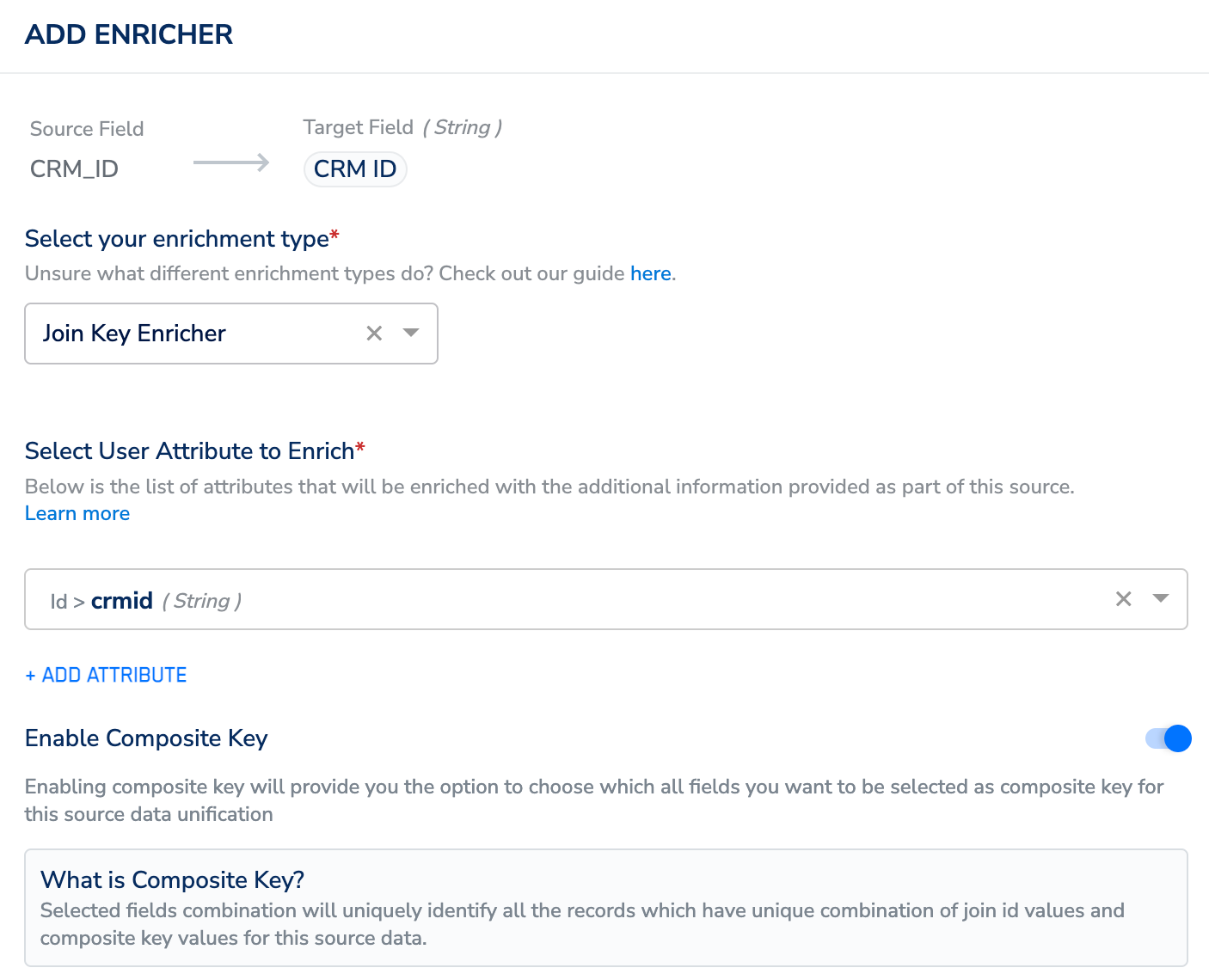 In this example, assuming that the **Composite Key** is disabled, clicking **Save** establishes a connection between the **Customer Dataset** and the **Non-Customer Dataset**, resulting in the following dataset:
### Result of Mapping
After mapping:
* **Jane Doe’s profile** (from the CE dataset) links to her order details (**ORD001**, **2024-01-01**, **\$250**) in the NCE dataset.
* **John Smith’s profile** (from the CE dataset) links to his order details (**ORD002**, **2024-01-15**, **\$400**) in the NCE dataset.
| **CRM ID** | **Name** | **Email** | **Phone Number** | **Order ID** | **Order Date** | **Total Amount** |
| :--------- | :--------- | :-------------------------------------------------- | :--------------- | :----------- | :------------- | :--------------- |
| 12345 | Jane Doe | [jane.doe@email.com](mailto:jane.doe@email.com) | 555-1234 | ORD001 | 2024-01-01 | \$250 |
| 67890 | John Smith | [john.smith@email.com](mailto:john.smith@email.com) | 555-5678 | ORD002 | 2024-01-15 | \$400 |
### Confirm the User Profile Enrichment on Customer 360
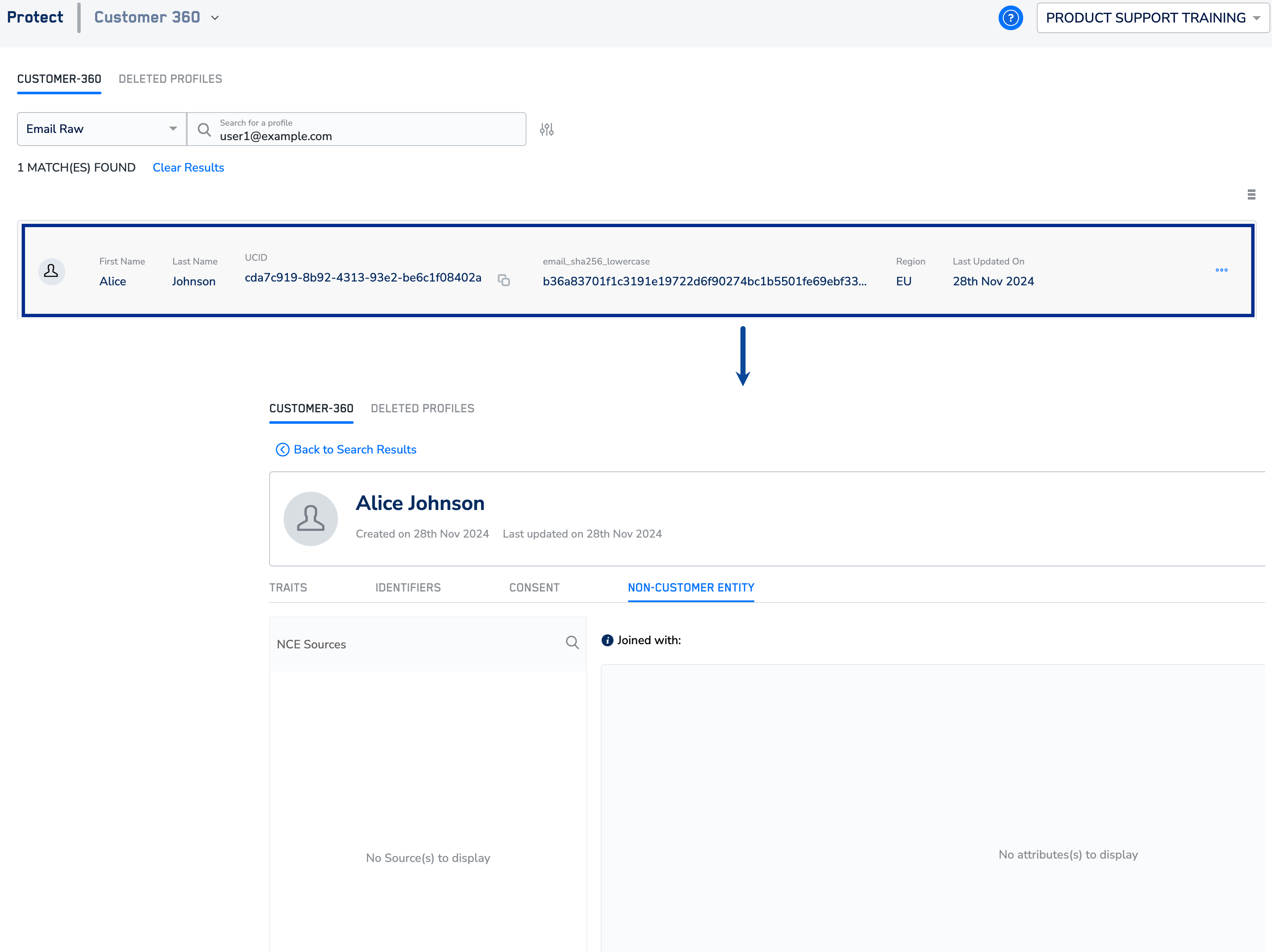
Navigate to the **Protect** module and go to **Customer 360**.
Search for a user using a unique identifier such as email.
In the screen that appears, you can find the identifiers, attributes, consent and marketing preferences associated with that user profile. In the **Non Customer Entity** tab, you can find details of the joined NCE source and attributes enriched in the user profile under the **Non-Customer Entity** tab.
In this example, assuming that the **Composite Key** is disabled, clicking **Save** establishes a connection between the **Customer Dataset** and the **Non-Customer Dataset**, resulting in the following dataset:
### Result of Mapping
After mapping:
* **Jane Doe’s profile** (from the CE dataset) links to her order details (**ORD001**, **2024-01-01**, **\$250**) in the NCE dataset.
* **John Smith’s profile** (from the CE dataset) links to his order details (**ORD002**, **2024-01-15**, **\$400**) in the NCE dataset.
| **CRM ID** | **Name** | **Email** | **Phone Number** | **Order ID** | **Order Date** | **Total Amount** |
| :--------- | :--------- | :-------------------------------------------------- | :--------------- | :----------- | :------------- | :--------------- |
| 12345 | Jane Doe | [jane.doe@email.com](mailto:jane.doe@email.com) | 555-1234 | ORD001 | 2024-01-01 | \$250 |
| 67890 | John Smith | [john.smith@email.com](mailto:john.smith@email.com) | 555-5678 | ORD002 | 2024-01-15 | \$400 |
### Confirm the User Profile Enrichment on Customer 360
Navigate to the **Protect** module and go to **Customer 360**.
Search for a user using a unique identifier such as email.
In the screen that appears, you can find the identifiers, attributes, consent and marketing preferences associated with that user profile. In the **Non Customer Entity** tab, you can find details of the joined NCE source and attributes enriched in the user profile under the **Non-Customer Entity** tab.
 ## Related Topics