> ## Documentation Index
> Fetch the complete documentation index at: https://docs.zeotap.com/llms.txt
> Use this file to discover all available pages before exploring further.
# How Calculated Attributes Work
> The mechanics of Calculated Attributes: where they sit in the data flow, the three kinds, what goes into a definition, and where the results are consumed.
A Calculated Attribute (CA) is a per-user value that Zeotap computes from your data — typically by aggregating the events each user performs — see the [Calculated Attributes overview](/articles/unify-customer/calculated-attributes) for the full introduction. This page explains the mechanics: where CAs sit in the data flow, the kinds available, what goes into a CA definition, and where the results are consumed. For click-by-click creation steps, see [Create a Batch Calculated Attribute](/articles/unify-customer/add-a-calculated-attribute) and [Create a Real-Time Calculated Attribute](/articles/unify-customer/create-a-real-time-calculated-attribute).
You find CAs in the platform under **Unify → Calculated Attributes**, with two tabs — **Batch Attributes** and **Real Time Attributes** — and a **+ Create Attribute** button.
## Where CAs sit in the data flow
Calculated Attributes are a link in the chain between raw ingested events and activation:
1. **Sources** ingest events into the platform.
2. The **Catalogue** defines the fields those events are mapped to.
3. A CA **aggregates those events per user** — every value is computed per unified customer profile.
4. The result sits on the **unified customer profile**.
5. From the profile, the value is available to **Audiences**, directly to **Journeys**, and to **Destinations** through audiences.
The key distinction: a Catalogue field stores data you *send*; a Calculated Attribute is a value Zeotap *computes* from that data. Field definitions and source-to-field mapping live in the [Catalogue](/articles/unify-customer/catalogue) and Sources areas, not in Calculated Attributes.
## The three kinds of Calculated Attributes
| Kind | How it updates | Notes |
| ---------------------- | ----------------------------------- | ----------------------------------------------------------------------------------------------------------------------------------------------------------------------------------------------------------------------------------------------------------- |
| **Batch** | Recomputed on a daily refresh | Supports 12 operators (see [Guardrails & Limits](/articles/unify-customer/calculated-attributes-guardrails-and-limits) for the full list), Standard and SQL definitions, and Group By. |
| **Real-Time** | Updates as qualifying events arrive | Supports 3 operators (see [Guardrails & Limits](/articles/unify-customer/calculated-attributes-guardrails-and-limits)), Standard definitions only, no Group By. Enabled per account — raise a support ticket to request it. |
| **Segment Membership** | System-defined batch CA | Tracks which audiences/segments a user belongs to, based on each segment's latest run. Usable in Audiences and Journeys. Enabled per account. See [Segment Membership Calculated Attribute](/articles/unify-customer/system-defined-calculated-attributes). |
For a full side-by-side comparison of batch and real-time behaviour, see [Batch vs. Real-Time Calculated Attributes](/articles/unify-customer/batch-vs-real-time-calculated-attributes).
## Anatomy of a Calculated Attribute
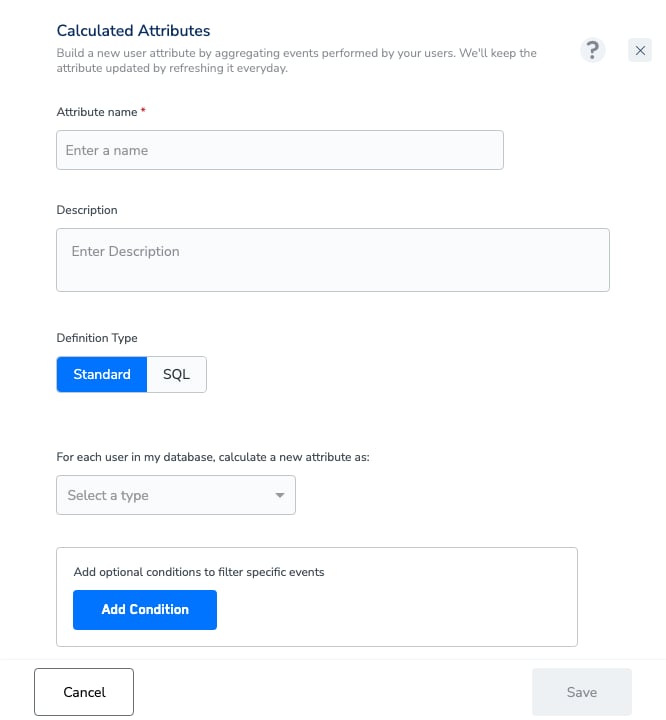
Every CA definition answers the same question: *which aggregation, of which field, over which events, filtered how, across which time window?* The create form expresses this as a sentence you complete:
> "For each user in my database, calculate a new attribute as: **\[operator]** of **\[field]** field, when they performed **\[event(s)]**"
 ### Operator
Batch CAs support 12 aggregation operators and real-time CAs support 3 — see [Calculated Attributes: Guardrails & Limits](/articles/unify-customer/calculated-attributes-guardrails-and-limits) for the full lists and per-operator data-type constraints.
### Conditions
You can filter which events qualify with up to 10 optional conditions, combined with **AND / OR** logic — for example, count only `purchase` events where the category is "electronics". For fields with many distinct values, the value dropdown gives way to free-text entry. The full builder limits are consolidated in [Guardrails & Limits](/articles/unify-customer/calculated-attributes-guardrails-and-limits).
### Computation window
The **Run computation** setting defines the time range the aggregation covers, with three modes:
* **Over the last N** units
* **Over entire data**
* **From** a fixed start date
The units available differ by kind — see [Batch vs. Real-Time Calculated Attributes](/articles/unify-customer/batch-vs-real-time-calculated-attributes) for the specifics.
The time window is part of the CA's definition and is **fixed at creation** — one CA covers one timeframe, and you can't vary it at query time. Teams that need 30-, 60-, and 90-day views create parallel CAs with a consistent naming convention (e.g. `sum_order_value_90d`).
### Group By
A batch CA can be split into one value per group by adding up to 3 **Group By** fields — for example, order value grouped by Country yields a per-country value on each profile. The result is stored as a **list-of-objects** attribute — each entry holds the computed value alongside its group-by values — which you can use and filter directly in audiences and journeys. Only attributes at the same level as the aggregation field are offered. Group By is not available on real-time CAs.
## Definition Type: Standard vs SQL
Batch CAs have two **Definition Types** — **Standard** (the sentence builder above) and **SQL** (a query editor for aggregations the sentence builder can't express — including aggregating attributes beyond event data, which form-based creation is limited to). Real-Time CAs are Standard only. The SQL CA Editor is **Beta** and enabled per account on request (raise a support ticket, as for real-time CAs). Both creation flows, including the SQL editor's validation rules and query guide, are documented on [Create a Batch Calculated Attribute](/articles/unify-customer/add-a-calculated-attribute).
## Lifecycle
A CA moves through a simple status lifecycle:
* **In Progress** — the attribute is being processed; its first computation is running.
* **Active** — computed and refreshing as expected. **Only an Active CA can be used in workflows.**
* **Paused** — not refreshed; its values are cleared (set to null) at the account's next daily refresh.
* **Draft** — a definition saved without being published for computation.
* **Published** — the definition is saved and queued for its first computation.
* **Failed** — the last computation did not complete; contact your Zeotap representative.
For what each status and column means on the listing screen, see [Components of the Calculated Attributes Screen](/articles/unify-customer/components-of-the-calculated-attributes-screen). For refresh cadence and freshness timing, see [Guardrails & Limits](/articles/unify-customer/calculated-attributes-guardrails-and-limits).
One behaviour to know before you write audience rules: a user with no qualifying events carries **no value** for a CA (not a `0`) — see [Guardrails & Limits → Users with no qualifying events](/articles/unify-customer/calculated-attributes-guardrails-and-limits#users-with-no-qualifying-events).
## Where CAs are consumed
* **Audiences** — "calculated attributes" is one of the rule types in the audience builder. See [Apply Attributes to Your Audience](/articles/segment-customer/apply-attributes-to-your-audience).
* **Real-time streaming filters** — filter users and events coming through a real-time [source](/articles/integrate-customer/sources).
* **Journeys** — use CAs directly in journey conditions. See [Orchestrate](/articles/orchestrate-customer/orchestrate).
* **Destinations** — activate on CAs through the audiences built on them. See [Create a New Destination](/articles/segment-customer/create-a-new-destination).
## Related Topics
### Operator
Batch CAs support 12 aggregation operators and real-time CAs support 3 — see [Calculated Attributes: Guardrails & Limits](/articles/unify-customer/calculated-attributes-guardrails-and-limits) for the full lists and per-operator data-type constraints.
### Conditions
You can filter which events qualify with up to 10 optional conditions, combined with **AND / OR** logic — for example, count only `purchase` events where the category is "electronics". For fields with many distinct values, the value dropdown gives way to free-text entry. The full builder limits are consolidated in [Guardrails & Limits](/articles/unify-customer/calculated-attributes-guardrails-and-limits).
### Computation window
The **Run computation** setting defines the time range the aggregation covers, with three modes:
* **Over the last N** units
* **Over entire data**
* **From** a fixed start date
The units available differ by kind — see [Batch vs. Real-Time Calculated Attributes](/articles/unify-customer/batch-vs-real-time-calculated-attributes) for the specifics.
The time window is part of the CA's definition and is **fixed at creation** — one CA covers one timeframe, and you can't vary it at query time. Teams that need 30-, 60-, and 90-day views create parallel CAs with a consistent naming convention (e.g. `sum_order_value_90d`).
### Group By
A batch CA can be split into one value per group by adding up to 3 **Group By** fields — for example, order value grouped by Country yields a per-country value on each profile. The result is stored as a **list-of-objects** attribute — each entry holds the computed value alongside its group-by values — which you can use and filter directly in audiences and journeys. Only attributes at the same level as the aggregation field are offered. Group By is not available on real-time CAs.
## Definition Type: Standard vs SQL
Batch CAs have two **Definition Types** — **Standard** (the sentence builder above) and **SQL** (a query editor for aggregations the sentence builder can't express — including aggregating attributes beyond event data, which form-based creation is limited to). Real-Time CAs are Standard only. The SQL CA Editor is **Beta** and enabled per account on request (raise a support ticket, as for real-time CAs). Both creation flows, including the SQL editor's validation rules and query guide, are documented on [Create a Batch Calculated Attribute](/articles/unify-customer/add-a-calculated-attribute).
## Lifecycle
A CA moves through a simple status lifecycle:
* **In Progress** — the attribute is being processed; its first computation is running.
* **Active** — computed and refreshing as expected. **Only an Active CA can be used in workflows.**
* **Paused** — not refreshed; its values are cleared (set to null) at the account's next daily refresh.
* **Draft** — a definition saved without being published for computation.
* **Published** — the definition is saved and queued for its first computation.
* **Failed** — the last computation did not complete; contact your Zeotap representative.
For what each status and column means on the listing screen, see [Components of the Calculated Attributes Screen](/articles/unify-customer/components-of-the-calculated-attributes-screen). For refresh cadence and freshness timing, see [Guardrails & Limits](/articles/unify-customer/calculated-attributes-guardrails-and-limits).
One behaviour to know before you write audience rules: a user with no qualifying events carries **no value** for a CA (not a `0`) — see [Guardrails & Limits → Users with no qualifying events](/articles/unify-customer/calculated-attributes-guardrails-and-limits#users-with-no-qualifying-events).
## Where CAs are consumed
* **Audiences** — "calculated attributes" is one of the rule types in the audience builder. See [Apply Attributes to Your Audience](/articles/segment-customer/apply-attributes-to-your-audience).
* **Real-time streaming filters** — filter users and events coming through a real-time [source](/articles/integrate-customer/sources).
* **Journeys** — use CAs directly in journey conditions. See [Orchestrate](/articles/orchestrate-customer/orchestrate).
* **Destinations** — activate on CAs through the audiences built on them. See [Create a New Destination](/articles/segment-customer/create-a-new-destination).
## Related Topics