> ## Documentation Index
> Fetch the complete documentation index at: https://docs.zeotap.com/llms.txt
> Use this file to discover all available pages before exploring further.
# Components of the Calculated Attributes Screen
The following list helps you to understand the various fields on the Calculated Attributes screen:
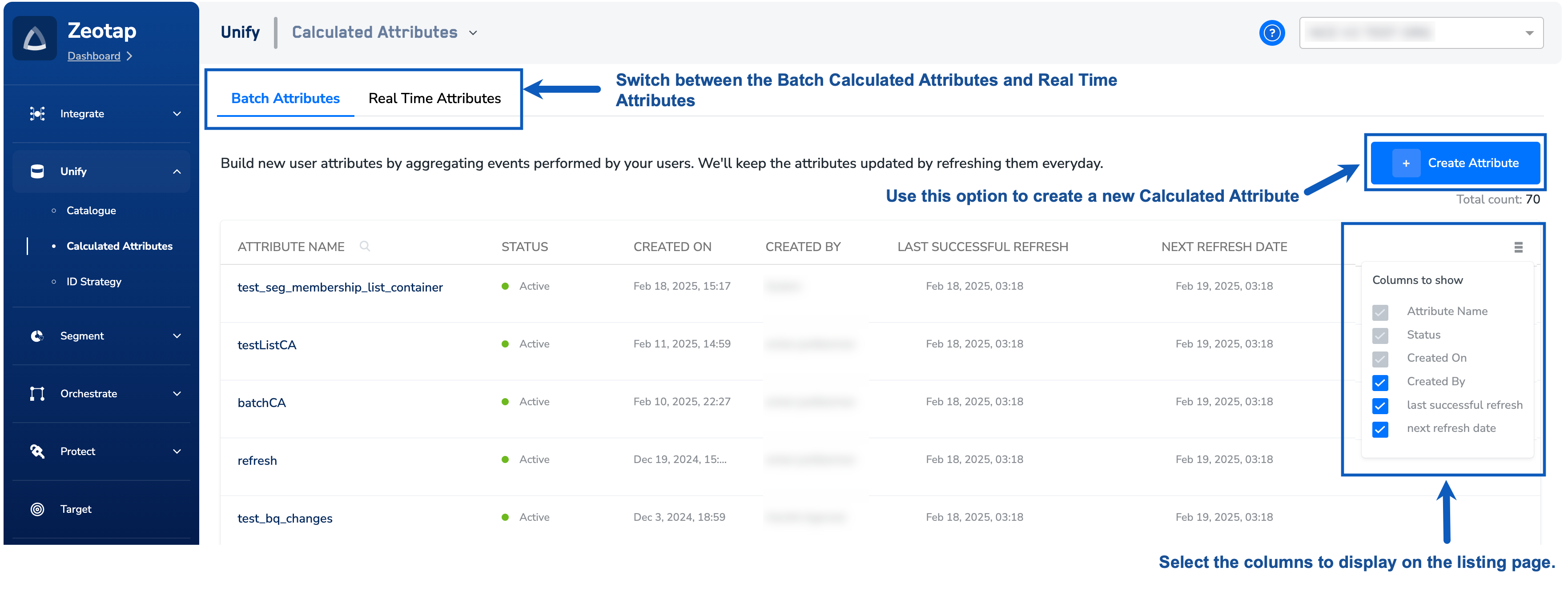 Navigate to the **CATALOGUE** tab to work with the calculated attributes. The above image shows the fields that appear under the **CATALOGUE** tab and the various actions that you can perform.
* **Attribute Name** – Name associated with the calculated attributes for easy identification
* **Status** – A calculated attribute can have the following statuses:
* **Active** – This indicates that the attribute is calculated for the first time and the daily refresh is working as expected. You can only use an active calculated attribute in workflows.
* **In Progress** – This indicates that the calculated attributed is being processed.
* **Created On** – The date when the calculated attribute was created.
* **Created By** – Indicates who created the calculated attribute.
* **Last Successful Refresh** –
Indicates the date and time when the previous refresh successfully completed.
* **Next Refresh Date** –
Indicates the date and time when the next refresh is scheduled for the Calculated Attribute.
* **More Options** – Use this option to select the columns to display on the listing page.
* **Create Attribute** – Use this option to create a new Calculated Attribute. To know more about the process, refer to [Adding a Calculated Attribute](/articles/unify-customer/add-a-calculated-attribute).
**Note:**
*For Real-Time Calculated Attributes, the **Last Successful Refresh** and **Next Refresh Date**options are unavailable because the refresh occurs in real time.*
Navigate to the **CATALOGUE** tab to work with the calculated attributes. The above image shows the fields that appear under the **CATALOGUE** tab and the various actions that you can perform.
* **Attribute Name** – Name associated with the calculated attributes for easy identification
* **Status** – A calculated attribute can have the following statuses:
* **Active** – This indicates that the attribute is calculated for the first time and the daily refresh is working as expected. You can only use an active calculated attribute in workflows.
* **In Progress** – This indicates that the calculated attributed is being processed.
* **Created On** – The date when the calculated attribute was created.
* **Created By** – Indicates who created the calculated attribute.
* **Last Successful Refresh** –
Indicates the date and time when the previous refresh successfully completed.
* **Next Refresh Date** –
Indicates the date and time when the next refresh is scheduled for the Calculated Attribute.
* **More Options** – Use this option to select the columns to display on the listing page.
* **Create Attribute** – Use this option to create a new Calculated Attribute. To know more about the process, refer to [Adding a Calculated Attribute](/articles/unify-customer/add-a-calculated-attribute).
**Note:**
*For Real-Time Calculated Attributes, the **Last Successful Refresh** and **Next Refresh Date**options are unavailable because the refresh occurs in real time.*