> ## Documentation Index
> Fetch the complete documentation index at: https://docs.zeotap.com/llms.txt
> Use this file to discover all available pages before exploring further.
# Using the 'Delete customers in this Audience from the system' checkbox
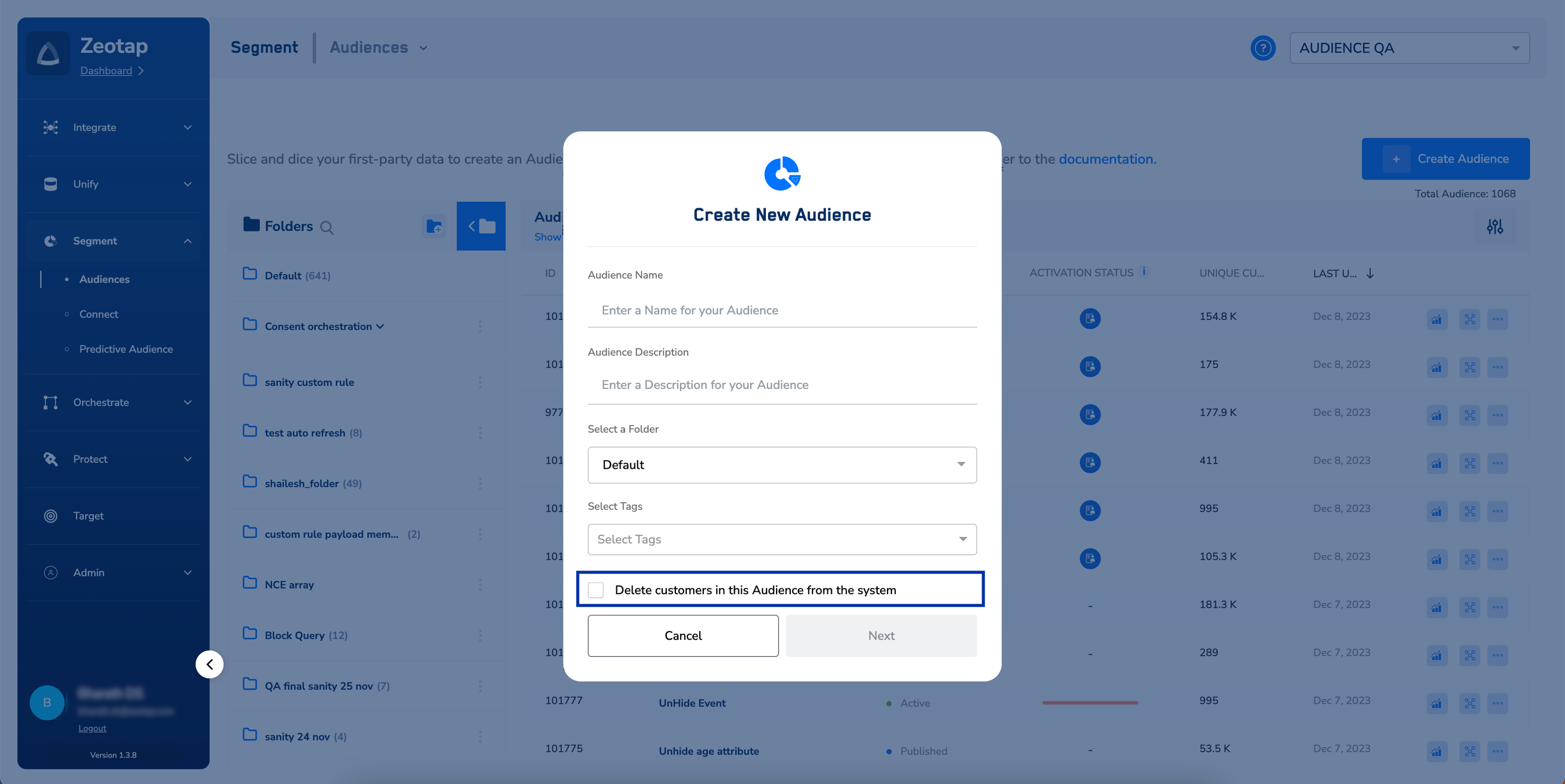
In line with Zeotap CDP’s support for the Right to Erasure functionality as per GDPR Compliances, we allow you to delete customers in bulk from the system, in the Audiences module. By enabling the **Delete customers in this Audience from the system** checkbox shown in the image below, you can delete a cohort of customers meeting the Audience criteria.
**Note**
It can take 7 to 10 days for deleted profiles to be erased from the database.
 ## Use cases
A couple of popular use cases where this feature can be used are as follows:
* Delete customers who have not given advertising consent.
* Delete customers who have opted out of marketing updates on a daily basis.
## How and when to use the checkbox?
If your use case is one of the above or it involves deleting customers (user profiles) from the Zeotap system in bulk, then while creating an Audience, select the **Delete customers in this Audience from the system** checkbox. By default, this checkbox is not selected as it is a sensitive feature that deletes customer data in bulk.
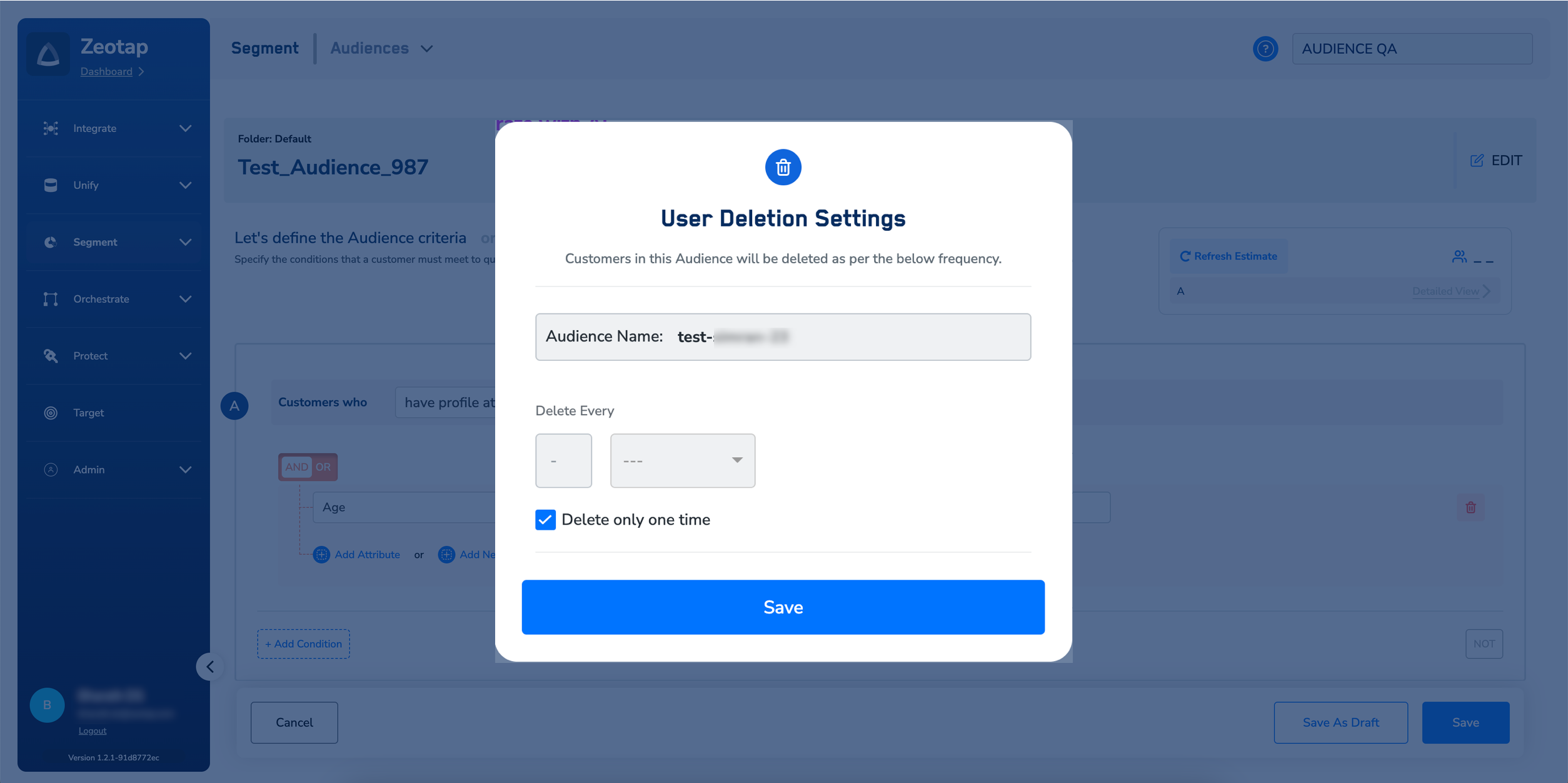
Upon saving this Audience, a window appears as shown in the image below. Here, you can set the frequency for deleting the customers qualifying for the Audience as per your requirement.
**Note:**
Selecting the **Delete only one time** checkbox deletes customers who qualify for the Audience only once.However, if you want to delete customers at specific intervals, then set a frequency for your Audience underthe **Delete Every** option.
## Use cases
A couple of popular use cases where this feature can be used are as follows:
* Delete customers who have not given advertising consent.
* Delete customers who have opted out of marketing updates on a daily basis.
## How and when to use the checkbox?
If your use case is one of the above or it involves deleting customers (user profiles) from the Zeotap system in bulk, then while creating an Audience, select the **Delete customers in this Audience from the system** checkbox. By default, this checkbox is not selected as it is a sensitive feature that deletes customer data in bulk.
Upon saving this Audience, a window appears as shown in the image below. Here, you can set the frequency for deleting the customers qualifying for the Audience as per your requirement.
**Note:**
Selecting the **Delete only one time** checkbox deletes customers who qualify for the Audience only once.However, if you want to delete customers at specific intervals, then set a frequency for your Audience underthe **Delete Every** option.
 **Note:**
Ensure that you take care of the following points while using this checkbox:
* If you select the checkbox, then the Audience cannot be activated on any Destination.
* This feature deletes customers from the Zeotap system. However, it does not impact customers activated on
the Destinations.
* The **Delete customers in this Audience from the system** checkbox is enabled only for the Client Admin and **Campaign Admin** roles.
## How to view the deleted customers?
You can view the UCIDs of the deleted customers in Customer 360. To do so, log into the *Zeotap CDP App* as an Admin and navigate to **Customer 360** > **DELETED PROFILES** tab. Here, you can find the UCIDs of the deleted customers along with the name of the Audience to which they belonged. The log of deleted customers serves as a valuable resource during audits when seeking information on deleted customers.
**Note:**
Ensure that you take care of the following points while using this checkbox:
* If you select the checkbox, then the Audience cannot be activated on any Destination.
* This feature deletes customers from the Zeotap system. However, it does not impact customers activated on
the Destinations.
* The **Delete customers in this Audience from the system** checkbox is enabled only for the Client Admin and **Campaign Admin** roles.
## How to view the deleted customers?
You can view the UCIDs of the deleted customers in Customer 360. To do so, log into the *Zeotap CDP App* as an Admin and navigate to **Customer 360** > **DELETED PROFILES** tab. Here, you can find the UCIDs of the deleted customers along with the name of the Audience to which they belonged. The log of deleted customers serves as a valuable resource during audits when seeking information on deleted customers.