> ## Documentation Index
> Fetch the complete documentation index at: https://docs.zeotap.com/llms.txt
> Use this file to discover all available pages before exploring further.
# Object, List of Objects and NCE Support in Destination Upload
Zeotap CDP allows you to send attributes as objects, list/array of objects, and Non-Customer data (NCE) to Destinations, enabling effective targeting. The following use case explains how and when to use these data types in Zeotap CDP for sending data to destinations.
## Stock Replenishment Use Case
In this use case, we explore how Zeotap CDP can be used to send List/Array of Objects for targeting based on user data related to product replenishment.
### Customer Overview
Assume that the below table represents your customer data available in Zeotap CDP, where there are four user profiles (UCID1, UCID2, UCID3, UCID4) with different product information associated with them as shown below.
| **UCID** | **Age** | **Product Name** | **Replenishment Date** | **Propensity Score** |
| :------- | :------ | :--------------------------------------- | :--------------------- | :------------------- |
| ucid1 | 26 | Fitbit Charge 5 Battery Pack | 2/10/2024 | 0.6 |
| ucid1 | 26 | Outdoor Patio Furniture Covers | 10/10/2024 | 0.4 |
| ucid2 | 32 | Nespresso Coffee Pods (Limited Edition) | 11/12/2024 | 0.9 |
| ucid2 | 32 | Smart Home Thermostat Filter | 1/12/2024 | 0.3 |
| ucid3 | 29 | Wireless Earbuds | 15/11/2024 | 0.8 |
| ucid3 | 29 | Yoga Mat with Carrying Strap | 25/11/2024 | 0.7 |
| ucid4 | 34 | High-Speed HDMI Cable | 20/12/2024 | 0.5 |
| ucid4 | 34 | Electric Kettle with Temperature Control | 5/1/2025 | 0.6 |
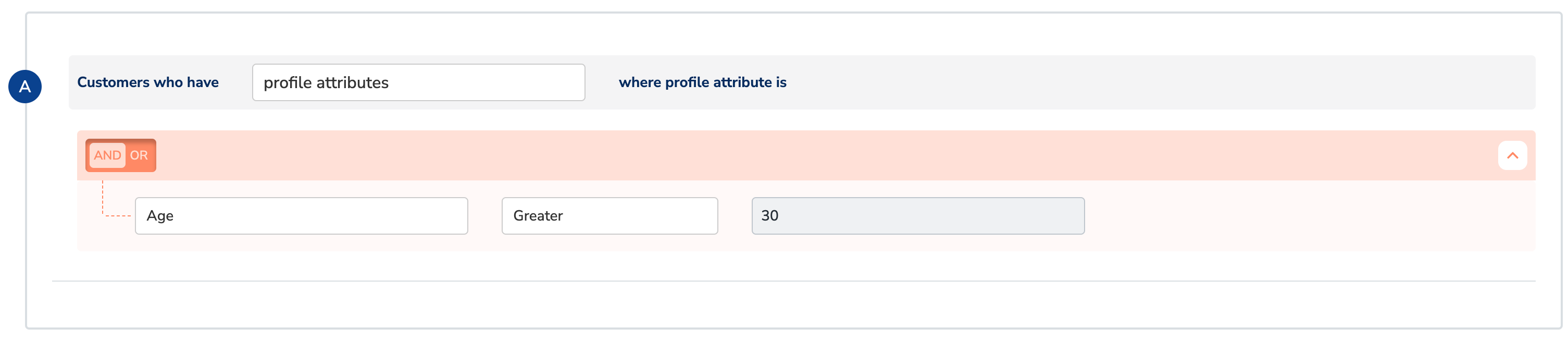
### Step 1: Create an Audience and filter them by Age
Let’s say, you create an audience with condition to filter users above 30 years as shown below.
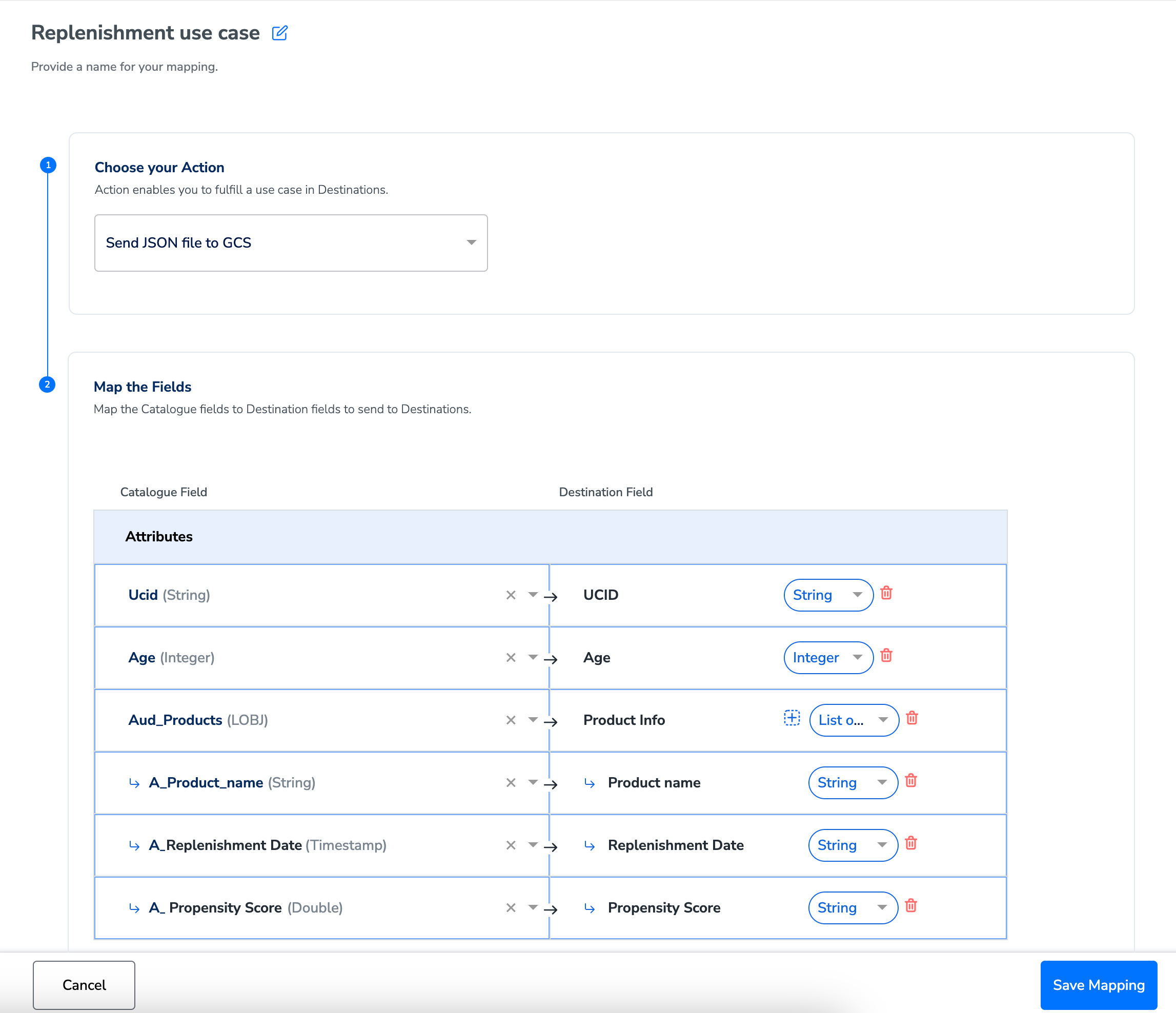
 During the Activation stage, on the **Mapping** screen, use the drop-down against each attribute to choose the data type for your attribute or identifier and map the corresponding Catalogue fields to the Destination fields. If you select **Objects** or **List of Objects**, then you must also map the object properties below the object, as shown below. For more information about the data types supported and when to use them, refer [here](/articles/unify-customer/data-types-in-catalogue).
In this example, Product Info is a List of Object with Product name, Replenishment Date, Propensity Score as its properties.
During the Activation stage, on the **Mapping** screen, use the drop-down against each attribute to choose the data type for your attribute or identifier and map the corresponding Catalogue fields to the Destination fields. If you select **Objects** or **List of Objects**, then you must also map the object properties below the object, as shown below. For more information about the data types supported and when to use them, refer [here](/articles/unify-customer/data-types-in-catalogue).
In this example, Product Info is a List of Object with Product name, Replenishment Date, Propensity Score as its properties.
 So, when you create this audience with condition to filter users above 30 years, only **UCID 2** and **UCID 4** qualify as shown below. Note that each user profile (UCID) has multiple product information associated with it.
| **UCID** | **Age** | **Product Name** | **Replenishment Date** | **Propensity Score** |
| :------- | :------ | :--------------------------------------- | :--------------------- | :------------------- |
| ucid2 | 32 | Nespresso Coffee Pods (Limited Edition) | 11/12/2024 | 0.9 |
| ucid2 | 32 | Smart Home Thermostat Filter | 1/12/2024 | 0.3 |
| ucid4 | 34 | High-Speed HDMI Cable | 20/12/2024 | 0.5 |
| ucid4 | 34 | Electric Kettle with Temperature Control | 5/1/2025 | 0.6 |
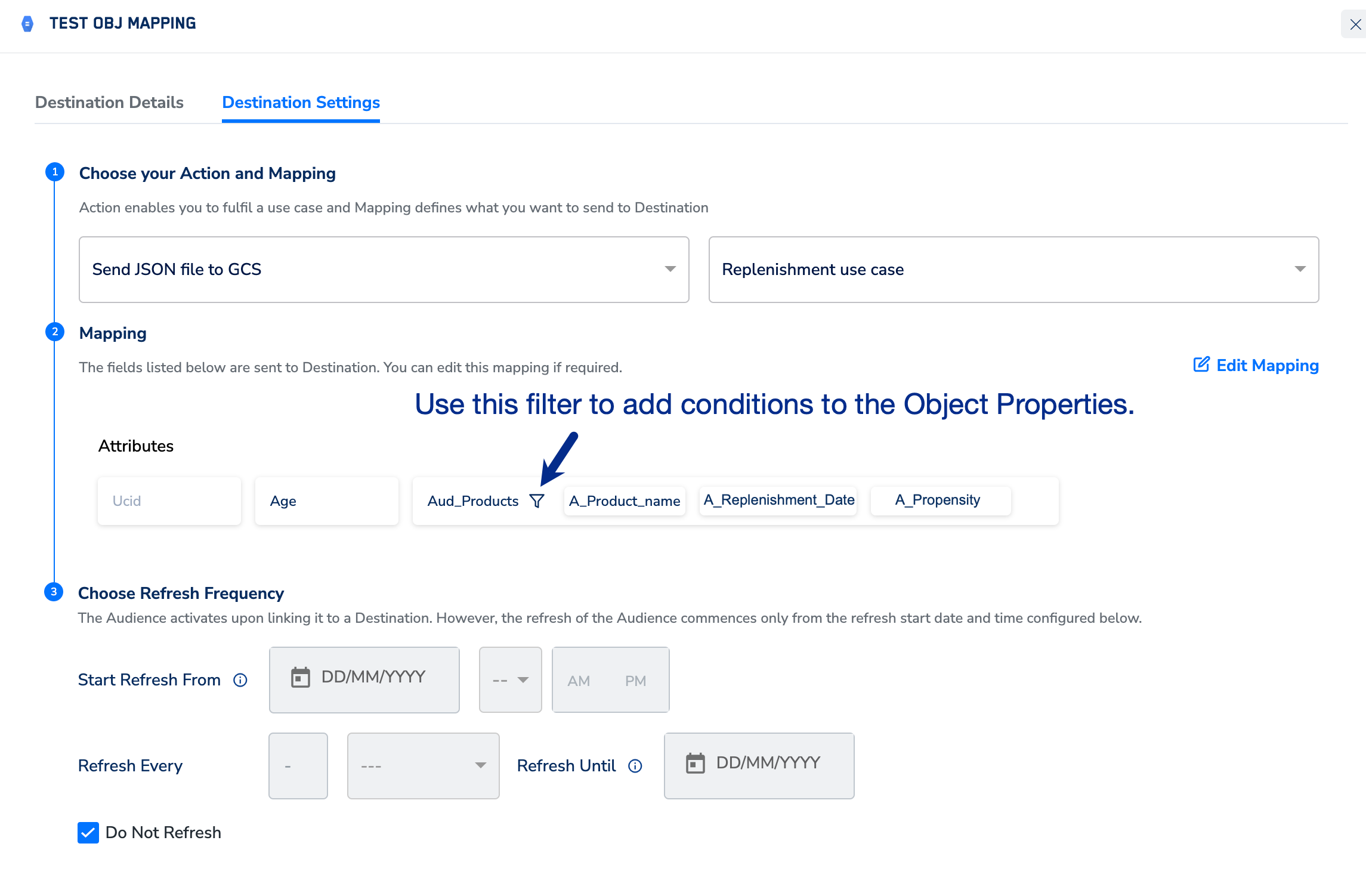
### Step 2: Additional Filtering at Destination Level by Propensity Score
At this point, you can apply a filter on the properties of the objects to include only the required products in the user profiles. You can do this in the **Destination Settings**, as shown below.
So, when you create this audience with condition to filter users above 30 years, only **UCID 2** and **UCID 4** qualify as shown below. Note that each user profile (UCID) has multiple product information associated with it.
| **UCID** | **Age** | **Product Name** | **Replenishment Date** | **Propensity Score** |
| :------- | :------ | :--------------------------------------- | :--------------------- | :------------------- |
| ucid2 | 32 | Nespresso Coffee Pods (Limited Edition) | 11/12/2024 | 0.9 |
| ucid2 | 32 | Smart Home Thermostat Filter | 1/12/2024 | 0.3 |
| ucid4 | 34 | High-Speed HDMI Cable | 20/12/2024 | 0.5 |
| ucid4 | 34 | Electric Kettle with Temperature Control | 5/1/2025 | 0.6 |
### Step 2: Additional Filtering at Destination Level by Propensity Score
At this point, you can apply a filter on the properties of the objects to include only the required products in the user profiles. You can do this in the **Destination Settings**, as shown below.
 In this example, the filter is added to include only products with a **Propensity Score** above 0.5.
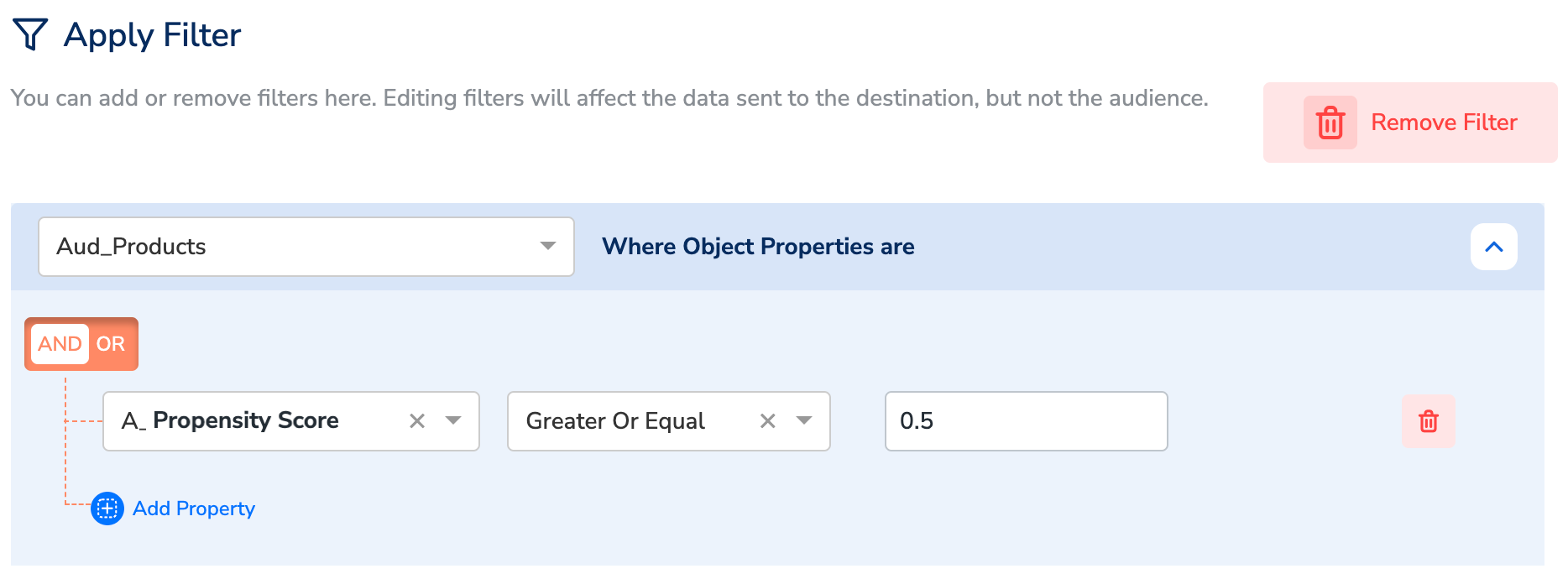 ### Conclusion
Here, the following product information of the users UCID 2 and UCID 4 qualify for Destination upload at this stage:
* **UCID 2** with the product *Nespresso Coffee Pods (Limited Edition)*.
* **UCID 4** with the product *Electric Kettle with Temperature Control*.
This approach allows you to successfully filter and specifically target only UCID 2 and UCID 4 with promotions or ads for relevant products, that is *Nespresso Coffee Pods (Limited Edition) and Electric Kettle with Temperature Control* respectively.
### How Data is Sent to Destination
Depending on the destination platform, you can choose the data format in which the final data is sent to Destination. For example, Google Cloud Storage accepts only JSON or CSV formats. Below are the data examples in both formats.
**In JSON Format**
```json JSON theme={null}
[
{
"UCID": "ucid2",
"Age": 32,
"Product Name": "Nespresso Coffee Pods (Limited Edition)",
"Replenishment Date": "11/12/2024",
"Propensity Score": 0.9
},
{
"UCID": "ucid4",
"Age": 34,
"Product Name": "Electric Kettle with Temperature Control",
"Replenishment Date": "5/1/2025",
"Propensity Score": 0.6
}
]
```
**In CSV Format**
```bash Code theme={null}
UCID,Age,Product Name,Replenishment Date,Propensity Score
ucid2,32,Nespresso Coffee Pods (Limited Edition),11/12/2024,0.9
ucid4,34,Electric Kettle with Temperature Control,5/1/2025,0.6
```
### Conclusion
Here, the following product information of the users UCID 2 and UCID 4 qualify for Destination upload at this stage:
* **UCID 2** with the product *Nespresso Coffee Pods (Limited Edition)*.
* **UCID 4** with the product *Electric Kettle with Temperature Control*.
This approach allows you to successfully filter and specifically target only UCID 2 and UCID 4 with promotions or ads for relevant products, that is *Nespresso Coffee Pods (Limited Edition) and Electric Kettle with Temperature Control* respectively.
### How Data is Sent to Destination
Depending on the destination platform, you can choose the data format in which the final data is sent to Destination. For example, Google Cloud Storage accepts only JSON or CSV formats. Below are the data examples in both formats.
**In JSON Format**
```json JSON theme={null}
[
{
"UCID": "ucid2",
"Age": 32,
"Product Name": "Nespresso Coffee Pods (Limited Edition)",
"Replenishment Date": "11/12/2024",
"Propensity Score": 0.9
},
{
"UCID": "ucid4",
"Age": 34,
"Product Name": "Electric Kettle with Temperature Control",
"Replenishment Date": "5/1/2025",
"Propensity Score": 0.6
}
]
```
**In CSV Format**
```bash Code theme={null}
UCID,Age,Product Name,Replenishment Date,Propensity Score
ucid2,32,Nespresso Coffee Pods (Limited Edition),11/12/2024,0.9
ucid4,34,Electric Kettle with Temperature Control,5/1/2025,0.6
```