> ## Documentation Index
> Fetch the complete documentation index at: https://docs.zeotap.com/llms.txt
> Use this file to discover all available pages before exploring further.
# Write Key
> Understanding and obtaining your Zeotap Web SDK Write Key.
**Important:** Please ensure your CMP configuration includes new **Vendor ID 1469** for 1st Party data tracking. Additionally, include **Vendor ID 301** if cookie sync is enabled. [Learn more](/articles/sdks/web-js/configurations/consent-options#shouldcheckzeotapvendorconsent)
The **Write Key** is a unique identifier essential for integrating the Zeotap Web SDK with your website or application. It ensures that all data collected by the SDK is correctly attributed to your source in your Zeotap account.
## How to Obtain Your Write Key
You can find your Write Key within the Zeotap Customer Data Platform (CDP) after setting up a "Web Javascript Source."
**Here's a step-by-step guide:**
1. **Access Zeotap CDP:**
* Log in to your Zeotap Customer Data Platform account. If you don't have access, please contact your Zeotap account manager or support team.
2. **Create or Locate Your Web Javascript Source:**
* **If you haven't already, create a new "Web Javascript Source"** within the CDP. This source represents your website or web application where you'll be implementing the SDK. For detailed instructions, refer to the [official Zeotap documentation on creating a Web JS source](https://docs.zeotap.com/articles/#!integrate-customer/creating-web-js-source).
* **If you have an existing source,** navigate to integrate > sources section where all sources are listed.
3. **View Source Details & Find the Write Key:**
* Once you've selected or created your Web Javascript Source, go to its "Implementation Details" section.
* The **Write Key** will be displayed here. It's a long string of alphanumeric characters.
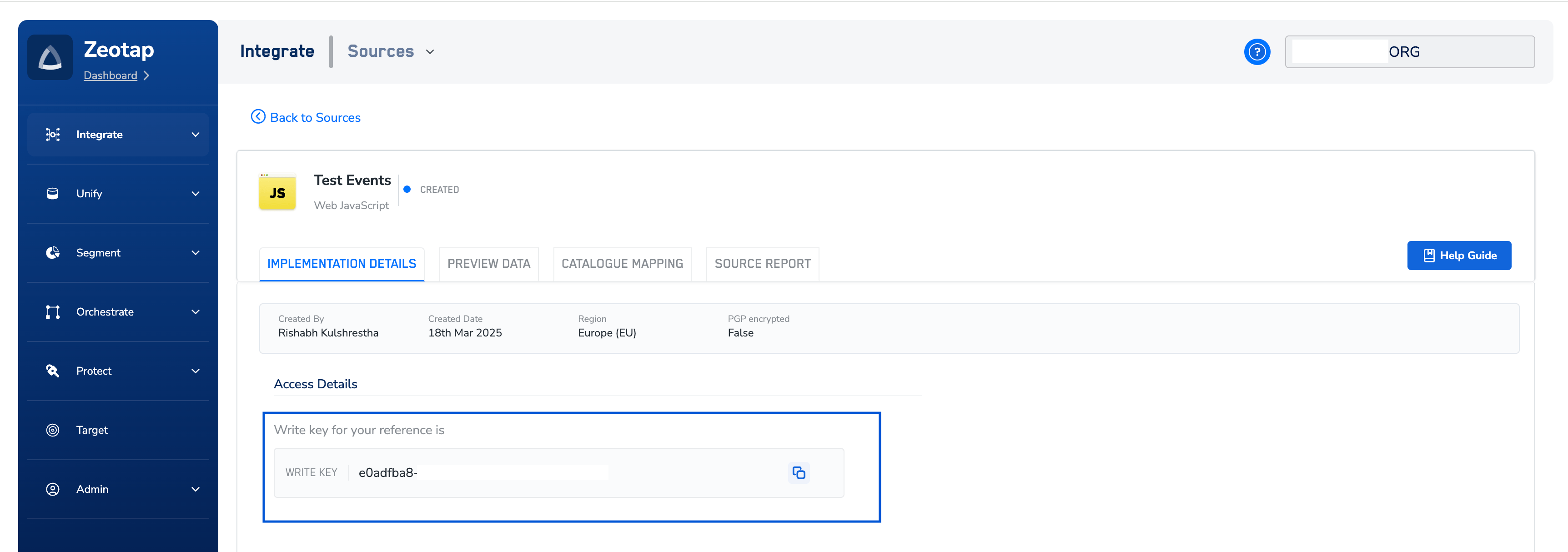 *(The image above shows an example of the Zeotap CDP interface where the Write Key can be found.)*
## Using the Write Key in Your SDK Initialization
When you initialize the Zeotap Web SDK in your website's code, the Write Key is the first and most crucial parameter you provide:
```jsx theme={null}
window.zeotap.init("YOUR_WRITE_KEY", {
// ... other configuration options
});
```
*(The image above shows an example of the Zeotap CDP interface where the Write Key can be found.)*
## Using the Write Key in Your SDK Initialization
When you initialize the Zeotap Web SDK in your website's code, the Write Key is the first and most crucial parameter you provide:
```jsx theme={null}
window.zeotap.init("YOUR_WRITE_KEY", {
// ... other configuration options
});
```