> ## Documentation Index
> Fetch the complete documentation index at: https://docs.zeotap.com/llms.txt
> Use this file to discover all available pages before exploring further.
# Tag Configuration Overview
**Important:** Please ensure your CMP configuration includes new **Vendor ID 1469** for 1st Party data tracking. Additionally, include **Vendor ID 301** if cookie sync is enabled. [Learn more](/articles/sdks/web-js/configurations/consent-options#shouldcheckzeotapvendorconsent)
Once the Zeotap Collect Tag is [added](/articles/sdks/gtm/setup-guide/add-tag-to-gtm) to your Google Tag Manager (GTM) workspace, detailed configuration is required to tailor its functionality to your specific data collection needs. This involves setting up various options that control how the tag initializes, tracks user behavior, manages identities, and integrates with other services.
The configuration process is broken down into the following key sections:
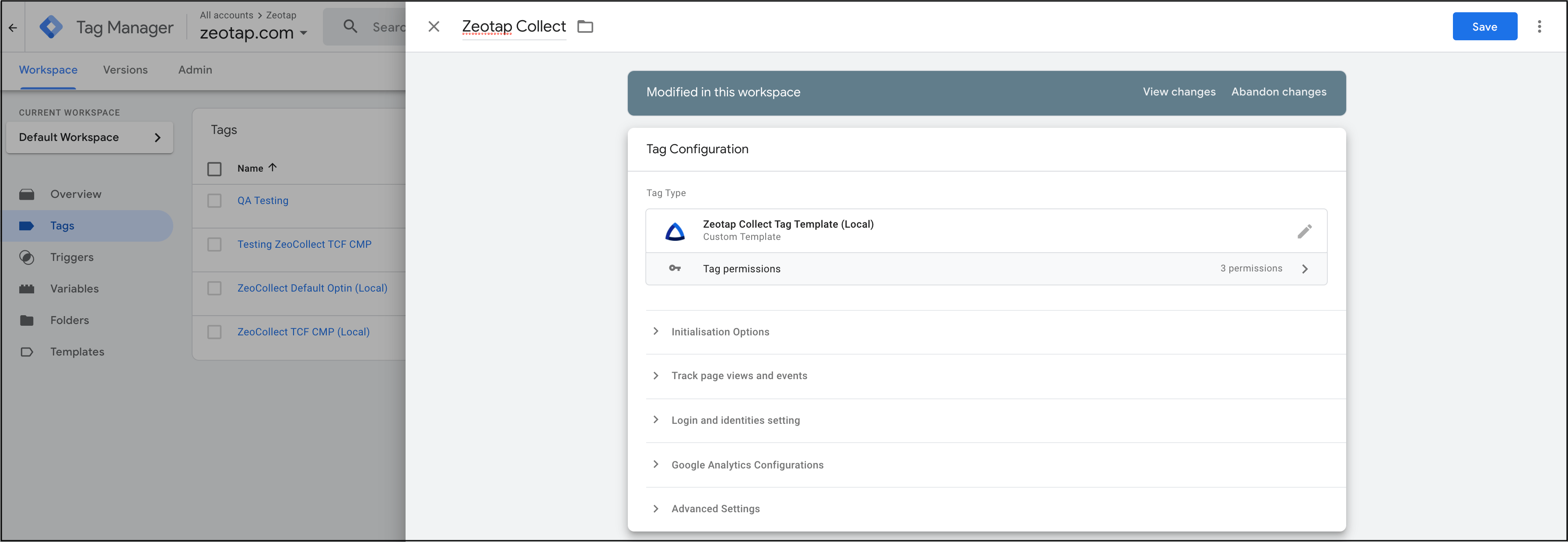
Below is a visual overview of where these configuration options are typically found within the GTM interface for the Zeotap Collect Tag:
 ### 1. [Initialization Options](/articles/sdks/gtm/setup-guide/configuration/initialisation)
This section covers the fundamental settings for the tag, including your Zeotap Write Key, user country for data storage, and consent management preferences. These are critical for the tag to start collecting data correctly.
### 2. [Tracking Page Views and Events](/articles/sdks/gtm/setup-guide/configuration/tracking)
Here, you'll define how the tag tracks user interactions, such as page views and custom events. This includes specifying event names, using regex for event matching, and managing properties associated with these events.
### 3. [Login and Identities Settings](/articles/sdks/gtm/setup-guide/configuration/login)
This part focuses on how user identities are captured and managed. You'll configure settings related to login events, hashing of personally identifiable information (PII) like email or phone numbers.
### 4. [Google Analytics Configuration](/articles/sdks/gtm/setup-guide/configuration/google-analytics)
If you use Google Analytics, this section allows you to configure settings to capture GA-related IDs. This can enhance reporting and enable integrations like Optimize360.
### 5. [ID5 Integration](/articles/sdks/gtm/setup-guide/configuration/id5)
This section enables integration with the [ID5 Identity solution](https://www.id5.io/). It allows the Zeotap Collect Tag to collect and use the ID5 ID for identity resolution and enrichment.
After completing the configuration, proceed to [set up triggers](/articles/sdks/gtm/setup-guide/triggers) and [validate](/articles/sdks/gtm/setup-guide/validation) your implementation.
### 1. [Initialization Options](/articles/sdks/gtm/setup-guide/configuration/initialisation)
This section covers the fundamental settings for the tag, including your Zeotap Write Key, user country for data storage, and consent management preferences. These are critical for the tag to start collecting data correctly.
### 2. [Tracking Page Views and Events](/articles/sdks/gtm/setup-guide/configuration/tracking)
Here, you'll define how the tag tracks user interactions, such as page views and custom events. This includes specifying event names, using regex for event matching, and managing properties associated with these events.
### 3. [Login and Identities Settings](/articles/sdks/gtm/setup-guide/configuration/login)
This part focuses on how user identities are captured and managed. You'll configure settings related to login events, hashing of personally identifiable information (PII) like email or phone numbers.
### 4. [Google Analytics Configuration](/articles/sdks/gtm/setup-guide/configuration/google-analytics)
If you use Google Analytics, this section allows you to configure settings to capture GA-related IDs. This can enhance reporting and enable integrations like Optimize360.
### 5. [ID5 Integration](/articles/sdks/gtm/setup-guide/configuration/id5)
This section enables integration with the [ID5 Identity solution](https://www.id5.io/). It allows the Zeotap Collect Tag to collect and use the ID5 ID for identity resolution and enrichment.
After completing the configuration, proceed to [set up triggers](/articles/sdks/gtm/setup-guide/triggers) and [validate](/articles/sdks/gtm/setup-guide/validation) your implementation.