> ## Documentation Index
> Fetch the complete documentation index at: https://docs.zeotap.com/llms.txt
> Use this file to discover all available pages before exploring further.
# Orchestrate
## Overview
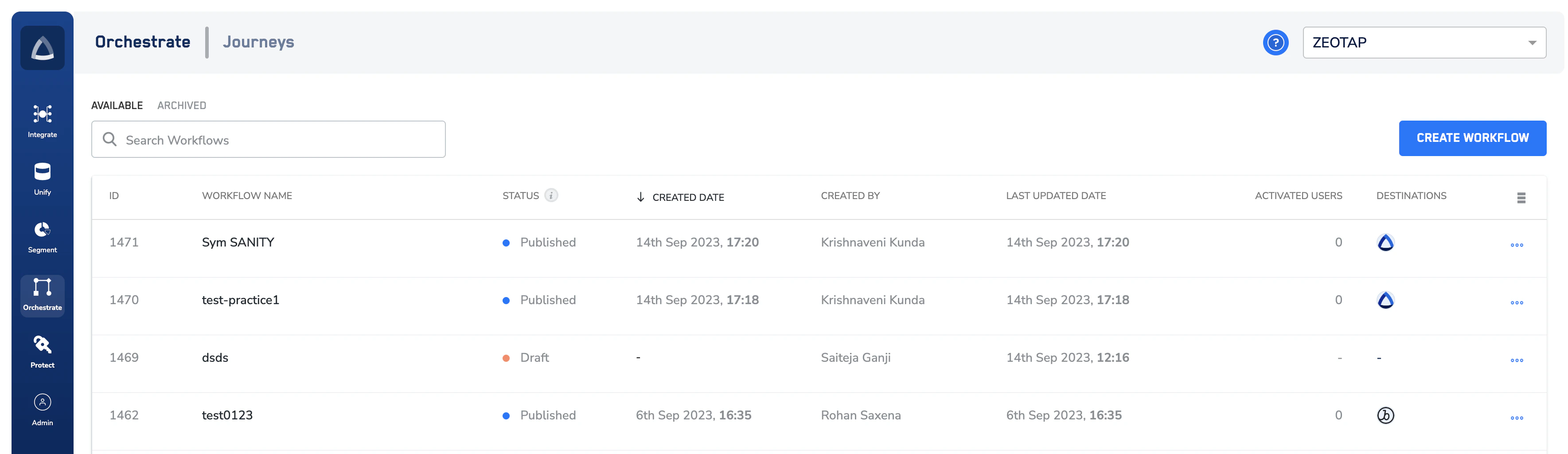
Orchestrate encompasses a sub-product called Journeys, which is Zeotap's real-time user journey orchestration product that ensures consistent and real-time personalisation across a user journey. These journeys are built on a foundation of their first-party data unified by Zeotap. For example, when website visitors abandon their cart and you can then choose to target high-valued and low-valued users differently. Or if these users continue their purchase Journey in the the Zeotap CDP App, you can offer fine-grained personalisations that improve conversion.
## Highlights
The following are the highlights offered by Journeys
* Marketer-friendly interface to personalise user journeys in real-time.
* Data unification and activation across platforms to power omnichannel personalisation.
## Get Started with Journeys
For you to be able to use Journey and create workflows, ensure the following:
* You have a real-time streaming source created in Sources
* You have mapped the streaming source in your Catalogue
A workflow runs on the Event Name and other attributes that are mapped in the Catalogue. Hence, ensure that the above points are taken care of.
 ## Related Topics
* To learn about all the options available on the Journeys Listing page, refer [here](/articles/orchestrate-customer/components-of-the-listing-screen).
* To learn about how to create a Workflow in Journeys, refer [here](/articles/orchestrate-customer/create-a-workflow).
## Related Topics
* To learn about all the options available on the Journeys Listing page, refer [here](/articles/orchestrate-customer/components-of-the-listing-screen).
* To learn about how to create a Workflow in Journeys, refer [here](/articles/orchestrate-customer/create-a-workflow).