> ## Documentation Index
> Fetch the complete documentation index at: https://docs.zeotap.com/llms.txt
> Use this file to discover all available pages before exploring further.
# Add Concurrent Entry
> Control whether the same user can be active in a journey more than once at the same time.
## Overview
Concurrent entry is a journey setting that controls whether the same user can be active in a journey more than once at the same time.
By default this setting is off. A user can only be at one point in a journey at a time, which is the correct behaviour for most journeys. Enable concurrent entry only when you have a specific need for multiple independent instances of the same user to run through the same journey simultaneously.
This is a non-default, advanced setting. For most journeys — onboarding, re-engagement, suppression — leave this off.
***
## How it works
When concurrent entry is **off** (default), a journey enforces one active instance per user. If a user is already in the journey and a new trigger fires, that trigger is held until the current instance has exited and the re-entry window has passed.
When concurrent entry is **on**, each new trigger creates a fresh, independent instance for that user immediately — regardless of whether they already have an active instance. Each instance runs with its own state, timing, and destination output.
| Concurrent entry off (default) | Concurrent entry on |
| ------------------------------------------------ | --------------------------------------------------------- |
| One active instance per user at any time | Multiple active instances per user allowed simultaneously |
| New triggers held until current instance exits | Each new trigger starts a fresh instance immediately |
| Recommended for profile-based journeys | Recommended for event-driven or multi-context journeys |
| Re-entry controlled by the re-entry time setting | Each instance runs independently end to end |
***
## When to use concurrent entry
Enable concurrent entry when all of the following are true:
* Multiple signals or triggers can fire for the same user simultaneously or in very quick succession.
* Each signal carries distinct data that must be processed and forwarded independently.
* It is acceptable — and intentional — for the same user to receive multiple outputs from the journey at the same time.
### Common use cases
* **High-frequency independent event forwarding** — Multiple distinct events for the same user fire in rapid succession and each must be forwarded to a downstream destination without any being dropped or queued behind another.
* **Multi-context user identities** — A single user identity in your data represents more than one relationship, account, or subscription, and each context needs to progress through the journey independently.
* **Parallel data processing flows** — Each incoming data signal for a user carries its own payload that must be enriched, transformed, and sent separately — rather than being merged or deduplicated with other signals.
### When not to use concurrent entry
Keep concurrent entry off for:
* **Onboarding journeys** — A user should move through onboarding once in a single controlled sequence.
* **Re-engagement campaigns** — Sending the same re-engagement message to a user multiple times simultaneously is unlikely to be the intended outcome.
* **Suppression journeys** — Concurrent entry can interfere with suppression logic — one instance may trigger suppression while another is still progressing through earlier nodes.
* **Any journey where duplicate communications are undesirable** — If receiving the same message more than once simultaneously would be a problem for your users, leave concurrent entry off.
***
## Configure on a new journey
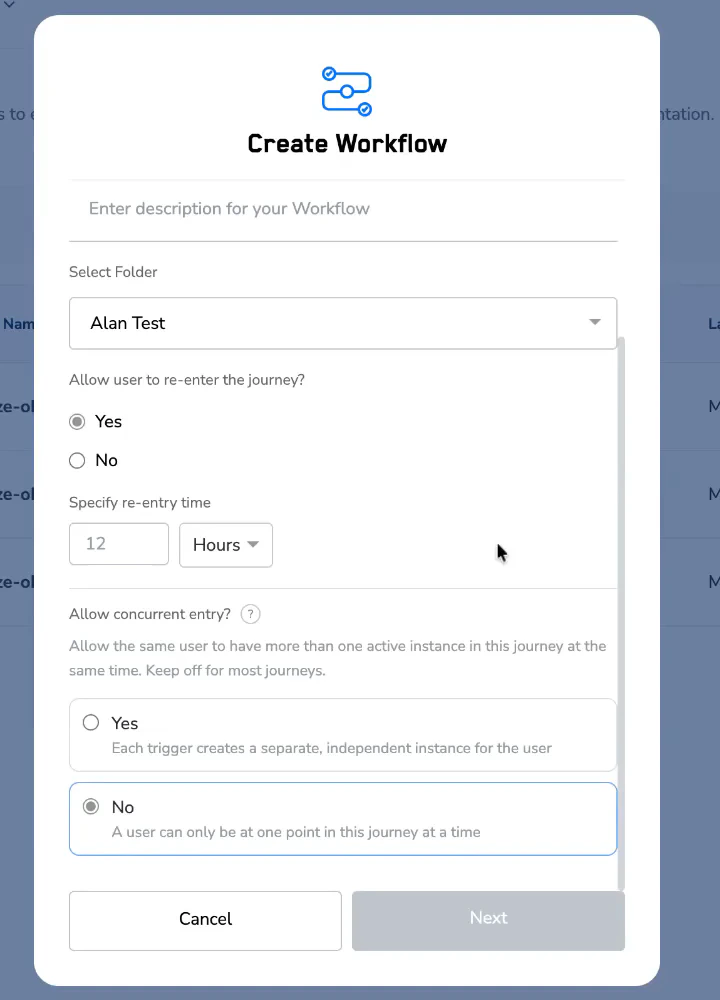
Concurrent entry is configured during journey creation in the settings panel.
From the Journeys listing page, click **Create Workflow** to open the journey creation flow.
The concurrent entry option only appears when re-entry is enabled. Set re-entry to **Yes** first.
Once re-entry is on, the **Allow concurrent entry?** field becomes visible directly below it. **No** is selected by default.
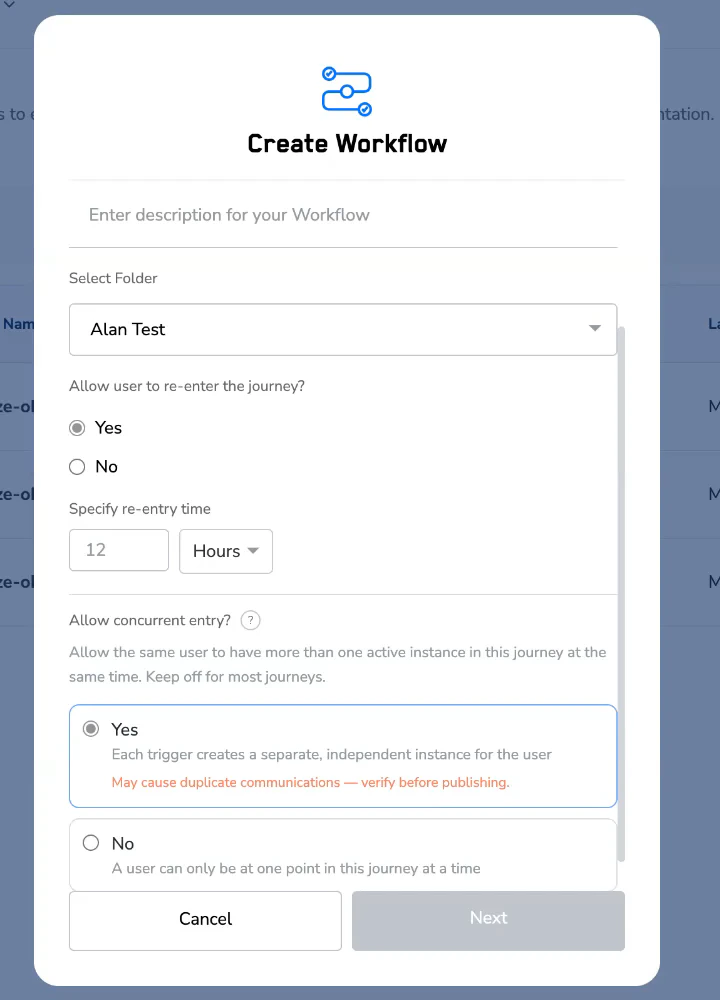
 Selecting **Yes** enables concurrent entry. An inline warning appears confirming that users may receive multiple simultaneous communications from this journey.
 Configure the rest of your journey and publish when ready.
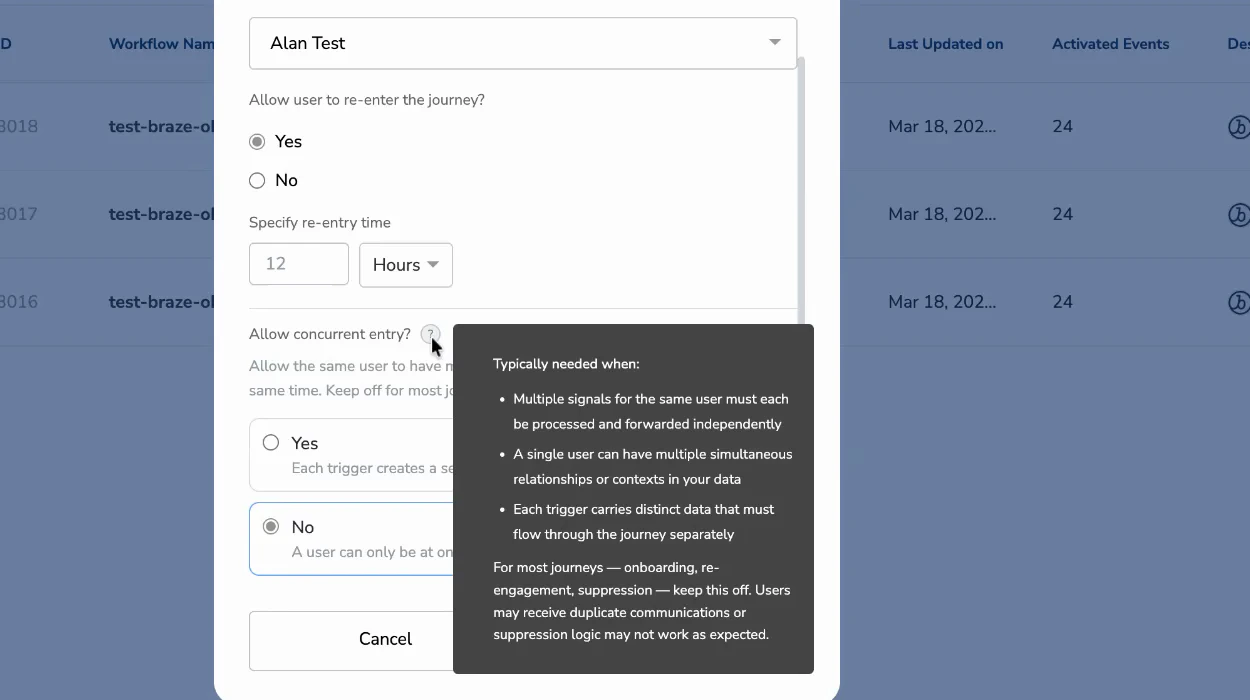
Click the **?** icon next to the **Allow concurrent entry?** label to expand an inline help guide explaining when this setting is appropriate, without leaving the settings panel.
Configure the rest of your journey and publish when ready.
Click the **?** icon next to the **Allow concurrent entry?** label to expand an inline help guide explaining when this setting is appropriate, without leaving the settings panel.
 ***
## Configure on an existing (published) journey
You can change the concurrent entry setting on a live journey at any time.
From the journey canvas, click the edit icon in the top-left corner. The same settings panel opens.
Change **Allow concurrent entry?** to **Yes** or **No** as needed.
A confirmation popup appears asking how to handle returning users.
If concurrent entry is enabled, an amber information box appears in the popup confirming it is on and summarising its behaviour. Review and confirm.
***
## Configure on an existing (published) journey
You can change the concurrent entry setting on a live journey at any time.
From the journey canvas, click the edit icon in the top-left corner. The same settings panel opens.
Change **Allow concurrent entry?** to **Yes** or **No** as needed.
A confirmation popup appears asking how to handle returning users.
If concurrent entry is enabled, an amber information box appears in the popup confirming it is on and summarising its behaviour. Review and confirm.
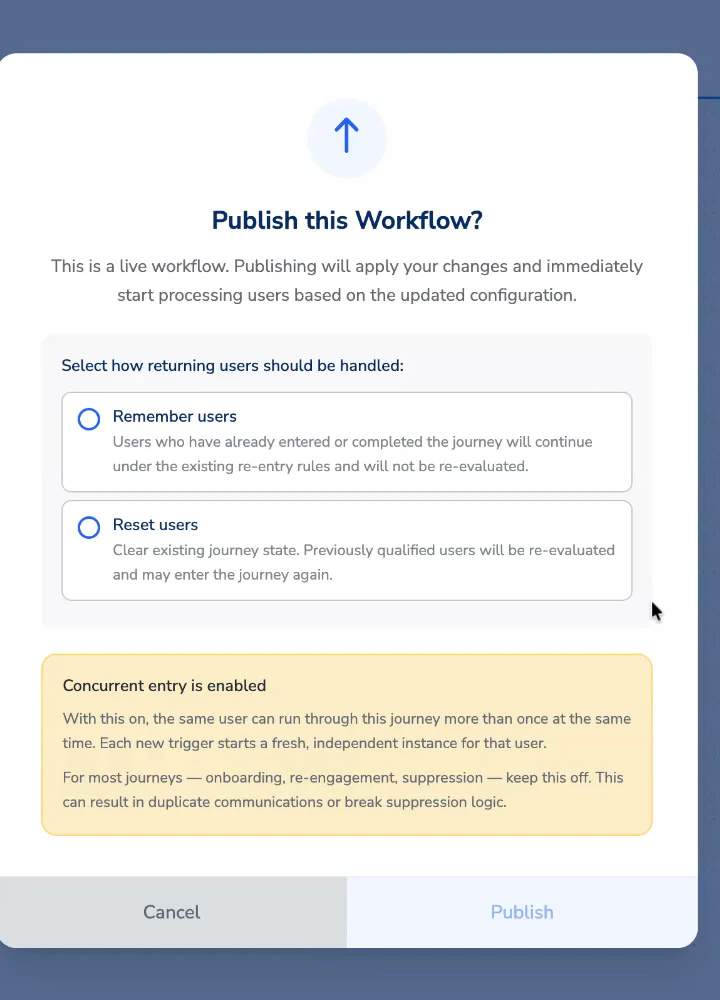 Choose **Remember users** (existing journey state is preserved) or **Reset users** (journey state is cleared and users may be re-evaluated). Then publish.
**Concurrent entry is enabled**
With this on, the same user can run through this journey more than once at the same time. Each new trigger starts a fresh, independent instance for that user.
For most journeys — onboarding, re-engagement, suppression — keep this off. This can result in duplicate communications or break suppression logic.
The journey will not publish until you explicitly confirm. This ensures the setting is always a deliberate choice.
***
## Check the current status
The concurrent entry status is always visible in the top-right corner of the journey canvas, alongside the other journey settings.
Choose **Remember users** (existing journey state is preserved) or **Reset users** (journey state is cleared and users may be re-evaluated). Then publish.
**Concurrent entry is enabled**
With this on, the same user can run through this journey more than once at the same time. Each new trigger starts a fresh, independent instance for that user.
For most journeys — onboarding, re-engagement, suppression — keep this off. This can result in duplicate communications or break suppression logic.
The journey will not publish until you explicitly confirm. This ensures the setting is always a deliberate choice.
***
## Check the current status
The concurrent entry status is always visible in the top-right corner of the journey canvas, alongside the other journey settings.
 | Status | Canvas header display |
| ------------- | ---------------------------------------------------------------------------- |
| Off (default) | **Concurrent entry: Disabled** — shown in neutral grey |
| On | **Concurrent entry: Enabled** — shown in amber to signal a non-default state |
***
## Relationship with the re-entry setting
Concurrent entry and re-entry are related but separate settings.
| Setting | What it controls |
| --------------------------------------- | ------------------------------------------------------------------------------------------------------------------------------------------------------------------------------------------------ |
| **Allow user to re-enter the journey?** | Whether a user who has already exited the journey can enter it again. Controlled by a time window after exit. See [Add Re-entry Criteria](/articles/orchestrate-customer/add-re-entry-criteria). |
| **Allow concurrent entry?** | Whether a user who is currently active in the journey can also start a new instance simultaneously. |
Concurrent entry only appears as an option when re-entry is set to **Yes**. However, they control different things — re-entry is about users returning after they have left; concurrent entry is about users having multiple active instances at the same time.
If re-entry is off, concurrent entry is not available. Turn re-entry on first to access the concurrent entry option.
***
## Frequently asked questions
Active instances are not interrupted. They complete normally. Only new triggers are affected — they will queue as standard (one at a time) once concurrent entry is turned off.
There is no hard cap. Each qualifying trigger creates a new instance. Design your journey with your expected trigger frequency in mind.
Suppression actions apply per instance. If a user has multiple concurrent instances, one may trigger suppression while others are still progressing through earlier nodes. For journeys where suppression is critical, keep concurrent entry off.
Yes. Journey analytics count instances, not unique users. With concurrent entry on, a single user contributing multiple instances will be counted multiple times in node-level metrics.
Reach out to your Customer Success Manager. They can review your journey design and advise on whether concurrent entry is the right approach.
***
## Quick reference
| Item | Detail |
| ------------------------ | --------------------------------------------------------------------------------------------------- |
| Default state | Off |
| Where to find it | Journey settings panel → **Allow concurrent entry?** (visible only when re-entry is set to **Yes**) |
| Access on a new journey | Click **Create Workflow** → set re-entry to **Yes** → the concurrent entry field appears |
| Access on a live journey | Open journey → click the edit icon (top-left) → the settings panel opens |
| Inline help | Click the **?** icon next to the label to expand usage guidance |
| Warning on enable | Inline warning appears in the settings panel when set to **Yes** |
| Publish confirmation | Amber callout in the publish popup when concurrent entry is on |
| Canvas status indicator | Amber chip top-right when enabled; neutral grey when off |
| Recommended for | High-frequency event forwarding, multi-context user identities, parallel data flows |
| Not recommended for | Onboarding, re-engagement, suppression journeys |
| Status | Canvas header display |
| ------------- | ---------------------------------------------------------------------------- |
| Off (default) | **Concurrent entry: Disabled** — shown in neutral grey |
| On | **Concurrent entry: Enabled** — shown in amber to signal a non-default state |
***
## Relationship with the re-entry setting
Concurrent entry and re-entry are related but separate settings.
| Setting | What it controls |
| --------------------------------------- | ------------------------------------------------------------------------------------------------------------------------------------------------------------------------------------------------ |
| **Allow user to re-enter the journey?** | Whether a user who has already exited the journey can enter it again. Controlled by a time window after exit. See [Add Re-entry Criteria](/articles/orchestrate-customer/add-re-entry-criteria). |
| **Allow concurrent entry?** | Whether a user who is currently active in the journey can also start a new instance simultaneously. |
Concurrent entry only appears as an option when re-entry is set to **Yes**. However, they control different things — re-entry is about users returning after they have left; concurrent entry is about users having multiple active instances at the same time.
If re-entry is off, concurrent entry is not available. Turn re-entry on first to access the concurrent entry option.
***
## Frequently asked questions
Active instances are not interrupted. They complete normally. Only new triggers are affected — they will queue as standard (one at a time) once concurrent entry is turned off.
There is no hard cap. Each qualifying trigger creates a new instance. Design your journey with your expected trigger frequency in mind.
Suppression actions apply per instance. If a user has multiple concurrent instances, one may trigger suppression while others are still progressing through earlier nodes. For journeys where suppression is critical, keep concurrent entry off.
Yes. Journey analytics count instances, not unique users. With concurrent entry on, a single user contributing multiple instances will be counted multiple times in node-level metrics.
Reach out to your Customer Success Manager. They can review your journey design and advise on whether concurrent entry is the right approach.
***
## Quick reference
| Item | Detail |
| ------------------------ | --------------------------------------------------------------------------------------------------- |
| Default state | Off |
| Where to find it | Journey settings panel → **Allow concurrent entry?** (visible only when re-entry is set to **Yes**) |
| Access on a new journey | Click **Create Workflow** → set re-entry to **Yes** → the concurrent entry field appears |
| Access on a live journey | Open journey → click the edit icon (top-left) → the settings panel opens |
| Inline help | Click the **?** icon next to the label to expand usage guidance |
| Warning on enable | Inline warning appears in the settings panel when set to **Yes** |
| Publish confirmation | Amber callout in the publish popup when concurrent entry is on |
| Canvas status indicator | Amber chip top-right when enabled; neutral grey when off |
| Recommended for | High-frequency event forwarding, multi-context user identities, parallel data flows |
| Not recommended for | Onboarding, re-engagement, suppression journeys |