> ## Documentation Index
> Fetch the complete documentation index at: https://docs.zeotap.com/llms.txt
> Use this file to discover all available pages before exploring further.
# Audience Recommender
> Describe a marketing goal in plain language and receive AI-generated audience segment recommendations grounded in your real customer behavioural data.
## Overview
The **Audience Recommender** lets you describe a campaign goal in plain language and receive AI-generated audience segment recommendations grounded in your organisation's actual customer behavioural data. You do not need to write queries or understand your data model — describe what you are trying to achieve and the tool handles the rest.
Particularly useful when:
* You are starting a new campaign and are unsure how to define the right segment
* You want a second perspective on a brief you already have
* You want to explore less obvious segments for a specific marketing goal
The Audience Recommender is part of the **AI Playground**. Using it is subject to the [Beta Terms of Use](/articles/labs-customer/ai-playground#beta-terms-of-use).
## How to generate a recommendation
Open the **Labs** section from the Zeotap sidebar. You will see the **AI Playground** listing with all available and upcoming tools.
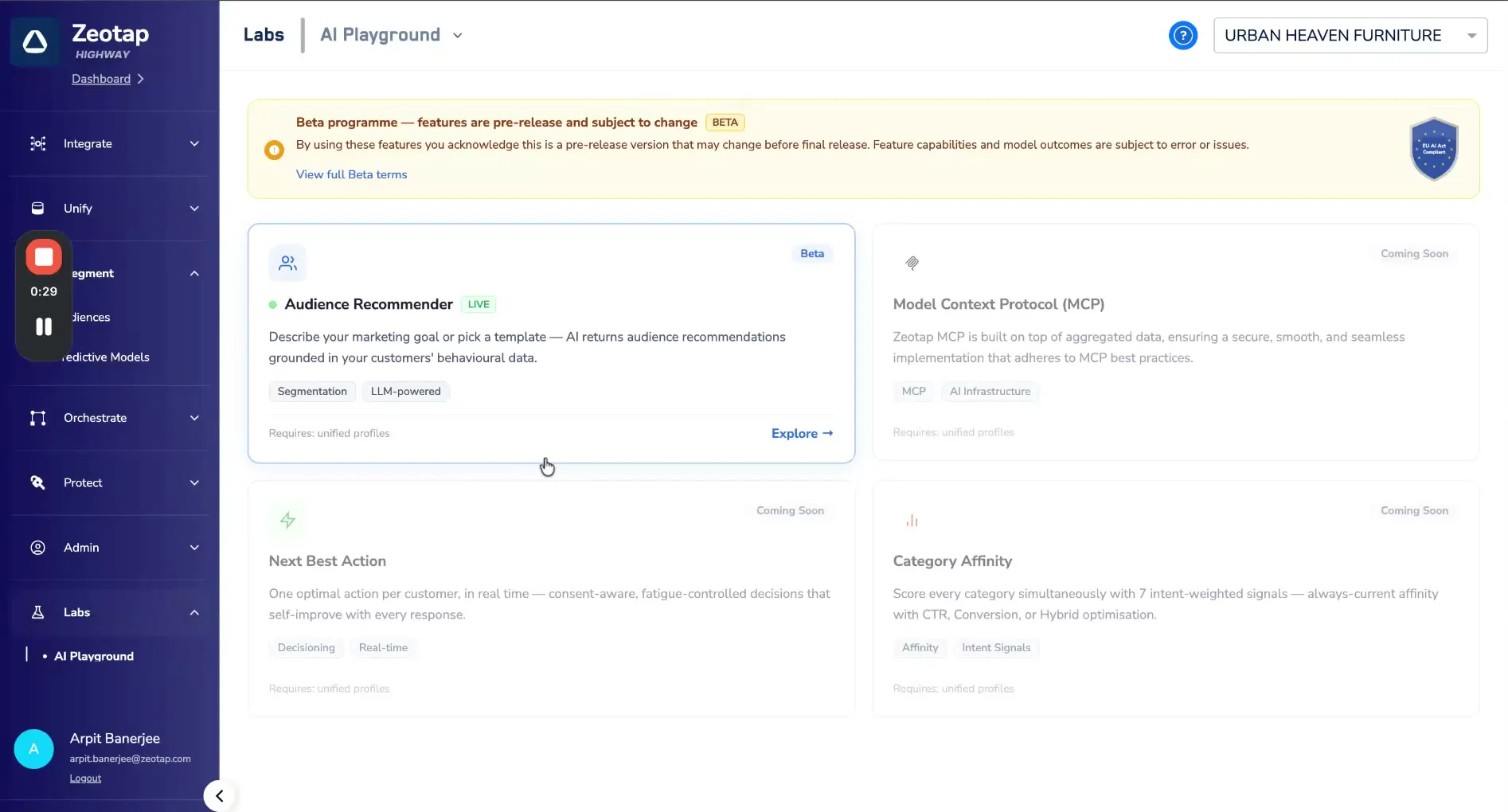 Click **Explore** on the **Audience Recommender** card (marked with a green **Live** indicator). On first use, you will be prompted to review and accept the **Beta Terms** before proceeding.
The main dashboard shows a table of all previous recommendation sessions for your organisation. Each row is a session containing the audiences generated for it. You can revisit and reference these at any time without regenerating.
Click **Explore** on the **Audience Recommender** card (marked with a green **Live** indicator). On first use, you will be prompted to review and accept the **Beta Terms** before proceeding.
The main dashboard shows a table of all previous recommendation sessions for your organisation. Each row is a session containing the audiences generated for it. You can revisit and reference these at any time without regenerating.
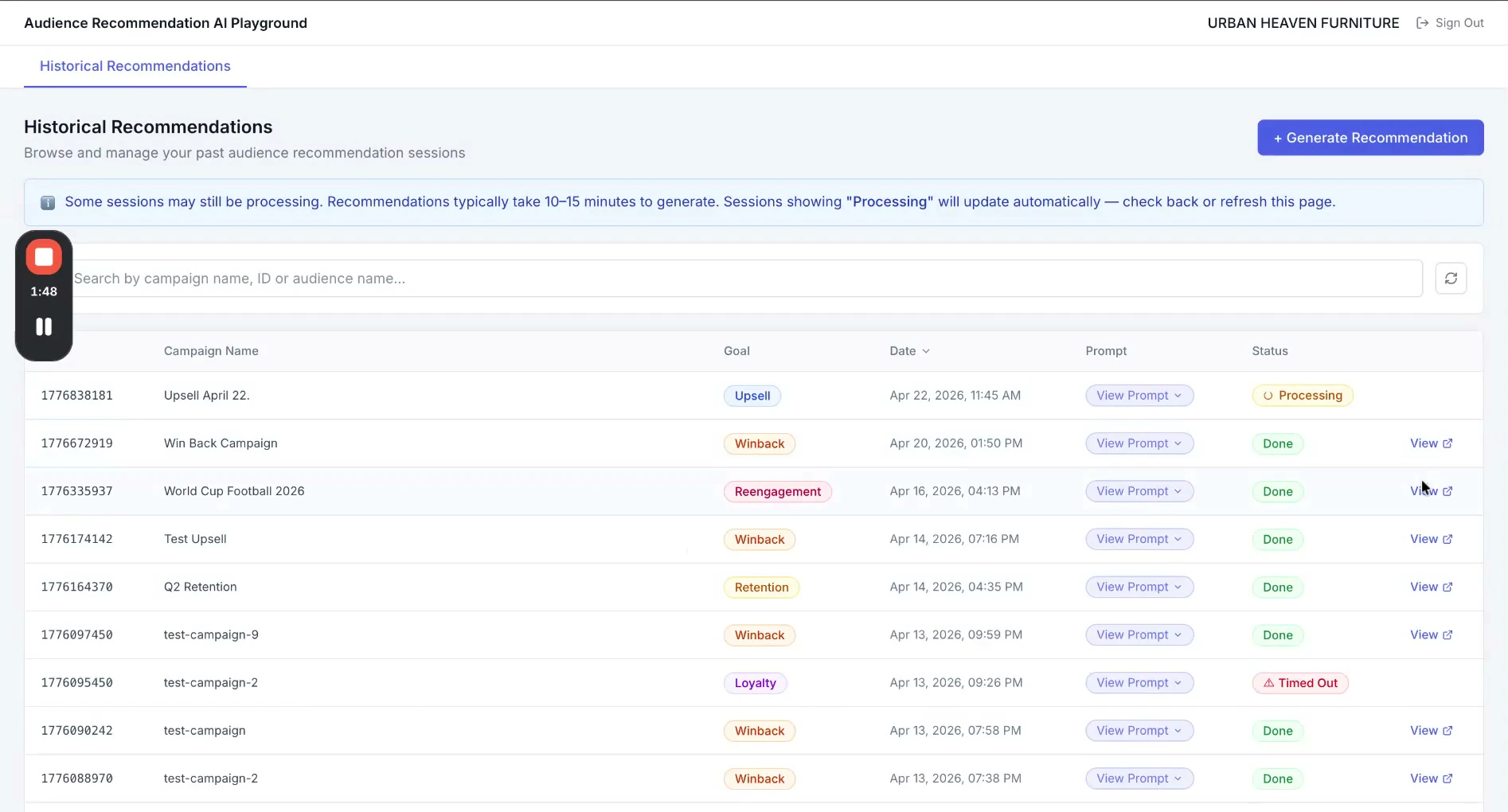 Click **+ Generate Recommendation** to begin a new session.
Choose the goal type that fits your campaign: **Upsell**, **Acquisition**, **Win-Back**, **Retention**, **Loyalty**, **Seasonal**, or **Re-engagement**. Alternatively, select a **Quick-start Template** — pre-written prompts for common use cases that drop directly into the goal field. Use a template as-is or edit it to reflect your specific context. The more specific your prompt, the more targeted the output.
Click **+ Generate Recommendation** to begin a new session.
Choose the goal type that fits your campaign: **Upsell**, **Acquisition**, **Win-Back**, **Retention**, **Loyalty**, **Seasonal**, or **Re-engagement**. Alternatively, select a **Quick-start Template** — pre-written prompts for common use cases that drop directly into the goal field. Use a template as-is or edit it to reflect your specific context. The more specific your prompt, the more targeted the output.
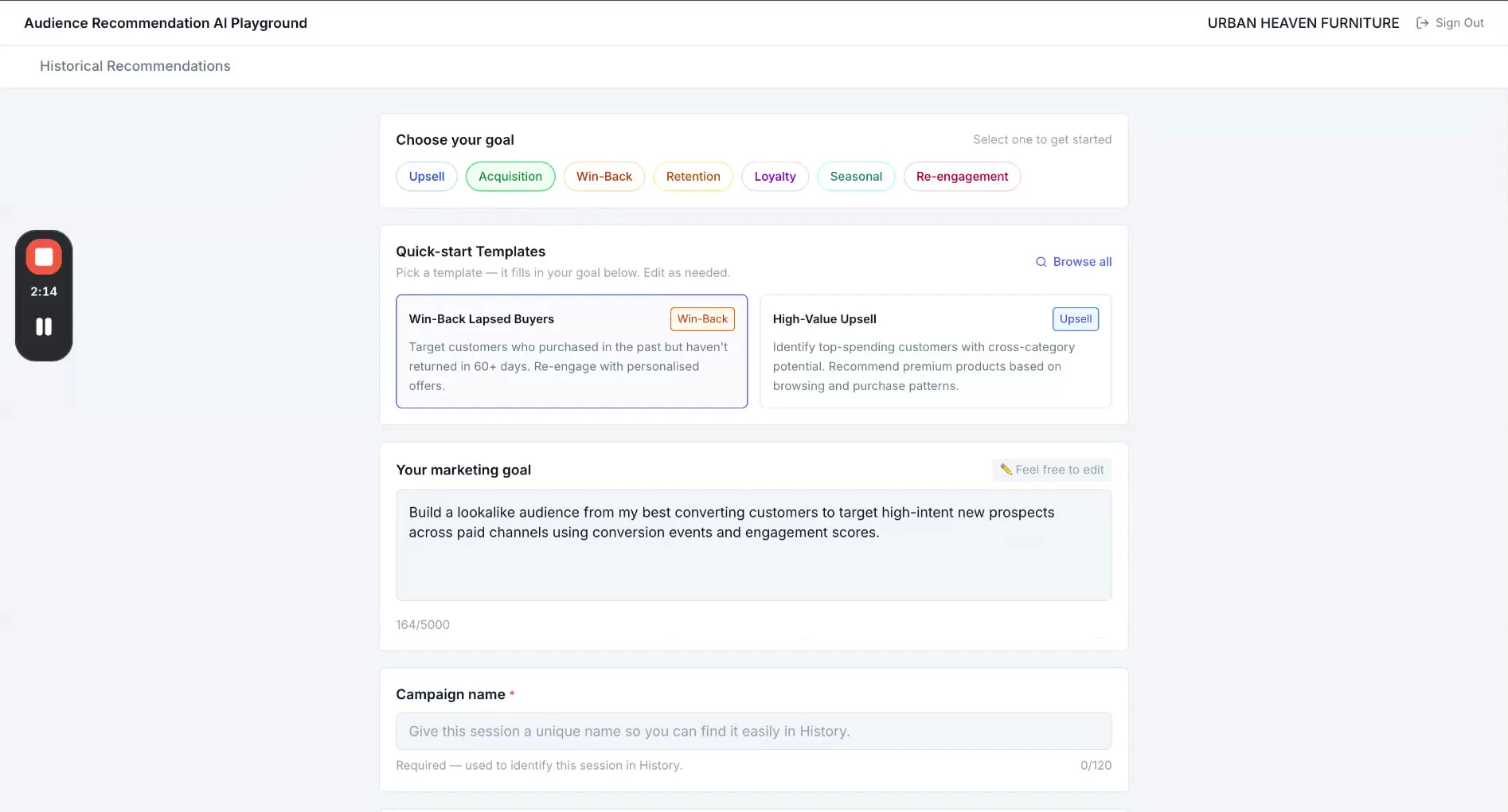 Give the session a **Campaign name** so you can find it later — the campaign name, brief title, quarter, or anything that helps your team identify it.
In the **Settings** panel, choose the data period the model should draw from. Options depend on which analysis runs have been completed for your organisation.
The session appears in your table immediately with a **Processing** status. You do not need to stay on the page — it updates automatically.
Give the session a **Campaign name** so you can find it later — the campaign name, brief title, quarter, or anything that helps your team identify it.
In the **Settings** panel, choose the data period the model should draw from. Options depend on which analysis runs have been completed for your organisation.
The session appears in your table immediately with a **Processing** status. You do not need to stay on the page — it updates automatically.
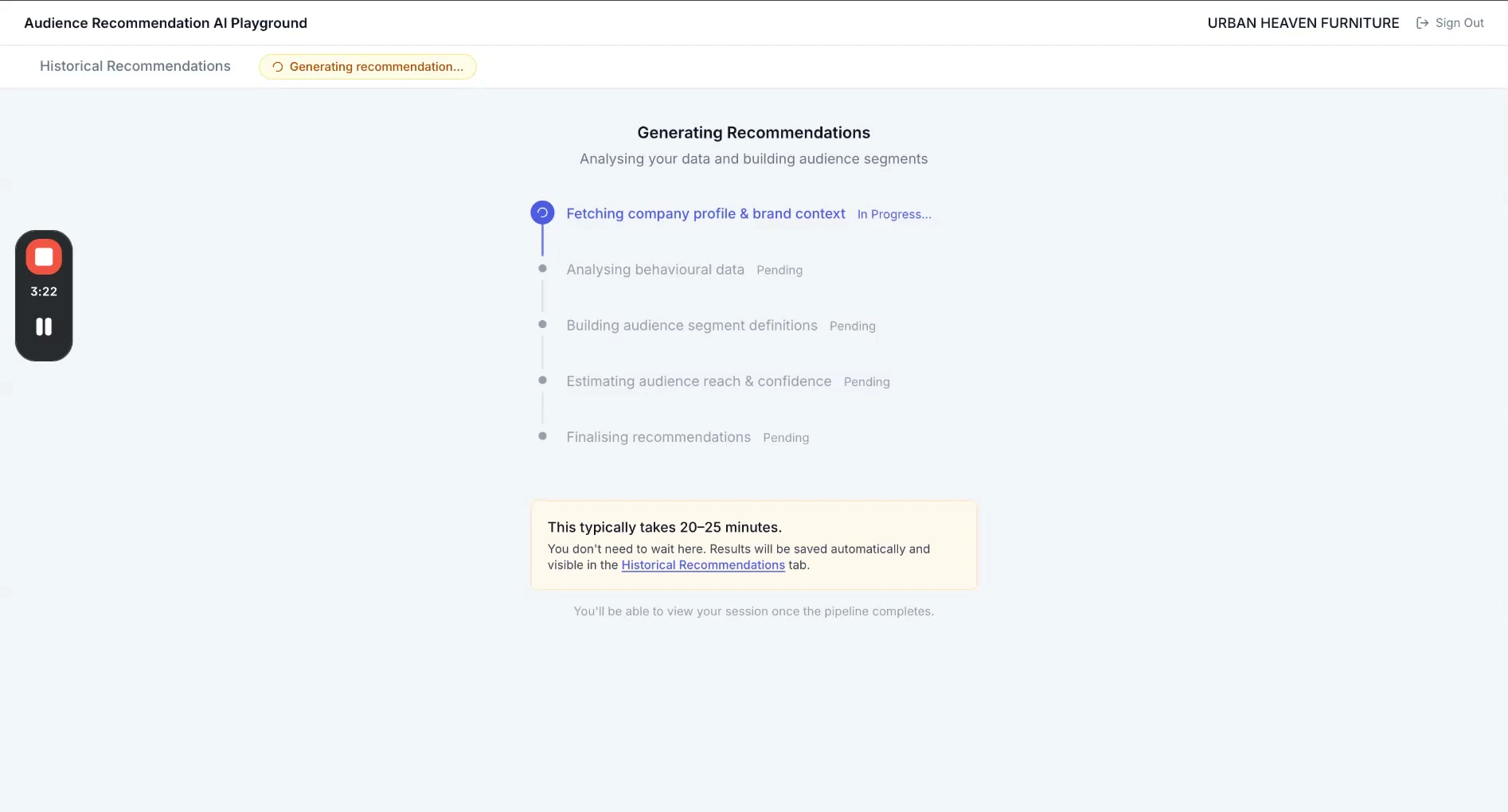 Generating recommendations typically takes **10–15 minutes**. Sessions showing "Processing" will update automatically — check back or refresh the page.
## Reviewing and using recommendations
Once processing is complete, click into the session to see the full list of generated audience recommendations.
Generating recommendations typically takes **10–15 minutes**. Sessions showing "Processing" will update automatically — check back or refresh the page.
## Reviewing and using recommendations
Once processing is complete, click into the session to see the full list of generated audience recommendations.
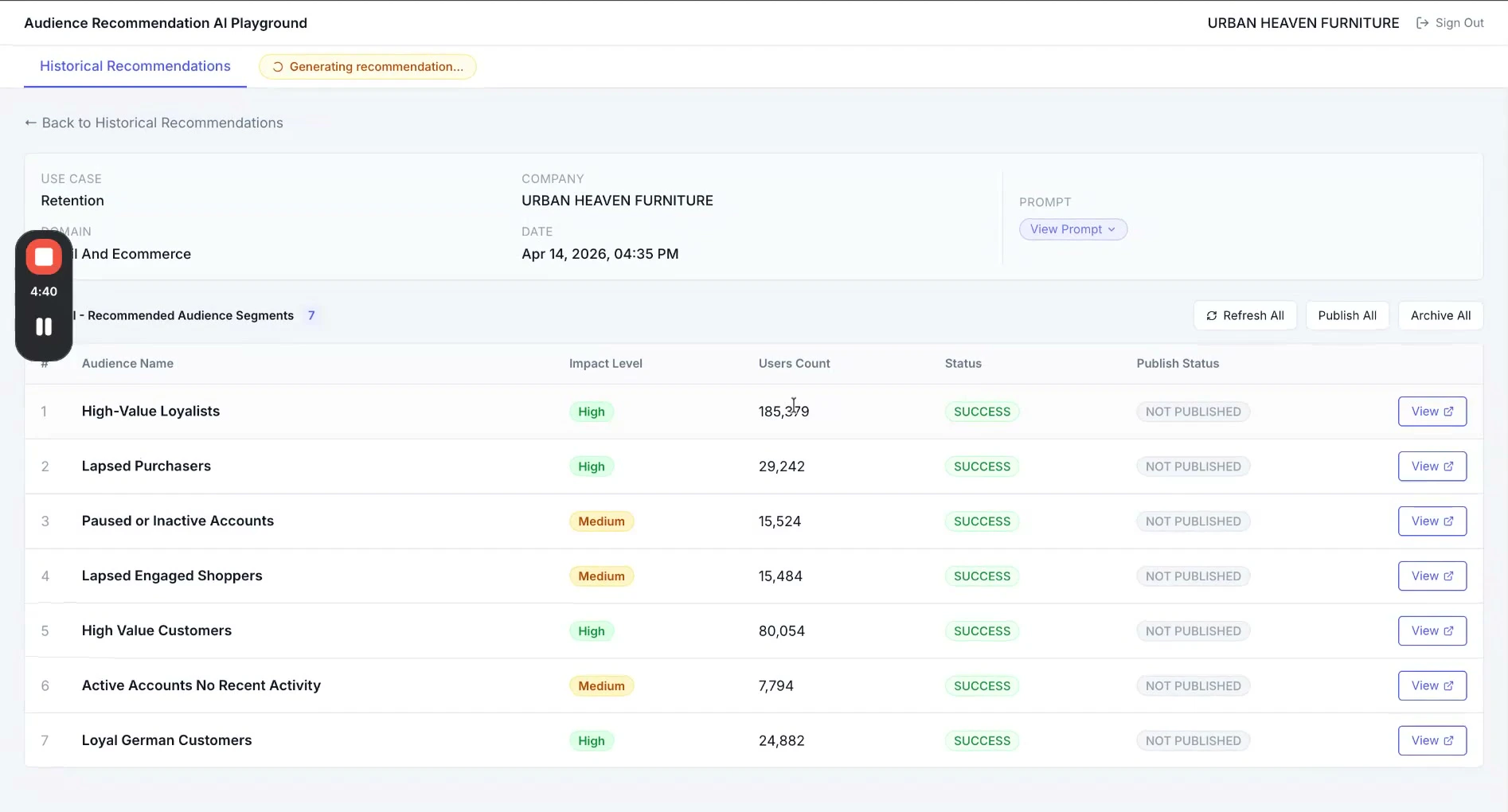 For each recommendation you will see:
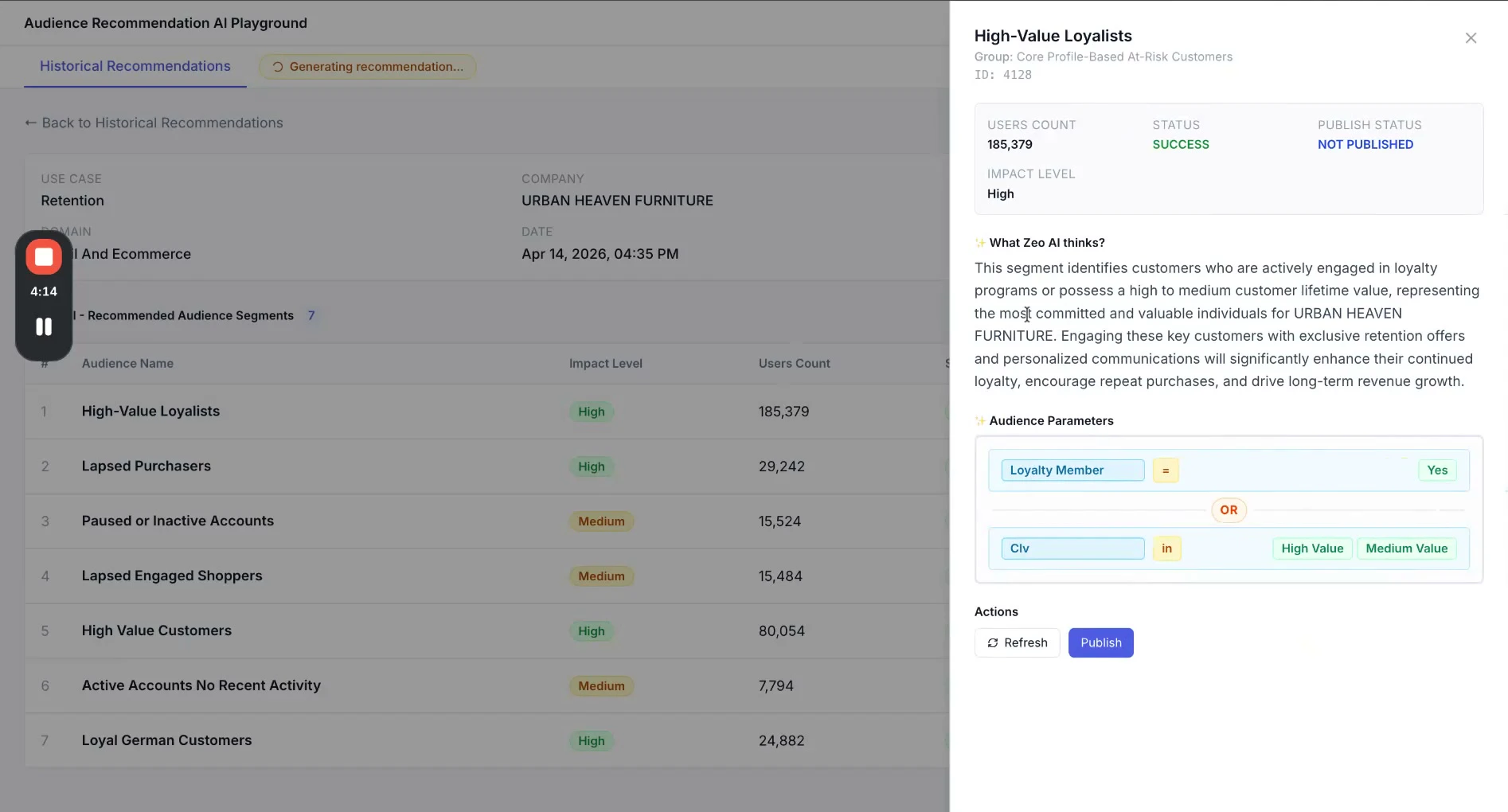
* **The reasoning** — why this segment was recommended, in plain language
* **The segment query** — the underlying logic that defines the audience
* **The original prompt** — the goal you submitted that produced this recommendation
* **Audience count** — the number of customer profiles matching the segment. Use the **Refresh** button if the count has not yet populated on a freshly completed session.
For each recommendation you will see:
* **The reasoning** — why this segment was recommended, in plain language
* **The segment query** — the underlying logic that defines the audience
* **The original prompt** — the goal you submitted that produced this recommendation
* **Audience count** — the number of customer profiles matching the segment. Use the **Refresh** button if the count has not yet populated on a freshly completed session.
 ### Publishing a recommendation
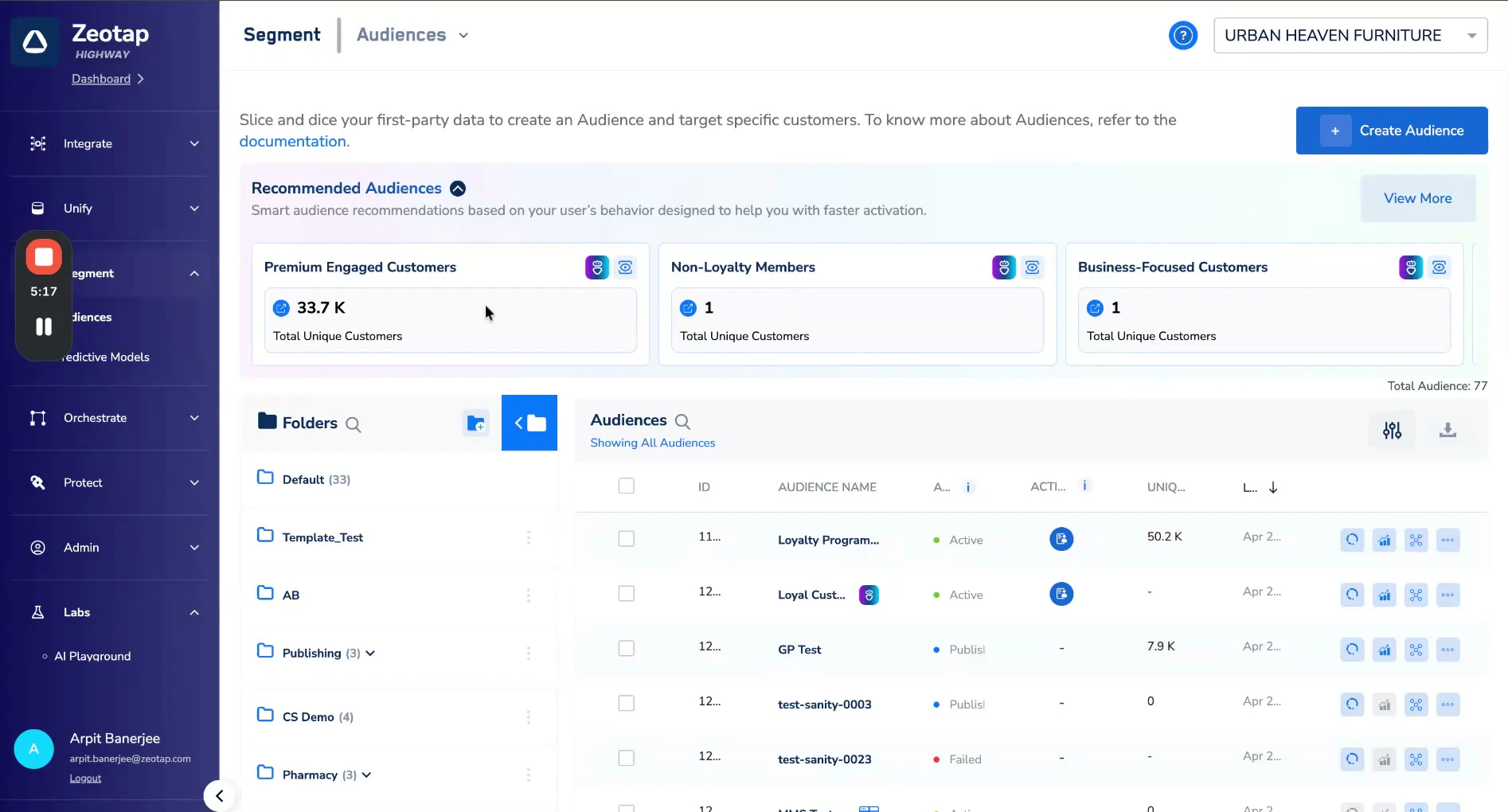
When you find a recommendation you want to act on, click **Publish**.
Publishing does **not** create a live audience immediately. It surfaces the recommendation in the **Recommended Audiences** section of the main **Audiences** module. From there, your team can pick it up at any time and create a live audience from it. The recommendation remains available as a standing option until acted on.
### Publishing a recommendation
When you find a recommendation you want to act on, click **Publish**.
Publishing does **not** create a live audience immediately. It surfaces the recommendation in the **Recommended Audiences** section of the main **Audiences** module. From there, your team can pick it up at any time and create a live audience from it. The recommendation remains available as a standing option until acted on.
 ## Data privacy and usage
Understanding how your data is used is important. This section explains the full pipeline — from the moment you submit a request to the point an audience count is returned — so you can see exactly where your data goes and what protections are in place at each step.
### Pipeline overview
The Audience Recommender operates in three distinct stages. At no point does an AI model receive personally identifiable information (PII) about your customers.
| Stage | What happens | PII exposure |
| ------------------------------------ | ---------------------------------------------------------------------------------------------------------------------------------------------------------------------------------------------------------------------------------------------------------------------------------------------------------------------------------------------------------------- | ---------------------------- |
| **Stage 1 — Feature Analysis** | Your event and profile data is processed to collect aggregated behavioural metrics — things like what percentage of records contain a given field, and what the distinct values are (e.g. `purchase`, `add to cart`, `checkout`). All PII columns are removed before this data is stored or used further. No individual user records are retained at this stage. | **No PII stored** |
| **Stage 2 — Agent Planning** | A planning agent receives only the non-PII aggregated feature analysis data. Using this context, it produces a structured plan describing potential audience segments to create. No raw customer data is passed to the agent at this stage. | **No PII passed** |
| **Stage 3 — SQL Validation & Count** | An LLM converts the agent's plan into SQL queries (e.g. `event name = add to cart AND country = Germany`). These queries run against your organisation's data within Zeotap's infrastructure to retrieve the count of unique user IDs matching each segment. Only the count — not individual profiles — is returned, stored, and surfaced in the UI. | **Count only — no profiles** |
### What the AI model sees
The AI model (LLM) used in this pipeline is provided only with:
* Aggregated, anonymised feature metadata — field names, fill rates, and sample distinct values (e.g. `purchase`, `Germany`, `mobile`)
* The segment plan produced by the planning agent
* The natural language goal you submitted
The AI model **does not** see, process, or store any of the following:
* Individual customer records
* User IDs or any personally identifiable information
* Raw event or profile data
**Privacy by design.** PII removal happens before data is made available to the planning agent or the LLM. This is an architectural guarantee, not a configuration option — the pipeline is designed so that individual-level data never reaches the AI layer.
### Data storage and hosting
All project data for the Audience Recommender is held within Zeotap's CDP Pro infrastructure:
* Feature analysis data is stored in an organisation-specific manner
* Data is stored in **Delta Lake** format
* All data is hosted in the **Europe region**, consistent with GDPR requirements
* Audience counts (the output of Stage 3) are stored and made available via API to the Audiences module
**Data residency.** All data processed and stored by the Audience Recommender pipeline remains in the Europe region. No customer data is transferred outside this region as part of the recommendation pipeline.
### Organisation data isolation
Feature analysis data is aggregated and stored on an organisation-by-organisation basis. Data belonging to your organisation is not shared with, accessible to, or combined with data from any other organisation using the platform.
## Frequently asked questions
Typically **10 to 15 minutes** from the point you submit a request. The session status updates automatically in your recommendations table — you do not need to stay on the page while it processes.
No. The tool is designed for marketers. You describe your goal in plain English and the system handles the segment logic. No query language or data modelling knowledge is required.
No. The AI model only receives aggregated, anonymised feature metadata — things like what fields exist in your data, how often they are populated, and what the distinct values are (e.g. `purchase`, `add to cart`). Individual customer records and user IDs are never passed to the AI model. See the [Data privacy and usage](#data-privacy-and-usage) section for the full pipeline explanation.
All data processed by the Audience Recommender pipeline — including feature analysis data and audience counts — is stored in Zeotap's **EU-hosted infrastructure** (Europe region). No data is transferred outside this region as part of the recommendation pipeline.
No. Feature analysis data is stored on an organisation-specific basis. Your aggregated data is isolated and not accessible to or shared with any other organisation on the platform.
The AI model receives three things: the aggregated, anonymised feature metadata from your data (field names, fill rates, sample distinct values), the segment plan produced by the planning agent, and the natural language goal you submitted. It does not receive raw customer data, user IDs, or any PII.
Not directly within the tool at this stage. If a recommendation is close but not quite right, you can **publish** it and adjust the audience definition in the main **Audiences** module. You can also generate a new recommendation with a more specific prompt — the more detail you provide in your goal, the more targeted the output tends to be.
Audience counts are fetched in a separate step after recommendation generation. On a freshly completed session the count may not have populated yet. Use the **Refresh** button next to the count field to pull the latest figure.
No. The recommendations are AI-generated and advisory in nature. They are a starting point or second opinion — not a replacement for human judgement. You should review recommendations before acting on them, particularly for high-value campaigns or sensitive audience segments.
The **lookback window** is the period of customer data the model draws from when generating recommendations. Longer windows capture more behavioural history; shorter windows reflect more recent behaviour. The options available to you depend on which analysis runs have been completed for your organisation. If you are unsure which to choose, speak to your Customer Success Manager.
The beta programme is Zeotap's structured early-access initiative. Features in the AI Playground are pre-release: they work and run on your real data, but they are still being refined. Zeotap operates on **4-week feedback cycles** — your input has a direct and fast impact on how these features develop. See the [Beta Terms of Use](/articles/labs-customer/ai-playground#beta-terms-of-use) for the full terms.
Your **Customer Success Manager** is your first point of contact for any questions, issues, or feedback about the AI Playground. For product feedback, you can also use the in-product feedback mechanisms within the AI Playground.
## Data privacy and usage
Understanding how your data is used is important. This section explains the full pipeline — from the moment you submit a request to the point an audience count is returned — so you can see exactly where your data goes and what protections are in place at each step.
### Pipeline overview
The Audience Recommender operates in three distinct stages. At no point does an AI model receive personally identifiable information (PII) about your customers.
| Stage | What happens | PII exposure |
| ------------------------------------ | ---------------------------------------------------------------------------------------------------------------------------------------------------------------------------------------------------------------------------------------------------------------------------------------------------------------------------------------------------------------- | ---------------------------- |
| **Stage 1 — Feature Analysis** | Your event and profile data is processed to collect aggregated behavioural metrics — things like what percentage of records contain a given field, and what the distinct values are (e.g. `purchase`, `add to cart`, `checkout`). All PII columns are removed before this data is stored or used further. No individual user records are retained at this stage. | **No PII stored** |
| **Stage 2 — Agent Planning** | A planning agent receives only the non-PII aggregated feature analysis data. Using this context, it produces a structured plan describing potential audience segments to create. No raw customer data is passed to the agent at this stage. | **No PII passed** |
| **Stage 3 — SQL Validation & Count** | An LLM converts the agent's plan into SQL queries (e.g. `event name = add to cart AND country = Germany`). These queries run against your organisation's data within Zeotap's infrastructure to retrieve the count of unique user IDs matching each segment. Only the count — not individual profiles — is returned, stored, and surfaced in the UI. | **Count only — no profiles** |
### What the AI model sees
The AI model (LLM) used in this pipeline is provided only with:
* Aggregated, anonymised feature metadata — field names, fill rates, and sample distinct values (e.g. `purchase`, `Germany`, `mobile`)
* The segment plan produced by the planning agent
* The natural language goal you submitted
The AI model **does not** see, process, or store any of the following:
* Individual customer records
* User IDs or any personally identifiable information
* Raw event or profile data
**Privacy by design.** PII removal happens before data is made available to the planning agent or the LLM. This is an architectural guarantee, not a configuration option — the pipeline is designed so that individual-level data never reaches the AI layer.
### Data storage and hosting
All project data for the Audience Recommender is held within Zeotap's CDP Pro infrastructure:
* Feature analysis data is stored in an organisation-specific manner
* Data is stored in **Delta Lake** format
* All data is hosted in the **Europe region**, consistent with GDPR requirements
* Audience counts (the output of Stage 3) are stored and made available via API to the Audiences module
**Data residency.** All data processed and stored by the Audience Recommender pipeline remains in the Europe region. No customer data is transferred outside this region as part of the recommendation pipeline.
### Organisation data isolation
Feature analysis data is aggregated and stored on an organisation-by-organisation basis. Data belonging to your organisation is not shared with, accessible to, or combined with data from any other organisation using the platform.
## Frequently asked questions
Typically **10 to 15 minutes** from the point you submit a request. The session status updates automatically in your recommendations table — you do not need to stay on the page while it processes.
No. The tool is designed for marketers. You describe your goal in plain English and the system handles the segment logic. No query language or data modelling knowledge is required.
No. The AI model only receives aggregated, anonymised feature metadata — things like what fields exist in your data, how often they are populated, and what the distinct values are (e.g. `purchase`, `add to cart`). Individual customer records and user IDs are never passed to the AI model. See the [Data privacy and usage](#data-privacy-and-usage) section for the full pipeline explanation.
All data processed by the Audience Recommender pipeline — including feature analysis data and audience counts — is stored in Zeotap's **EU-hosted infrastructure** (Europe region). No data is transferred outside this region as part of the recommendation pipeline.
No. Feature analysis data is stored on an organisation-specific basis. Your aggregated data is isolated and not accessible to or shared with any other organisation on the platform.
The AI model receives three things: the aggregated, anonymised feature metadata from your data (field names, fill rates, sample distinct values), the segment plan produced by the planning agent, and the natural language goal you submitted. It does not receive raw customer data, user IDs, or any PII.
Not directly within the tool at this stage. If a recommendation is close but not quite right, you can **publish** it and adjust the audience definition in the main **Audiences** module. You can also generate a new recommendation with a more specific prompt — the more detail you provide in your goal, the more targeted the output tends to be.
Audience counts are fetched in a separate step after recommendation generation. On a freshly completed session the count may not have populated yet. Use the **Refresh** button next to the count field to pull the latest figure.
No. The recommendations are AI-generated and advisory in nature. They are a starting point or second opinion — not a replacement for human judgement. You should review recommendations before acting on them, particularly for high-value campaigns or sensitive audience segments.
The **lookback window** is the period of customer data the model draws from when generating recommendations. Longer windows capture more behavioural history; shorter windows reflect more recent behaviour. The options available to you depend on which analysis runs have been completed for your organisation. If you are unsure which to choose, speak to your Customer Success Manager.
The beta programme is Zeotap's structured early-access initiative. Features in the AI Playground are pre-release: they work and run on your real data, but they are still being refined. Zeotap operates on **4-week feedback cycles** — your input has a direct and fast impact on how these features develop. See the [Beta Terms of Use](/articles/labs-customer/ai-playground#beta-terms-of-use) for the full terms.
Your **Customer Success Manager** is your first point of contact for any questions, issues, or feedback about the AI Playground. For product feedback, you can also use the in-product feedback mechanisms within the AI Playground.