> ## Documentation Index
> Fetch the complete documentation index at: https://docs.zeotap.com/llms.txt
> Use this file to discover all available pages before exploring further.
# TTD CRM Data
TTD (The Trade Desk) is a demand-side platform (DSP) that provides programmatic advertising solutions to marketers. It supports the European Unified ID (EUID), which targets logged-in, consented traffic. EUID is a version of The Trade Desk's UID2 and complies with GDPR privacy laws. By integrating with Zeotap, you can send email addresses and cell phone numbers to your Trade Desk account and drive personalisation and enhanced customer experience.
## Supported Identifiers
This integration supports both raw and hashed email addresses and cell phone numbers.
## Available Actions and Supported Features
The following table lists the available action types for the integration and the supported features for each action type:
| Action Name | [ID EXTENSION](/articles/segment-customer/extend-your-audience#id-extension) | [DELETE](https://docs.zeotap.com/articles/#!integrate-customer/delta-upload-and-delete-functions) | [DELTA UPLOAD](https://docs.zeotap.com/articles/#!integrate-customer/delta-upload-and-delete-functions) |
| :-------------------------------------------------- | :--------------------------------------------------------------------------- | :------------------------------------------------------------------------------------------------ | :------------------------------------------------------------------------------------------------------ |
| Send first-party data through CRM Data Platform API | - | - | - |
## Components of TTD CRM Data
Ensure that you have details about the below components of TTD available before creating a Destination.
### Advertiser ID
This is an ID assigned by TTD that identifies the advertiser on the TTD platform for account-level operations. You can obtain this information on the TTD interface by logging into this [link](https://auth.thetradedesk.com/Account/Login?ReturnUrl=%2Fconnect%2Fauthorize%2Fcallback%3Fscope%3Dopenid%2520ttdui_refresh%2520profile%2520email%2520offline_access%2520ttdapi_elevated%26nonce%3D297a936a9614dc6296557b3feb10c29b%26redirect_uri%3Dhttps%253A%252F%252Fdesk.thetradedesk.com%252Fsignin-gw%26state%3Dfa9c58e37386929d5ec34e3690a0a8e2%26client_id%3Ddesk.refresh%26response_type%3Dcode#look-up-advertiserand-partner-ids-and-secret-keys).
### Advertiser Token
This is a unique, secure string generated for authentication and authorization purposes within the Trade Desk platform. It provides secure access to advertiser data and services. You can reach out to TTD POC to obtain this information.
### Region
This is the geographical region where your account subscription is registered. You can either choose EU or US as per your requirement.
## Create a Destination for TTD CRM Data
Perform the following steps to create a Destination for TTD CRM Data:
Log into the Zeotap CDP App and go to the **DESTINATIONS** application.
 Click **+ Create Destination.**
 Under the **All Destinations** section, search for **TTD CRM Data**.
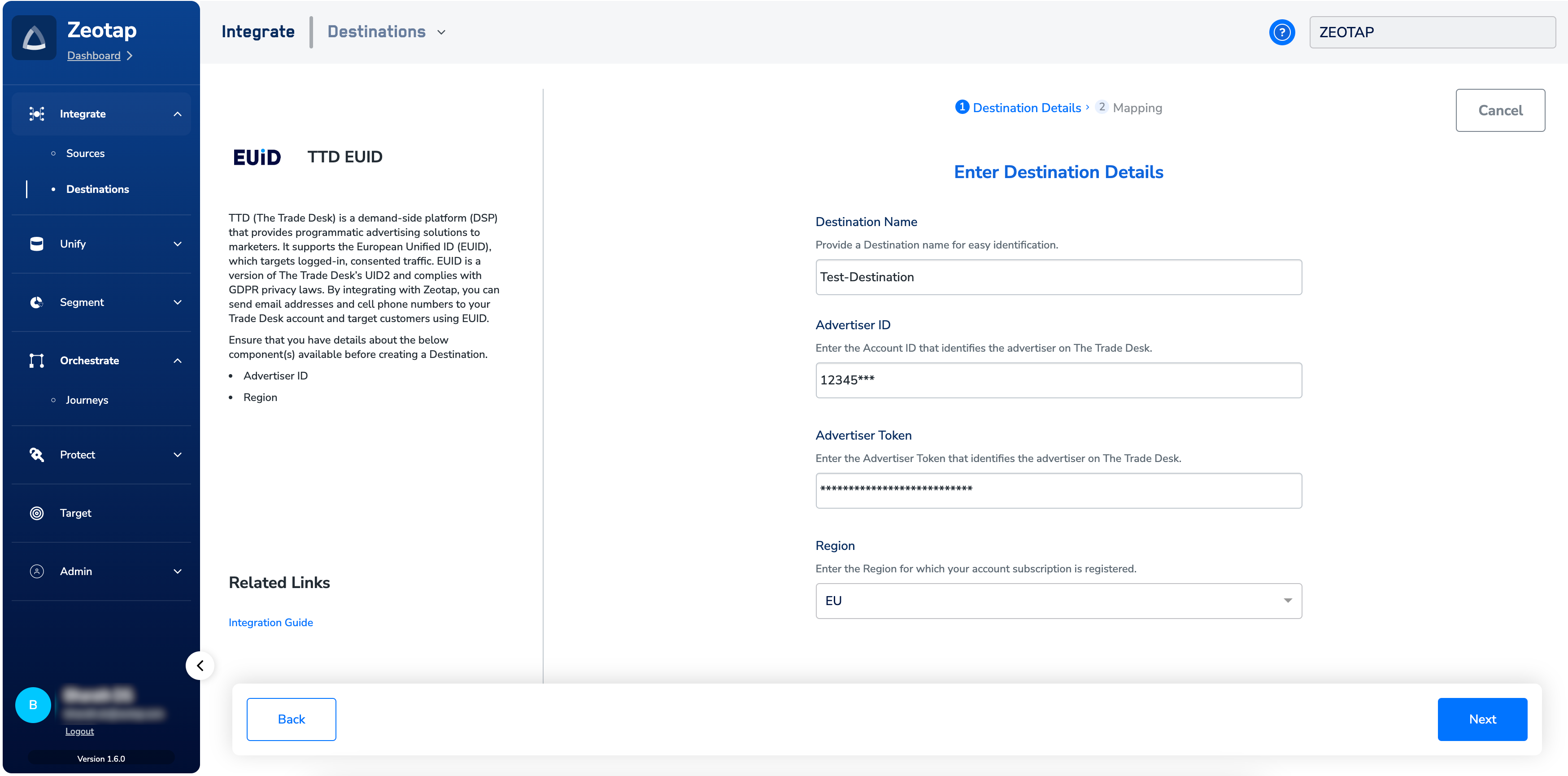
Click **TTD CRM Data**. A screen appears displaying details about the particular destination towards the left. On the right-hand side of the screen find a list of fields that are required for the integration to be established. Enter the required details as mentioned in the following steps:
a. Enter a name for the Destination.
b. Enter the **Advertiser ID** and **Advertiser Token** obtained form your TTD account/TTD POC.
c. In the **Region** field, choose the geographical region where your account subscription is registered.
d. Review all the values entered above and then click **Next** to proceed.
Under the **All Destinations** section, search for **TTD CRM Data**.
Click **TTD CRM Data**. A screen appears displaying details about the particular destination towards the left. On the right-hand side of the screen find a list of fields that are required for the integration to be established. Enter the required details as mentioned in the following steps:
a. Enter a name for the Destination.
b. Enter the **Advertiser ID** and **Advertiser Token** obtained form your TTD account/TTD POC.
c. In the **Region** field, choose the geographical region where your account subscription is registered.
d. Review all the values entered above and then click **Next** to proceed.
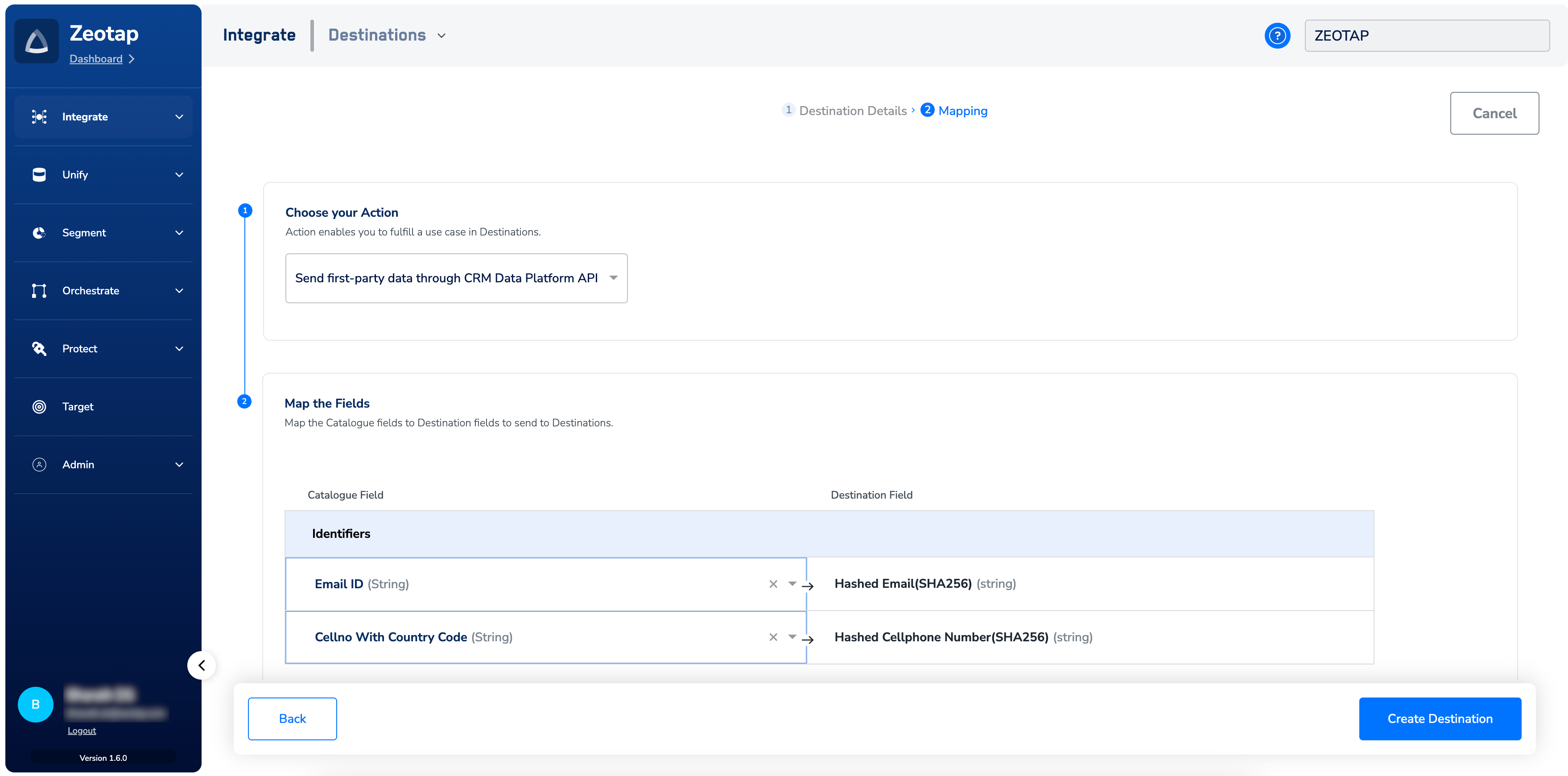
 In the new screen that appears, under **Choose your Action**, select **Send first-party data through CRM Data Platform API** as the action for activating your audience (segment) on the *Audiences* module. Under **Map the Fields**, you can map both raw and hashed email addresses and cellphone numbers.
* When you map hashed email addresses or cellphone numbers, Zeotap CDP assumes that valid normalisation and hashing are performed on them as per TTD's guidelines. Therefore, sends the identifiers as is to TTD.
* When you map raw email addresses or cellphone numbers, Zeotap performs the normalisation and hashing as required by TTD before uploading them.
**NOTE:**
To know more information about TTD's normalisation guidelines, refer [here](https://partner.thetradedesk.com/v3/portal/data/doc/DataPiiNormalization).
In the new screen that appears, under **Choose your Action**, select **Send first-party data through CRM Data Platform API** as the action for activating your audience (segment) on the *Audiences* module. Under **Map the Fields**, you can map both raw and hashed email addresses and cellphone numbers.
* When you map hashed email addresses or cellphone numbers, Zeotap CDP assumes that valid normalisation and hashing are performed on them as per TTD's guidelines. Therefore, sends the identifiers as is to TTD.
* When you map raw email addresses or cellphone numbers, Zeotap performs the normalisation and hashing as required by TTD before uploading them.
**NOTE:**
To know more information about TTD's normalisation guidelines, refer [here](https://partner.thetradedesk.com/v3/portal/data/doc/DataPiiNormalization).
 Click **Create Destination**. The created Destination gets listed in the **Audiences** application, which can be linked to an audience/segment.
## Link an Audience to the TTD CRM Data Destination
For information about how to link an audience or segment to the created Destination in **Audiences** application, refer [here](/articles/integrate-customer/link-an-audience-to-the-destination).
**Note:**
The terms *Audiences* and *Segments* are used interchangeably to refer to customer cohorts belonging to a specific category. For example, an Audience or a segment could be a specific group of customers who are over 18 years of age and who have performed an *addToCart* event within the last 30 days.
## Frequently Asked Questions
No, the processing ramp-up time applies only to the new identifiers. Suppose, say you replace a existing audience that has 9000 identifiers by adding 1000 new identifiers to it, then the ramp-up time (about 20-30 minutes) applies only to the 1000 new identifiers before they become active and targetable.
The following table summarises the processing time and changes when updating an audience with new identifiers for the
| **Affected Area** | **Change Description** |
| :-------------------- | :-------------------------------------------------------------------------------------------------------------------------------------------------------- |
| New 1000 IDs | Processing time applies to these IDs only. |
| Existing 9000 IDs | No additional processing. Only the time-to-live (TTL) expiration will be extended to an additional 90 days. |
| Identifier (ID) Count | The active identifier count will eventually increase from 9000 to 10000 over the next 24 hours. It will not drop to 0 IDs and then increase to 10000 IDs. |
The TTL for the identifiers to remain valid and accessible within the system is 90 days.
By default, Zeotap sets the Retention Enabled flag to True.
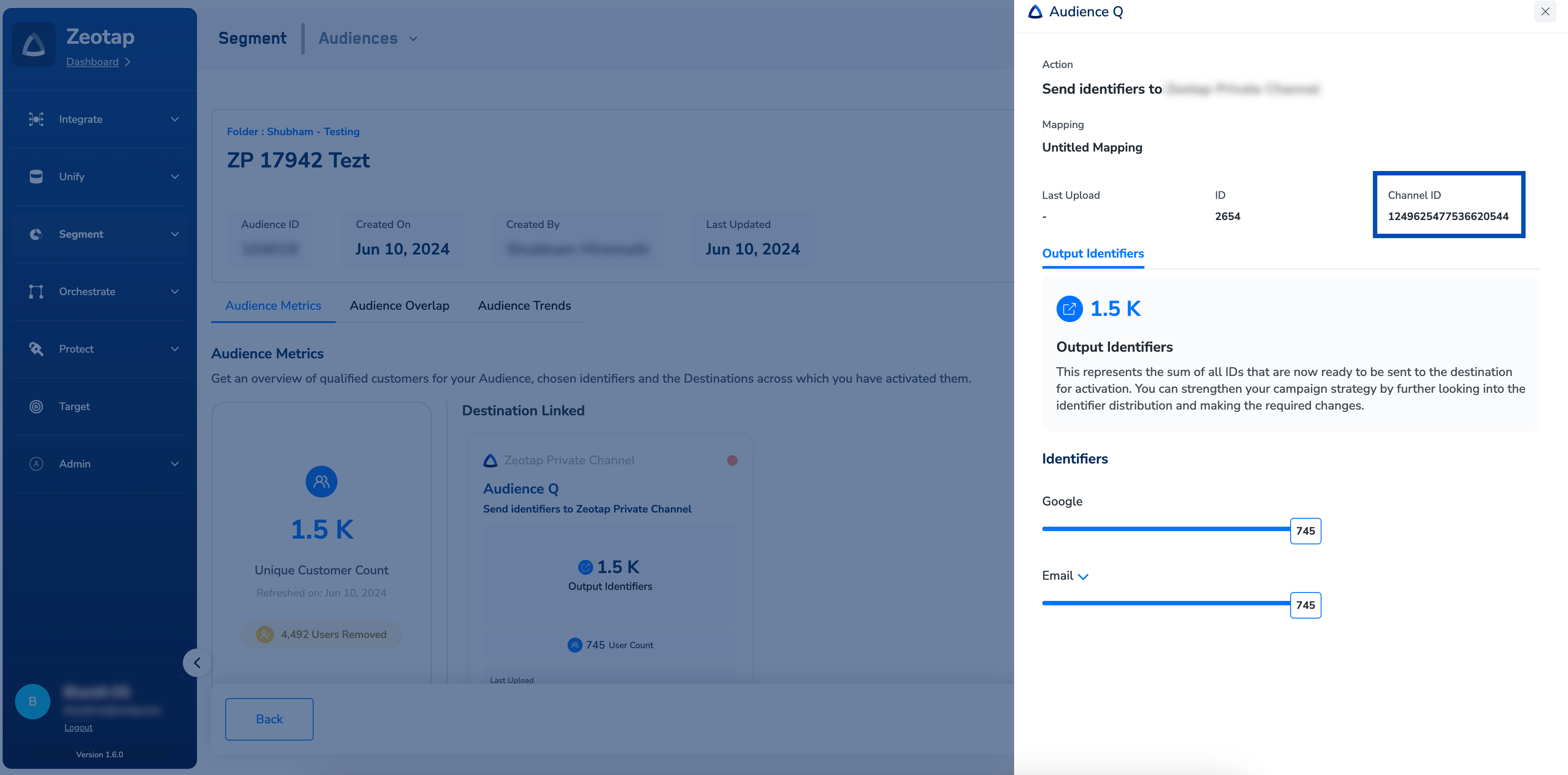
On the Audience Insights screen, click the desired Destination. In the window that appears, you can use the Channel ID mentioned as the CrmDataId for the API calls.
Click **Create Destination**. The created Destination gets listed in the **Audiences** application, which can be linked to an audience/segment.
## Link an Audience to the TTD CRM Data Destination
For information about how to link an audience or segment to the created Destination in **Audiences** application, refer [here](/articles/integrate-customer/link-an-audience-to-the-destination).
**Note:**
The terms *Audiences* and *Segments* are used interchangeably to refer to customer cohorts belonging to a specific category. For example, an Audience or a segment could be a specific group of customers who are over 18 years of age and who have performed an *addToCart* event within the last 30 days.
## Frequently Asked Questions
No, the processing ramp-up time applies only to the new identifiers. Suppose, say you replace a existing audience that has 9000 identifiers by adding 1000 new identifiers to it, then the ramp-up time (about 20-30 minutes) applies only to the 1000 new identifiers before they become active and targetable.
The following table summarises the processing time and changes when updating an audience with new identifiers for the
| **Affected Area** | **Change Description** |
| :-------------------- | :-------------------------------------------------------------------------------------------------------------------------------------------------------- |
| New 1000 IDs | Processing time applies to these IDs only. |
| Existing 9000 IDs | No additional processing. Only the time-to-live (TTL) expiration will be extended to an additional 90 days. |
| Identifier (ID) Count | The active identifier count will eventually increase from 9000 to 10000 over the next 24 hours. It will not drop to 0 IDs and then increase to 10000 IDs. |
The TTL for the identifiers to remain valid and accessible within the system is 90 days.
By default, Zeotap sets the Retention Enabled flag to True.
On the Audience Insights screen, click the desired Destination. In the window that appears, you can use the Channel ID mentioned as the CrmDataId for the API calls.