> ## Documentation Index
> Fetch the complete documentation index at: https://docs.zeotap.com/llms.txt
> Use this file to discover all available pages before exploring further.
# Reddit
## Overview
Reddit is a social media platform that offers a range of advertising solutions to help marketers reach their target audience through Reddit Ads Manager. This allows advertisers to show ads to users across multiple use cases based on their interests and activity on the platform. Integrated with Zeotap CDP, you can push the data from Zeotap CDP to your S3 bucket and later activate the segments in the Reddit platform to fulfil your business requirements.
## Prerequisites
To enable this integration, ensure that you have a Reddit Ads Manager account and an Amazon S3 cloud storage.
## Supported Identifiers
This integration supports email addresses (both raw and hashed) and MAIDs.
## Available Actions and Supported Features
The following table lists the available action types for the integration and the supported features for each action type:
| Action Name | [ID EXTENSION](/articles/segment-customer/extend-your-audience#id-extension) | [DELETE](https://docs.zeotap.com/articles/#!integrate-customer/delta-upload-and-delete-functions) | [DELTA UPLOAD](https://docs.zeotap.com/articles/#!integrate-customer/delta-upload-and-delete-functions) |
| :------------------------- | :--------------------------------------------------------------------------- | :------------------------------------------------------------------------------------------------ | :------------------------------------------------------------------------------------------------------ |
| Send identifiers to Reddit | ✅ | - | - |
## Components of Reddit
Ensure that you have the details about the below components before creating a Destination.
### Bucket Name
This is the name of your S3 bucket.
### S3 Bucket Region
This is the location of your S3 bucket where Zeotap can store your export data as CSV files.
### Folder
This is the path in your storage location where Zeotap CDP can store your export data as CSV files.
### S3 Access Token
This is the security token that provides access to Amazon S3 resources for a limited time.
### S3 Secret Token
This is a cryptographic token that is generated to protect certain data stored on S3.
## Create a Destination for Reddit
Perform the following steps to create a Destination for Reddit:
Log into the Zeotap CDP App and go to the **DESTINATIONS** application.
Click **+ Create Destination**.
Under the **All Destinations** section, search for **Reddit**.
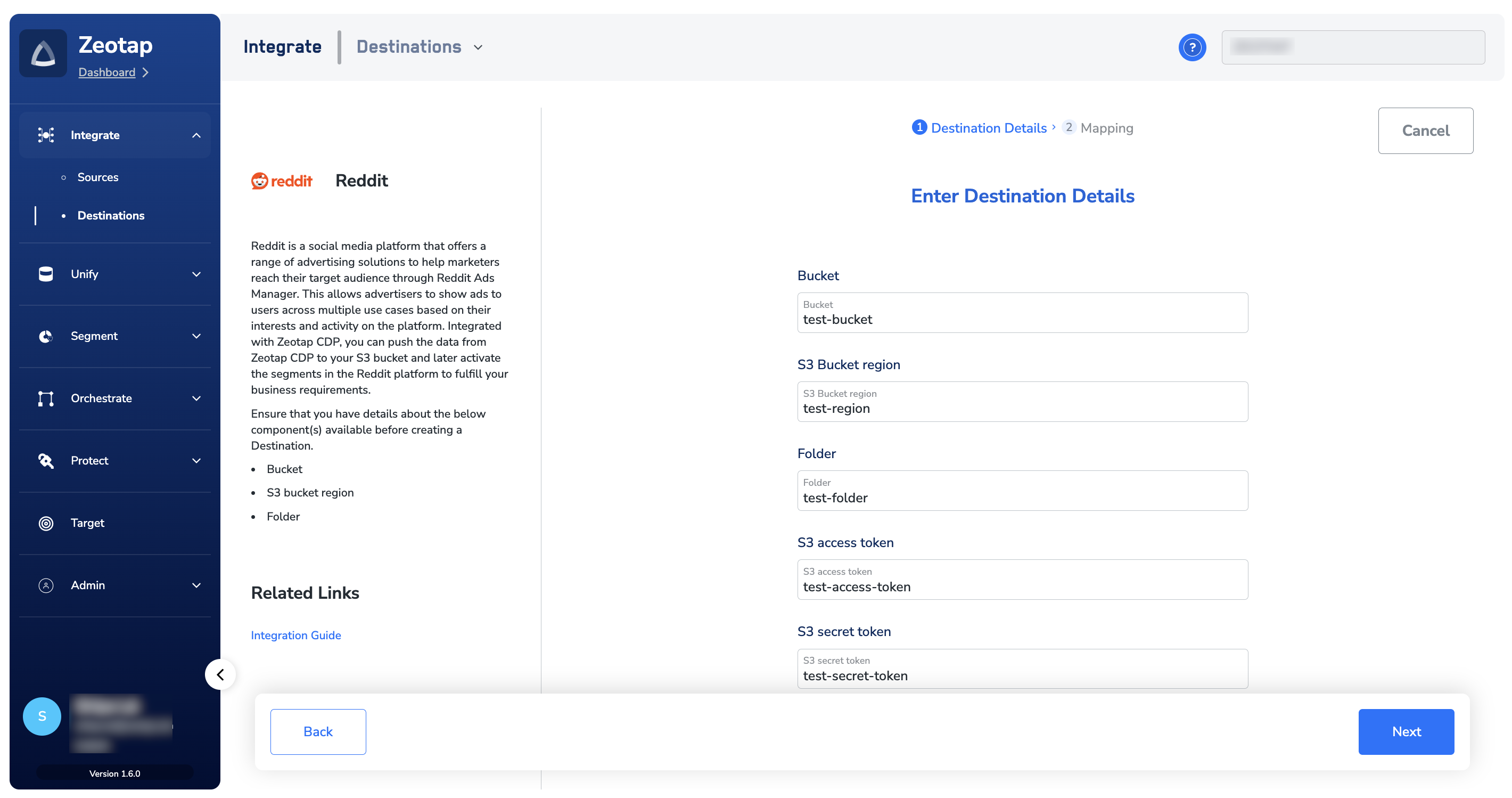
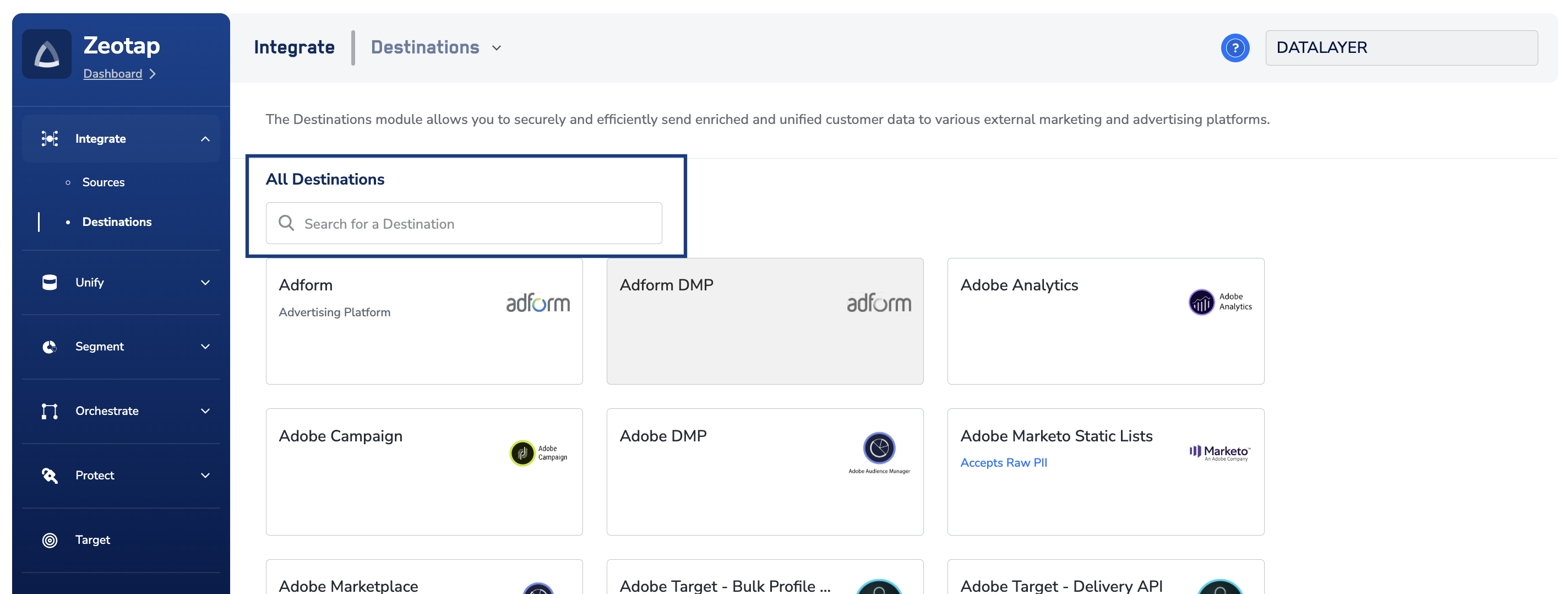 Click **Reddit**. A screen appears displaying details about the particular destination towards the left. On the right-hand side of the screen find a list of fields that are required for the integration to be established. Enter the required details as mentioned in the following steps:
a. Enter a descriptive name for the Destination.
b. In the **Bucket** field, enter the name of the S3 Bucket.
c. In the **S3 Bucket Region** field, enter the region of your S3 bucket where Zeotap CDP can store your export data as CSV files.
d. In the **Folder** field, provide the folder path in your storage location where Zeotap CDP can store your exported data.
e. Enter **S3 Access Token** and **S3 Secret Token** in their respective fields. For more information about these fields, refer to the [Components of Reddit](#components-of-reddit) section.
f. Review all the values entered above and then click **Next** to proceed.
Click **Reddit**. A screen appears displaying details about the particular destination towards the left. On the right-hand side of the screen find a list of fields that are required for the integration to be established. Enter the required details as mentioned in the following steps:
a. Enter a descriptive name for the Destination.
b. In the **Bucket** field, enter the name of the S3 Bucket.
c. In the **S3 Bucket Region** field, enter the region of your S3 bucket where Zeotap CDP can store your export data as CSV files.
d. In the **Folder** field, provide the folder path in your storage location where Zeotap CDP can store your exported data.
e. Enter **S3 Access Token** and **S3 Secret Token** in their respective fields. For more information about these fields, refer to the [Components of Reddit](#components-of-reddit) section.
f. Review all the values entered above and then click **Next** to proceed.
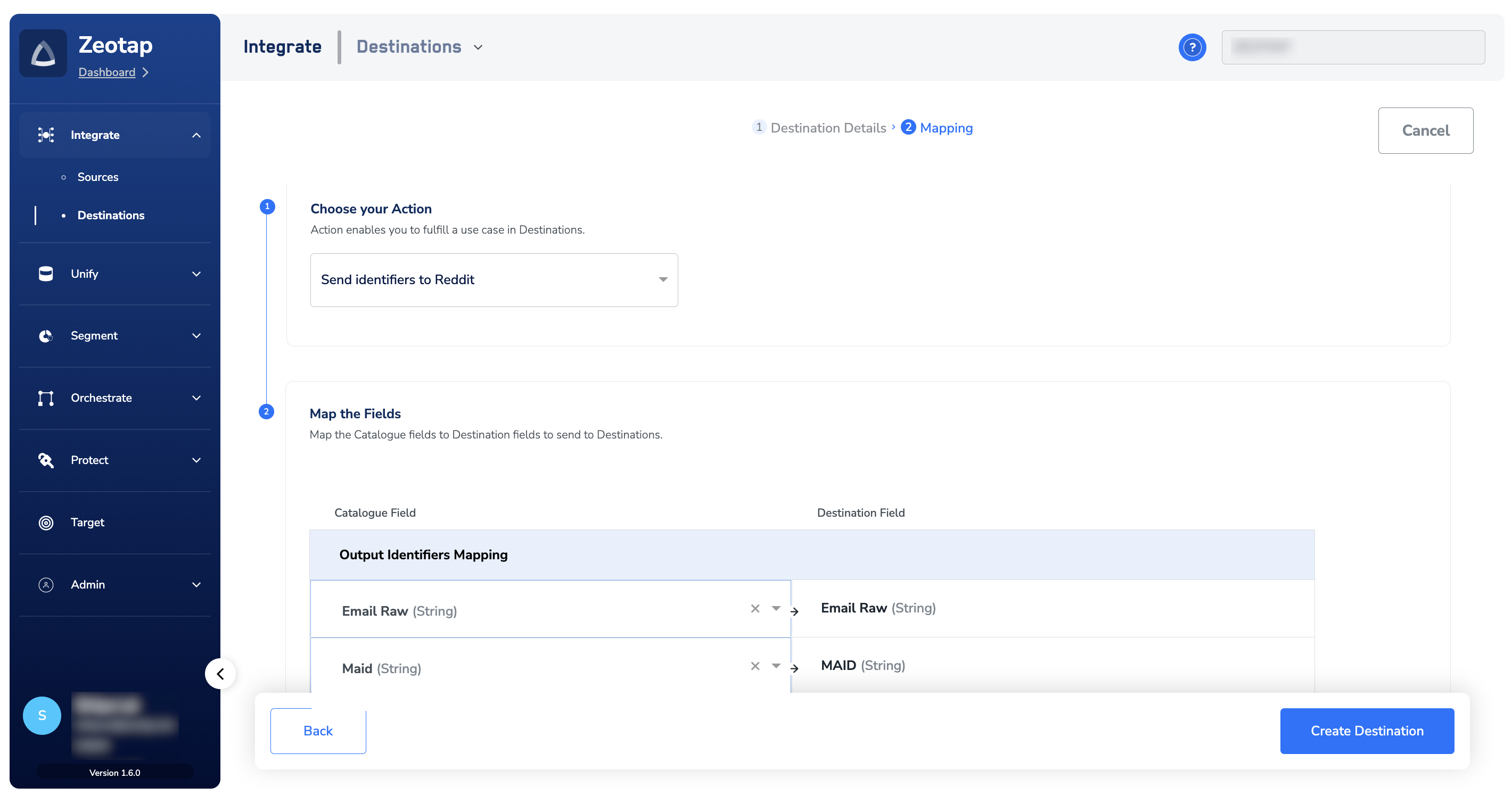
 In the new screen that appears, choose the appropriate [Action](/articles/integrate-customer/destinations#actions) under **Choose your Action** and then choose the corresponding identifiers under **Map the Fields**. By default, the [Output Identifiers](https://docs.zeotap.com/articles/segment-customer/choose-the-output-identifiers) that are accepted by the platform such as MAIDs, Cookies and more are displayed. However, you can edit, add or remove an identifier from the list. To do so, refer [here](/articles/integrate-customer/destinations#mappings).
Click **Create Destination**. The created Destination gets listed in the **Audiences** application, which can be linked to an Audience/segment.
In the new screen that appears, choose the appropriate [Action](/articles/integrate-customer/destinations#actions) under **Choose your Action** and then choose the corresponding identifiers under **Map the Fields**. By default, the [Output Identifiers](https://docs.zeotap.com/articles/segment-customer/choose-the-output-identifiers) that are accepted by the platform such as MAIDs, Cookies and more are displayed. However, you can edit, add or remove an identifier from the list. To do so, refer [here](/articles/integrate-customer/destinations#mappings).
Click **Create Destination**. The created Destination gets listed in the **Audiences** application, which can be linked to an Audience/segment.
 ## Link an Audience to the Reddit Destination
For information about how to link an Audience or segment to the created Destination in **Audiences** application, refer [here](/articles/integrate-customer/link-an-audience-to-the-destination).
**Note:**
*The terms Audiences and Segments are used interchangeably to refer to customer cohorts belonging to a specific category. For example, an Audience or a segment could be a specific group of customers who are over 18 years of age and who have performed an `addToCart` event within the last 30 days.*
## Identify Segment Files in the S3 Bucket
After an Audience is linked to a Destination, Zeotap CDP generates segment files in CSV format with the following naming convention:
`SegmentName_SegmentID_IDtype_timestamp.csv`
**Note:**
You can recognise the segment files by the identifiers mapped. In addition, note that the timestamp in these files is in epoch format.
Let's understand with an example. Suppose, you create a segment called PublicAbove18 with the segment ID 1234. You map identifiers like email addresses (both raw and hashed) and MAIDs. Here's how the files are named:
* For the segment file containing hashed email addresses: `PublicAbove18_1234_Email Addresses (hashed)_timestamp.csv`
* For the segment file containing MAIDS: `PublicAbove18_1234_Mobile IDs_timestamp.csv`
* For the segment file containing email address: `PublicAbove18_1234_Email Addresses_timestamp.csv`
## View Segments on Reddit
Once the Audience is linked to the Destination, segment files in CSV format is generated by Zeotap CDP and is pushed to your S3 storage bucket. Ensure to download this CSV file and upload it to the Reddit platform as explained in the following steps.
Log into your Reddit platform and navigate to **Dashboard** > **Audiences**.
## Link an Audience to the Reddit Destination
For information about how to link an Audience or segment to the created Destination in **Audiences** application, refer [here](/articles/integrate-customer/link-an-audience-to-the-destination).
**Note:**
*The terms Audiences and Segments are used interchangeably to refer to customer cohorts belonging to a specific category. For example, an Audience or a segment could be a specific group of customers who are over 18 years of age and who have performed an `addToCart` event within the last 30 days.*
## Identify Segment Files in the S3 Bucket
After an Audience is linked to a Destination, Zeotap CDP generates segment files in CSV format with the following naming convention:
`SegmentName_SegmentID_IDtype_timestamp.csv`
**Note:**
You can recognise the segment files by the identifiers mapped. In addition, note that the timestamp in these files is in epoch format.
Let's understand with an example. Suppose, you create a segment called PublicAbove18 with the segment ID 1234. You map identifiers like email addresses (both raw and hashed) and MAIDs. Here's how the files are named:
* For the segment file containing hashed email addresses: `PublicAbove18_1234_Email Addresses (hashed)_timestamp.csv`
* For the segment file containing MAIDS: `PublicAbove18_1234_Mobile IDs_timestamp.csv`
* For the segment file containing email address: `PublicAbove18_1234_Email Addresses_timestamp.csv`
## View Segments on Reddit
Once the Audience is linked to the Destination, segment files in CSV format is generated by Zeotap CDP and is pushed to your S3 storage bucket. Ensure to download this CSV file and upload it to the Reddit platform as explained in the following steps.
Log into your Reddit platform and navigate to **Dashboard** > **Audiences**.
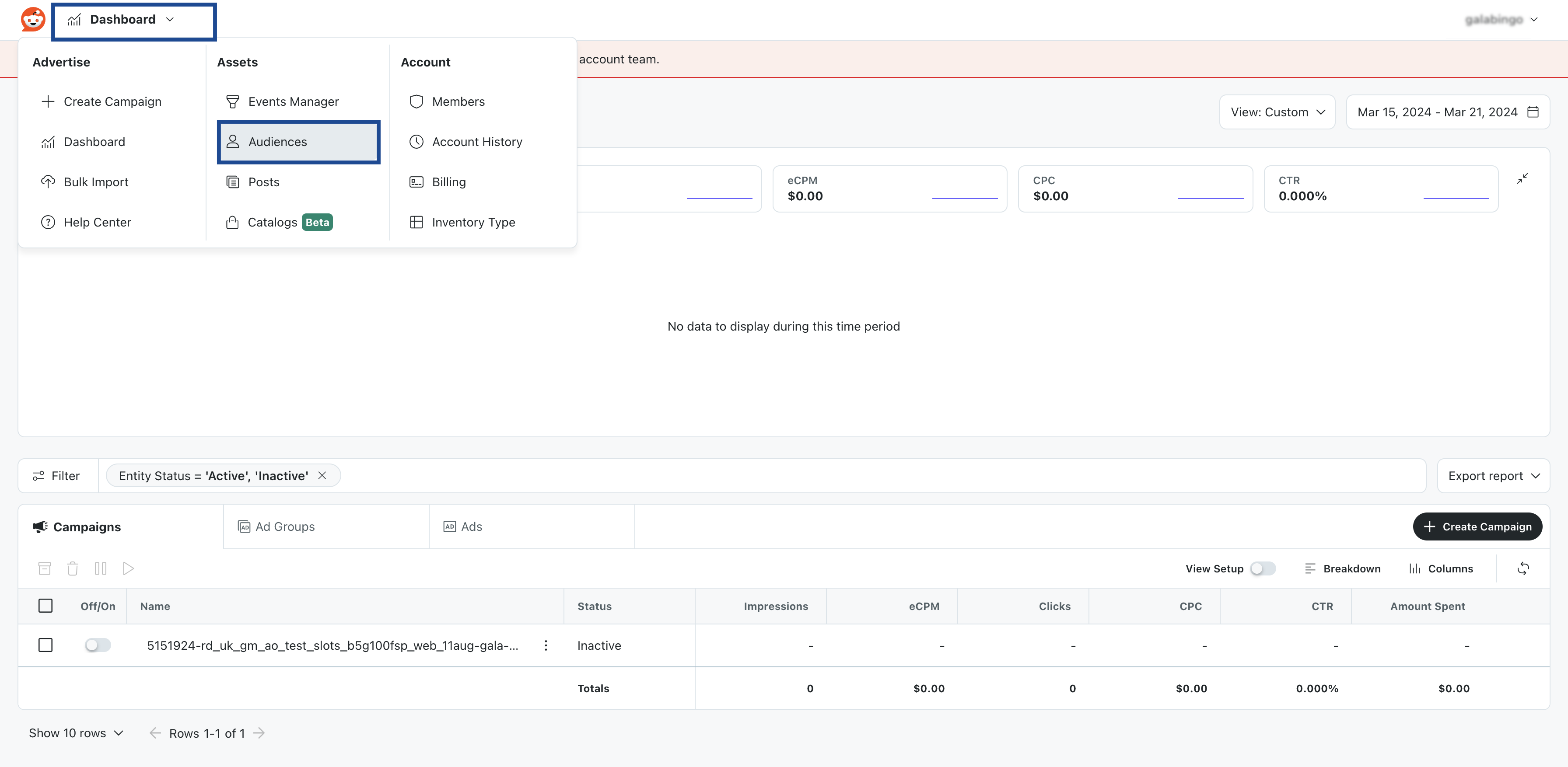 In the following page that appears, click **New Audience** > **Custom Audience**.
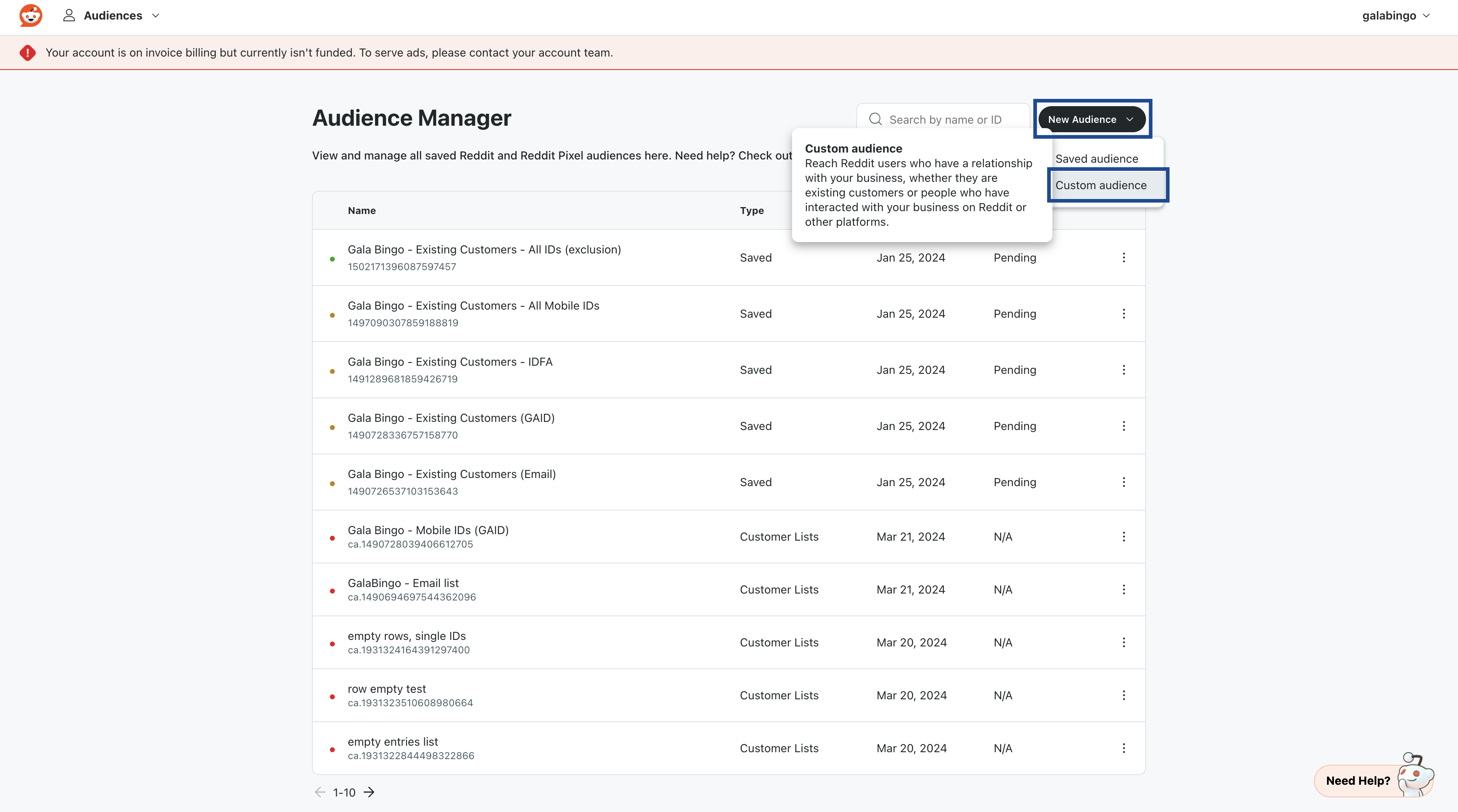 In the **Create new custom audience** page that appears, **Select audience type** as **Customer lists**.
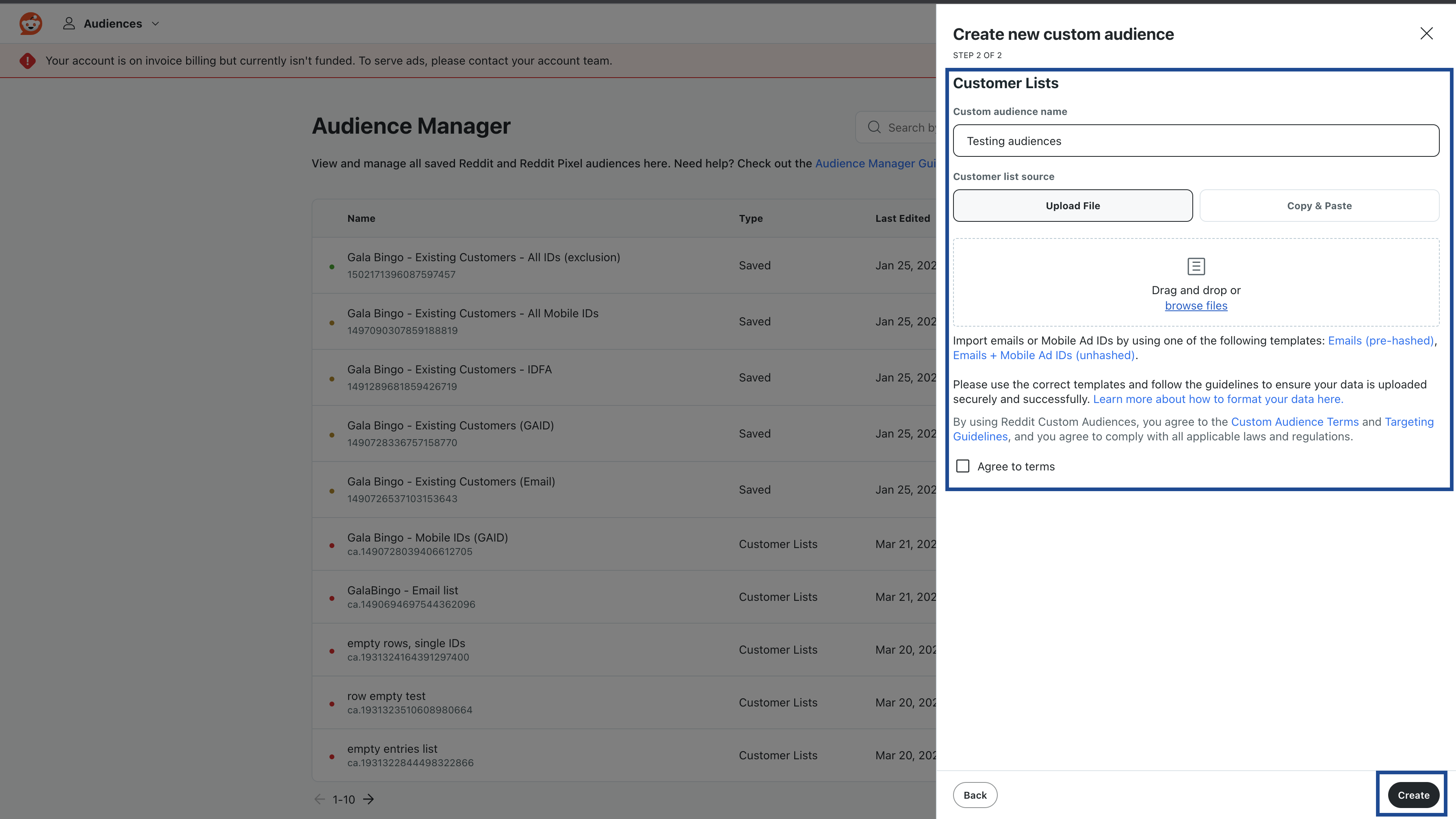
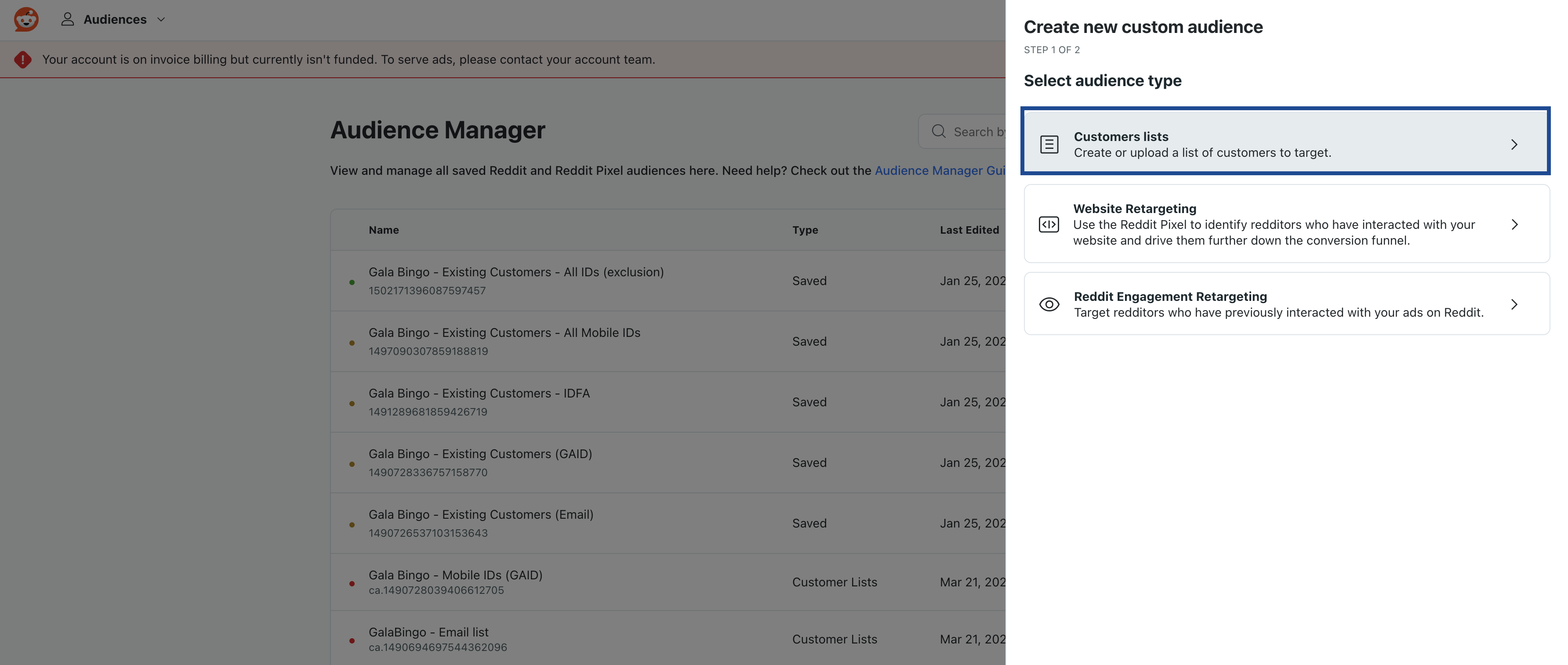 In the following page that appears, provide the following information:
a. Provide **Custom audience name** for your CSV file.
b. You can either **Drag and drop** or browse and **Upload** your CSV file under **Customer list source**.
c. Select the **Agree to terms** checkbox and click **Create**.
In the following page that appears, provide the following information:
a. Provide **Custom audience name** for your CSV file.
b. You can either **Drag and drop** or browse and **Upload** your CSV file under **Customer list source**.
c. Select the **Agree to terms** checkbox and click **Create**.
 The uploaded CSV file get listed in the Audience Manager page as shown below.