> ## Documentation Index
> Fetch the complete documentation index at: https://docs.zeotap.com/llms.txt
> Use this file to discover all available pages before exploring further.
# Meta Custom Audience
> Create a Meta Custom Audience destination in Zeotap CDP using the OAuth Connect flow, and activate audiences to a Facebook Ad Account without generating an access token.
## What this is
Meta Custom Audience pushes a Zeotap CDP audience into a Facebook Ad Account as a Custom Audience, so you can target or suppress those users in Meta campaigns.
It delivers the same audiences as the [Facebook 1P](/articles/integrate-customer/facebook-1p) destination. The difference is how the destination is authorised: Meta Custom Audience uses an OAuth **Connect** flow, so you sign in to Facebook once and Zeotap holds the connection, rather than generating an access token in the Facebook Developers portal and pasting it in. Both destinations are supported — pick whichever authorisation model suits your team.
## Supported actions, identifiers, and features
| Action | Supported identifiers/attributes | Supported features |
| --------------------------------------------- | ----------------------------------------------------------------------------------------------------------------------------------------------------------------------------------------- | ------------------------- |
| Send identifiers to Meta | MAIDs; Email address (SHA256); Phone number (SHA256); [Facebook External ID](#facebook-external-id) | Audience Boost and Delete |
| Send identifiers to Meta (hashed External ID) | As above, with the Facebook External ID supplied already hashed | Audience Boost and Delete |
| Send Multiple User Identifiers to Facebook 1P | MAIDs; Email address (SHA256); Phone number (SHA256); Gender; Date of birth; First Name and Last Name; State; City; ZIP Code; Country Code; [Facebook External ID](#facebook-external-id) | Audience Boost and Delete |
To raise the match rate, use **Send Multiple User Identifiers to Facebook 1P** so every identifier on a profile is sent as a single user record.
### Facebook External ID
A Facebook External ID is a unique string that represents a user on an advertiser's system — for example, a loyalty membership ID, internal user ID, or external cookie ID. For a given event, Facebook uses the `external_id` to match a record to a user on its platform. Before sending an External ID to Facebook, [add the identifier in your Zeotap Catalogue](/articles/unify-customer/add-a-catalogue-field), then map it when you create the destination.
For background, see Meta's [Custom Audiences External Identifiers guide](https://developers.facebook.com/docs/marketing-api/audiences/guides/custom-audiences/#external_identifiers). See [How External IDs flow between a brand and Facebook](#how-external-ids-flow-between-a-brand-and-facebook) for the end-to-end capture flow.
## Prerequisites
Complete the following before you create the destination in Zeotap CDP:
* **Full Access to a Facebook Ad Account** — the 16-digit Facebook Ad Account ID linked to your Facebook Business Manager, with **People with full control** access for the user who will authorise the connection.
* **Accepted Facebook Audiences Terms of Service** — the ad account has accepted the Custom Audiences ToS at [business.facebook.com/ads/manage/customaudiences/tos/](https://business.facebook.com/ads/manage/customaudiences/tos/?act=). This has been mandatory since September 2021.
* **Your Facebook Graph API version** — for example, `23.0`. Enter only the numerical part when configuring the destination; do not include the `v` prefix.
You do **not** need to create an app in the Facebook Developers portal or generate an access token — the OAuth flow authorises Zeotap directly.
The destination screen still lists **Access Token** among its components, and the **API Version** hint still refers to finding the version "along with the Access Token". Both are carried over from the token-based destination and do not apply here — there is no Access Token field on this form.
### Grant Full Access to the Ad Account
Confirm your Facebook user has full control of the Ad Account that will receive audience data. From Facebook Business Manager at [business.facebook.com](https://business.facebook.com/), select the business portfolio in the top-right corner, open **Settings → Accounts → Ad Accounts**, select the ad account, and open **Ad Account Access**. Under **People with full control**, your account must appear. To grant Full Access to another user, click **Manage** next to their name, then **Assign People**, and select them from the people with access to your Meta Business portfolio.
### Accept the Facebook Audiences Terms of Service
Sign in to your Facebook Ad Account at [adsmanager.facebook.com](https://adsmanager.facebook.com/), confirm the correct ad account is selected in the ad account selector at the top of the page, and open **Audiences** from the left navigation. If the ToS has not been accepted, you are prompted to accept it. If it has already been accepted, you see options to create new audiences.
## Create the destination in Zeotap CDP
Sign in to the Zeotap CDP app and go to **Integrate → Destinations**.
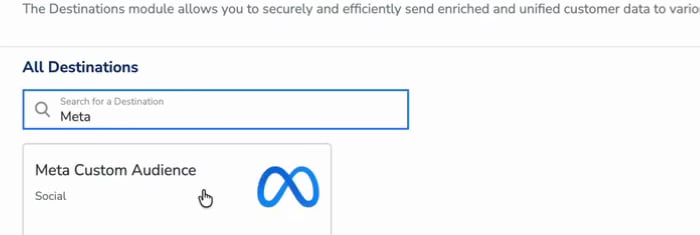
Click **+ Create Destination**. Under **All Destinations**, search for `Meta` and select **Meta Custom Audience**.
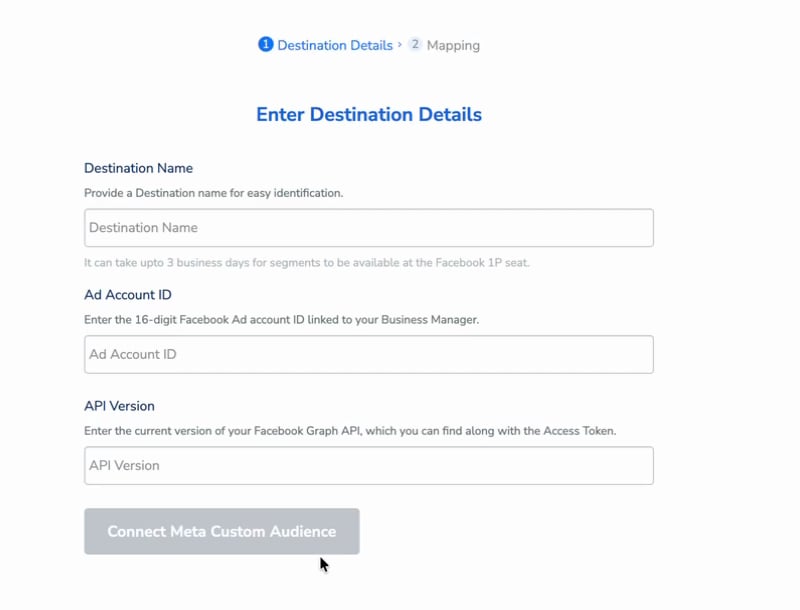
 On the **Enter Destination Details** screen:
1. In **Destination Name**, enter a name that identifies this destination in your Destinations list.
2. In **Ad Account ID**, enter the 16-digit Facebook Ad Account ID linked to your Business Manager.
3. In **API Version**, enter the Facebook Graph API version this destination should target — the numerical part only, for example `23.0`. If you are unsure which version to use, check with your Zeotap representative.
On the **Enter Destination Details** screen:
1. In **Destination Name**, enter a name that identifies this destination in your Destinations list.
2. In **Ad Account ID**, enter the 16-digit Facebook Ad Account ID linked to your Business Manager.
3. In **API Version**, enter the Facebook Graph API version this destination should target — the numerical part only, for example `23.0`. If you are unsure which version to use, check with your Zeotap representative.
 Click **Connect Meta Custom Audience**. You are redirected to Facebook — sign in with the user that has full control of the ad account, and grant the requested permissions.
Authorise with the Facebook user identified in [Prerequisites](#prerequisites). The connection inherits that user's access, so an account without full control of the ad account cannot activate audiences to it.
Once connected, the form records who established the connection and when, and shows the date on which the refresh token expires.
Click **Connect Meta Custom Audience**. You are redirected to Facebook — sign in with the user that has full control of the ad account, and grant the requested permissions.
Authorise with the Facebook user identified in [Prerequisites](#prerequisites). The connection inherits that user's access, so an account without full control of the ad account cannot activate audiences to it.
Once connected, the form records who established the connection and when, and shows the date on which the refresh token expires.
 Note the expiry date — see [Maintain the connection](#maintain-the-connection). Click **Next** to go to the Mapping screen.
Name the mapping, select an action under **Choose your Action**, then map your Catalogue fields to the destination fields under **Map the Fields**.
Note the expiry date — see [Maintain the connection](#maintain-the-connection). Click **Next** to go to the Mapping screen.
Name the mapping, select an action under **Choose your Action**, then map your Catalogue fields to the destination fields under **Map the Fields**.
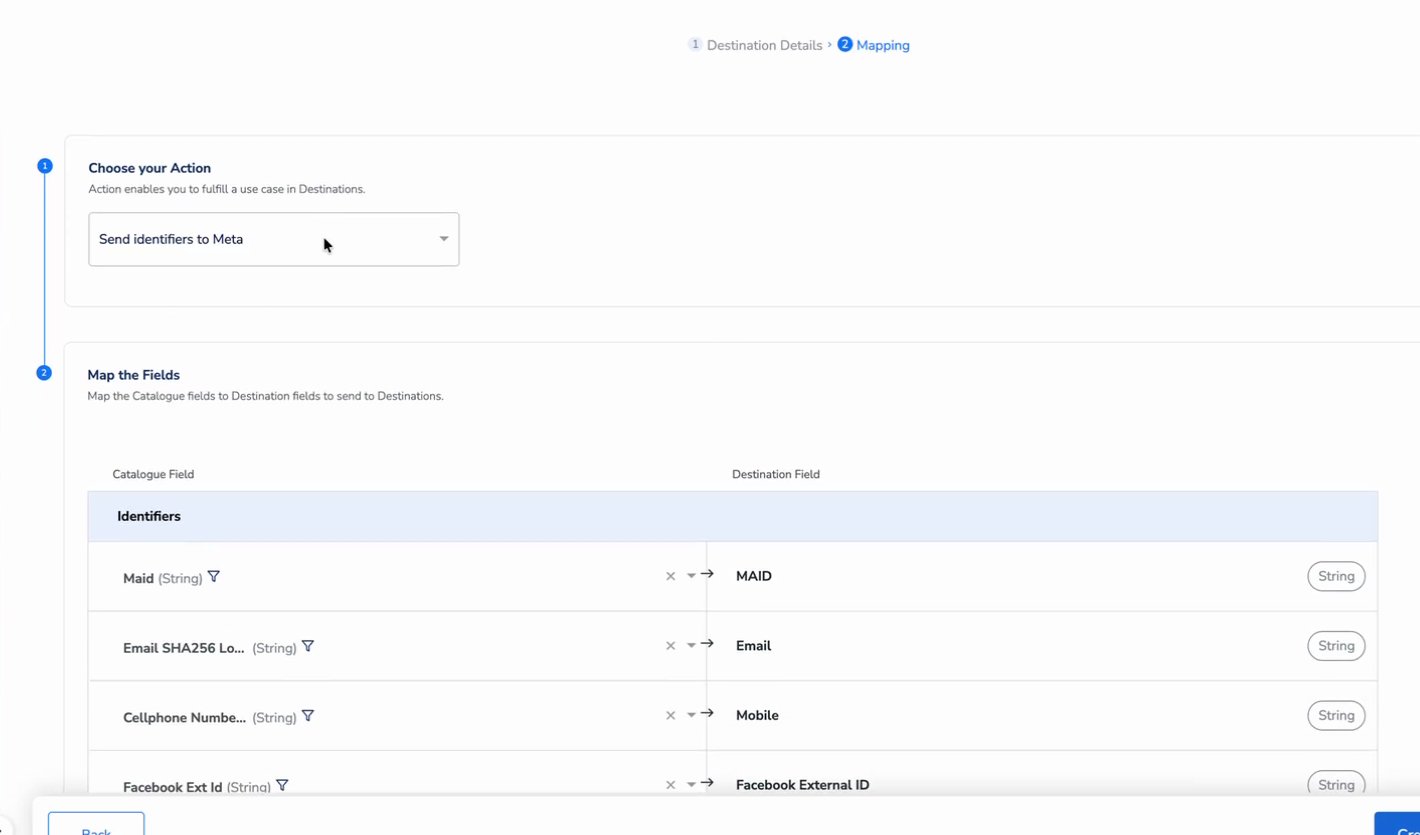 See [How Zeotap formats each attribute for Facebook](#how-zeotap-formats-each-attribute-for-facebook) for the Catalogue attribute to map to each field. Note that the destination field named **Mobile** takes the phone number; the Mobile Advertising ID maps to **MAID**.
Click **Create Destination**. The destination appears in the Audiences application, ready to be linked.
## How Zeotap formats each attribute for Facebook
Facebook requires specific formatting and hashing for each attribute. Zeotap CDP performs the transformations listed below, so you only need to ingest the source attribute into your Zeotap Catalogue.
| Attribute | Facebook requirement | Zeotap CDP transformation |
| ---------------------------- | --------------------------------------------------------------------------------------------------------------------------------------------- | -------------------------------------------------------------------------------------------------------------------------------------------------- |
| External ID | Hashing **not** required | Sent as-is |
| Email address | Hashing required; trim leading/trailing whitespace; lowercase all characters | Map from `Email SHA256 Lowercase` in the Zeotap Catalogue. Consult your Zeotap representative on ingesting this identifier. |
| Phone number | Hashing required; remove symbols, letters, and leading zeroes | Map from `Cellphone Number Withcode Sha256` in the Zeotap Catalogue. Consult your Zeotap representative on ingesting this identifier. |
| Gender | Hashing required; `m` for male, `f` for female | Zeotap extracts the first letter of the Gender value, lowercases it, hashes it, and sends it |
| Date of birth | Hashing required; send `YYYY`, `MM`, `DD` separately | Ingest Date of Birth as a timestamp field; Zeotap performs the split and hash |
| First Name, Last Name | Hashing required; a–z only, lowercase, no punctuation; special characters in UTF-8 | Zeotap performs the transformation |
| State | Hashing required; 2-character ANSI code, lowercase; non-US states normalised lowercase with no punctuation, special characters, or whitespace | Zeotap hashes the ingested State value and sends it |
| City | Hashing required; a–z only, lowercase, no punctuation, special characters, or whitespace | Zeotap hashes the ingested City value and sends it |
| ZIP Code | Hashing required; lowercase, no whitespace; US — first 5 digits; UK — Area/District/Sector | Zeotap removes whitespace, hashes the result, and sends it. Example: UK ZIP `SW1A 2AA` is sent as the SHA256 of `SW1A2AA`. |
| Country Code | Hashing required; lowercase 2-letter [ISO 3166-1 alpha-2](https://en.wikipedia.org/wiki/ISO_3166-1_alpha-2) | Map from `Country` in the Zeotap Catalogue. If you map another attribute, ingest a 3-letter country code; Zeotap converts it to the 2-letter code. |
| Mobile Advertising ID (MAID) | Hashing **not** required; lowercase, keep hyphens | Sent as-is |
## Maintain the connection
The OAuth connection is held by a refresh token with a fixed expiry. The destination form shows the expiry date once connected, and records the user who authorised it.
When the refresh token expires, Zeotap can no longer push audiences to this destination and activations fail with an authentication error. The connection has to be re-authorised before that date to avoid an interruption — if you are unsure how to re-authorise an existing destination, contact Zeotap support.
Check the refresh token expiry date when you create the destination and set a reminder ahead of it. Nothing prompts you as the date approaches — the first symptom is usually a failed activation.
The connection inherits the access of the user who authorised it. If that user loses full control of the ad account, the destination has to be re-authorised by a user who has it.
## Link an audience to the destination
In the Audiences application, link the audience or segment to the Meta Custom Audience destination. The terms *audience* and *segment* are used interchangeably for a customer cohort — for example, customers over 18 who performed an `addToCart` event in the last 30 days. For the linking procedure, see [Link an Audience to the Destination](/articles/integrate-customer/link-an-audience-to-the-destination).
* Segments are created directly in your Facebook account, so they do not appear under Zeotap's Ad accounts.
* The Facebook Custom Audience limit of 500 applies per Ad Account that you use — it does not apply to Zeotap's account.
* Facebook compares the data Zeotap uploads against the segment using their encrypted user data; matched IDs are added to the Custom Audience and ads are delivered to those users.
* Meta documents Custom Audience behaviour in its [Custom Audiences guide](https://developers.facebook.com/docs/marketing-api/audiences/guides/custom-audiences).
## Verify the audience reached Facebook
Allow up to 24 hours (one business day) after linking for a Zeotap CDP audience to sync to Facebook. The destination form additionally notes that segments can take up to **3 business days** to become available at the Facebook 1P seat, so allow for that longer window before investigating. To confirm:
1. Sign in to [Facebook Ads Manager](https://adsmanager.facebook.com/) and select the ad account configured in the destination, using the ad account selector at the top of the page.
2. Open **Audiences** from the left navigation.
3. Confirm the Custom Audience appears in the Audience list with a populated **Estimated audience size**. The audience name matches the one configured in Zeotap CDP.
If the audience appears but **Estimated audience size** reads **Below 1,000** with **Small after matching** beneath it, the sync completed but matching produced fewer records than Facebook's minimum threshold — review the identifiers being sent (see [How Zeotap formats each attribute for Facebook](#how-zeotap-formats-each-attribute-for-facebook)) and confirm the source identifiers are populated for the audience members.
This integration supports user disqualification. When a user no longer meets the audience criteria, the consent requirements, or other audience conditions, Zeotap CDP issues a user deletion request to Facebook on the next refresh cycle. Disqualified users are excluded from the audience on the configured refresh frequency. No manual action is required — the process runs automatically.
## Troubleshooting
### Common errors
| Error string | What it means | Where to look |
| ------------------------------------------------------------------------- | -------------------------------------------------------------------------------------------------------------------------------------------------------------------------------------- | ---------------------------------------------------------------------------------------------------------------------------------------------------------------------- |
| `{"message":"Facebook Error: Permission error","code":"400 BAD_REQUEST"}` | Ad Account or app permissions are not yet active on Facebook's side. Seen with new accounts before the Audiences ToS has been accepted or before Facebook permissions have propagated. | Confirm the [Audiences ToS](#accept-the-facebook-audiences-terms-of-service) is accepted; if accepted, allow time for Facebook permissions to take effect, then retry. |
| Segment activation fails with an authentication error | The refresh token has expired or the authorisation was revoked on Facebook's side. | The refresh token expiry date on the destination. The connection has to be re-authorised — see [Maintain the connection](#maintain-the-connection). |
| Activation fails after the authorising user's access changed | The connection inherits the access of the user who authorised it. If that user loses full control of the ad account, activations stop. | **Ad Account Access** in Business Manager; the destination has to be re-authorised by a user who has full control. |
### If the 400 BAD\_REQUEST error persists
If the 400 error continues after the Audiences ToS has been accepted, allow time for the Facebook permissions to propagate before retrying. If the error still appears after several days, confirm the authorising user still has **People with full control** access to the ad account.
## How External IDs flow between a brand and Facebook
When you target Facebook users by a brand-side identifier (loyalty ID, internal user ID, cookie), the flow is:
1. The brand places the Facebook pixel on its website and configures the tag to pass the Facebook cookie (or any custom identifier) as `extern_id` to Facebook. See Meta's [Pixel implementation guide](https://developers.facebook.com/docs/meta-pixel/get-started). The pixel push pattern:
```js theme={null}
fbq('init', '', {
'extern_id': ''
});
```
2. Facebook builds an internal mapping between the `extern_id` and its own user ID.
3. The brand also passes the Facebook cookie to Zeotap as `id_mid_62`, using Google Tag Manager, JavaScript, or another tag implementation.
4. The brand builds an audience in the Audiences application using the Facebook cookies.
5. Zeotap uploads the Facebook cookie as an External ID to Facebook. Facebook uses its internal mapping to resolve the External ID to the corresponding user on its platform.
Accepting the [Custom Audiences Terms of Service](https://business.facebook.com/ads/manage/customaudiences/tos/?act=) (mandatory since September 2021) is required for this flow.
## FAQ
Both push audiences into a Facebook Ad Account as a Custom Audience, and both send the same identifiers. They differ only in authorisation. **Meta Custom Audience** collects a Destination Name, Ad Account ID and API Version, then authorises through the **Connect Meta Custom Audience** OAuth flow — no access token, and no app in the Facebook Developers portal. [Facebook 1P](/articles/integrate-customer/facebook-1p) collects the same three values plus an **Access Token** you generate yourself. Both are supported; choose the one that fits how your team manages credentials.
Pick **Send Multiple User Identifiers to Facebook 1P** when you have more than one identifier per profile. All identifiers map to a single user record on Facebook's side, which raises the match rate. Pick **Send identifiers to Meta** only when each identifier needs to be sent as its own user profile.
For email, phone, name, gender, date of birth, address fields, and country code, Zeotap CDP performs the hashing and formatting Facebook requires — you ingest the source value into the matching Catalogue field. For Mobile Advertising IDs and External IDs, no hashing is required and Zeotap sends them as-is. See the [attribute table](#how-zeotap-formats-each-attribute-for-facebook) for the per-attribute Catalogue mapping.
Allow up to 24 hours (one business day) after linking for a Zeotap CDP audience to fully sync with Facebook, and up to 3 business days for it to become available at the Facebook 1P seat — the destination form states the longer figure. If it has not appeared after that window, confirm the audience link is active in Zeotap CDP and that the destination's refresh token has not expired.
Activations to the destination fail with an authentication error. The connection has to be re-authorised — see [Maintain the connection](#maintain-the-connection). The expiry date is shown on the destination once it is connected.
## Next steps
* [Explore the Facebook 1P destination →](/articles/integrate-customer/facebook-1p) for the access-token-authenticated variant of this destination
* [Explore linking an audience to a destination →](/articles/integrate-customer/link-an-audience-to-the-destination)
* [Explore Audience Insights to measure match rate and reach →](/articles/segment-customer/audience-insights)
See [How Zeotap formats each attribute for Facebook](#how-zeotap-formats-each-attribute-for-facebook) for the Catalogue attribute to map to each field. Note that the destination field named **Mobile** takes the phone number; the Mobile Advertising ID maps to **MAID**.
Click **Create Destination**. The destination appears in the Audiences application, ready to be linked.
## How Zeotap formats each attribute for Facebook
Facebook requires specific formatting and hashing for each attribute. Zeotap CDP performs the transformations listed below, so you only need to ingest the source attribute into your Zeotap Catalogue.
| Attribute | Facebook requirement | Zeotap CDP transformation |
| ---------------------------- | --------------------------------------------------------------------------------------------------------------------------------------------- | -------------------------------------------------------------------------------------------------------------------------------------------------- |
| External ID | Hashing **not** required | Sent as-is |
| Email address | Hashing required; trim leading/trailing whitespace; lowercase all characters | Map from `Email SHA256 Lowercase` in the Zeotap Catalogue. Consult your Zeotap representative on ingesting this identifier. |
| Phone number | Hashing required; remove symbols, letters, and leading zeroes | Map from `Cellphone Number Withcode Sha256` in the Zeotap Catalogue. Consult your Zeotap representative on ingesting this identifier. |
| Gender | Hashing required; `m` for male, `f` for female | Zeotap extracts the first letter of the Gender value, lowercases it, hashes it, and sends it |
| Date of birth | Hashing required; send `YYYY`, `MM`, `DD` separately | Ingest Date of Birth as a timestamp field; Zeotap performs the split and hash |
| First Name, Last Name | Hashing required; a–z only, lowercase, no punctuation; special characters in UTF-8 | Zeotap performs the transformation |
| State | Hashing required; 2-character ANSI code, lowercase; non-US states normalised lowercase with no punctuation, special characters, or whitespace | Zeotap hashes the ingested State value and sends it |
| City | Hashing required; a–z only, lowercase, no punctuation, special characters, or whitespace | Zeotap hashes the ingested City value and sends it |
| ZIP Code | Hashing required; lowercase, no whitespace; US — first 5 digits; UK — Area/District/Sector | Zeotap removes whitespace, hashes the result, and sends it. Example: UK ZIP `SW1A 2AA` is sent as the SHA256 of `SW1A2AA`. |
| Country Code | Hashing required; lowercase 2-letter [ISO 3166-1 alpha-2](https://en.wikipedia.org/wiki/ISO_3166-1_alpha-2) | Map from `Country` in the Zeotap Catalogue. If you map another attribute, ingest a 3-letter country code; Zeotap converts it to the 2-letter code. |
| Mobile Advertising ID (MAID) | Hashing **not** required; lowercase, keep hyphens | Sent as-is |
## Maintain the connection
The OAuth connection is held by a refresh token with a fixed expiry. The destination form shows the expiry date once connected, and records the user who authorised it.
When the refresh token expires, Zeotap can no longer push audiences to this destination and activations fail with an authentication error. The connection has to be re-authorised before that date to avoid an interruption — if you are unsure how to re-authorise an existing destination, contact Zeotap support.
Check the refresh token expiry date when you create the destination and set a reminder ahead of it. Nothing prompts you as the date approaches — the first symptom is usually a failed activation.
The connection inherits the access of the user who authorised it. If that user loses full control of the ad account, the destination has to be re-authorised by a user who has it.
## Link an audience to the destination
In the Audiences application, link the audience or segment to the Meta Custom Audience destination. The terms *audience* and *segment* are used interchangeably for a customer cohort — for example, customers over 18 who performed an `addToCart` event in the last 30 days. For the linking procedure, see [Link an Audience to the Destination](/articles/integrate-customer/link-an-audience-to-the-destination).
* Segments are created directly in your Facebook account, so they do not appear under Zeotap's Ad accounts.
* The Facebook Custom Audience limit of 500 applies per Ad Account that you use — it does not apply to Zeotap's account.
* Facebook compares the data Zeotap uploads against the segment using their encrypted user data; matched IDs are added to the Custom Audience and ads are delivered to those users.
* Meta documents Custom Audience behaviour in its [Custom Audiences guide](https://developers.facebook.com/docs/marketing-api/audiences/guides/custom-audiences).
## Verify the audience reached Facebook
Allow up to 24 hours (one business day) after linking for a Zeotap CDP audience to sync to Facebook. The destination form additionally notes that segments can take up to **3 business days** to become available at the Facebook 1P seat, so allow for that longer window before investigating. To confirm:
1. Sign in to [Facebook Ads Manager](https://adsmanager.facebook.com/) and select the ad account configured in the destination, using the ad account selector at the top of the page.
2. Open **Audiences** from the left navigation.
3. Confirm the Custom Audience appears in the Audience list with a populated **Estimated audience size**. The audience name matches the one configured in Zeotap CDP.
If the audience appears but **Estimated audience size** reads **Below 1,000** with **Small after matching** beneath it, the sync completed but matching produced fewer records than Facebook's minimum threshold — review the identifiers being sent (see [How Zeotap formats each attribute for Facebook](#how-zeotap-formats-each-attribute-for-facebook)) and confirm the source identifiers are populated for the audience members.
This integration supports user disqualification. When a user no longer meets the audience criteria, the consent requirements, or other audience conditions, Zeotap CDP issues a user deletion request to Facebook on the next refresh cycle. Disqualified users are excluded from the audience on the configured refresh frequency. No manual action is required — the process runs automatically.
## Troubleshooting
### Common errors
| Error string | What it means | Where to look |
| ------------------------------------------------------------------------- | -------------------------------------------------------------------------------------------------------------------------------------------------------------------------------------- | ---------------------------------------------------------------------------------------------------------------------------------------------------------------------- |
| `{"message":"Facebook Error: Permission error","code":"400 BAD_REQUEST"}` | Ad Account or app permissions are not yet active on Facebook's side. Seen with new accounts before the Audiences ToS has been accepted or before Facebook permissions have propagated. | Confirm the [Audiences ToS](#accept-the-facebook-audiences-terms-of-service) is accepted; if accepted, allow time for Facebook permissions to take effect, then retry. |
| Segment activation fails with an authentication error | The refresh token has expired or the authorisation was revoked on Facebook's side. | The refresh token expiry date on the destination. The connection has to be re-authorised — see [Maintain the connection](#maintain-the-connection). |
| Activation fails after the authorising user's access changed | The connection inherits the access of the user who authorised it. If that user loses full control of the ad account, activations stop. | **Ad Account Access** in Business Manager; the destination has to be re-authorised by a user who has full control. |
### If the 400 BAD\_REQUEST error persists
If the 400 error continues after the Audiences ToS has been accepted, allow time for the Facebook permissions to propagate before retrying. If the error still appears after several days, confirm the authorising user still has **People with full control** access to the ad account.
## How External IDs flow between a brand and Facebook
When you target Facebook users by a brand-side identifier (loyalty ID, internal user ID, cookie), the flow is:
1. The brand places the Facebook pixel on its website and configures the tag to pass the Facebook cookie (or any custom identifier) as `extern_id` to Facebook. See Meta's [Pixel implementation guide](https://developers.facebook.com/docs/meta-pixel/get-started). The pixel push pattern:
```js theme={null}
fbq('init', '', {
'extern_id': ''
});
```
2. Facebook builds an internal mapping between the `extern_id` and its own user ID.
3. The brand also passes the Facebook cookie to Zeotap as `id_mid_62`, using Google Tag Manager, JavaScript, or another tag implementation.
4. The brand builds an audience in the Audiences application using the Facebook cookies.
5. Zeotap uploads the Facebook cookie as an External ID to Facebook. Facebook uses its internal mapping to resolve the External ID to the corresponding user on its platform.
Accepting the [Custom Audiences Terms of Service](https://business.facebook.com/ads/manage/customaudiences/tos/?act=) (mandatory since September 2021) is required for this flow.
## FAQ
Both push audiences into a Facebook Ad Account as a Custom Audience, and both send the same identifiers. They differ only in authorisation. **Meta Custom Audience** collects a Destination Name, Ad Account ID and API Version, then authorises through the **Connect Meta Custom Audience** OAuth flow — no access token, and no app in the Facebook Developers portal. [Facebook 1P](/articles/integrate-customer/facebook-1p) collects the same three values plus an **Access Token** you generate yourself. Both are supported; choose the one that fits how your team manages credentials.
Pick **Send Multiple User Identifiers to Facebook 1P** when you have more than one identifier per profile. All identifiers map to a single user record on Facebook's side, which raises the match rate. Pick **Send identifiers to Meta** only when each identifier needs to be sent as its own user profile.
For email, phone, name, gender, date of birth, address fields, and country code, Zeotap CDP performs the hashing and formatting Facebook requires — you ingest the source value into the matching Catalogue field. For Mobile Advertising IDs and External IDs, no hashing is required and Zeotap sends them as-is. See the [attribute table](#how-zeotap-formats-each-attribute-for-facebook) for the per-attribute Catalogue mapping.
Allow up to 24 hours (one business day) after linking for a Zeotap CDP audience to fully sync with Facebook, and up to 3 business days for it to become available at the Facebook 1P seat — the destination form states the longer figure. If it has not appeared after that window, confirm the audience link is active in Zeotap CDP and that the destination's refresh token has not expired.
Activations to the destination fail with an authentication error. The connection has to be re-authorised — see [Maintain the connection](#maintain-the-connection). The expiry date is shown on the destination once it is connected.
## Next steps
* [Explore the Facebook 1P destination →](/articles/integrate-customer/facebook-1p) for the access-token-authenticated variant of this destination
* [Explore linking an audience to a destination →](/articles/integrate-customer/link-an-audience-to-the-destination)
* [Explore Audience Insights to measure match rate and reach →](/articles/segment-customer/audience-insights)