> ## Documentation Index
> Fetch the complete documentation index at: https://docs.zeotap.com/llms.txt
> Use this file to discover all available pages before exploring further.
# User Roles and Access
> This section explains the user roles and access granted for the various products.
**Note**
For information about the various roles available in the system with their descriptions, refer [here](/articles/admin-customer/role-descriptions).
## Integrate - User Roles and Access
The following table summarises the roles and access levels available for various features on Integrations:
| **Module** | **Access - Display Name** | **Campaign Admin** | **Campaign Manager** | **Campaign Viewer** | **CDP Admin** | **CDP Manager** | **CDP** **VIEWER** | **Destination Admin** | **Destination Viewer** | **Integrations Admin** | **Integrations Manager** | **Integrations Viewer** | **Zeotap Engineer** | **Zeotap Manager** | **ZEOTAP tester** | **ZEOTAP Viewer** |
| ---------------------------- | ------------------------------------------- | ------------------- | --------------------- | -------------------- | -------------- | ---------------- | ------------------- | ---------------------- | ----------------------- | ----------------------- | ------------------------- | ------------------------ | -------------------- | ------------------- | ------------------ | ------------------ |
| **Integrate > Sources** | View Sources | Y | Y | Y | Y | Y | Y | N | N | Y | Y | Y | Y | N | Y | Y |
| **Integrate > Sources** | Create, Pause, Resume, and Archive Sources | N | N | N | Y | Y | N | N | N | Y | Y | N | Y | N | Y | N |
| **Integrate > Sources** | Rename Sources | N | N | N | Y | Y | N | N | N | Y | Y | N | Y | N | Y | N |
| **Integrate > Sources** | Read and write to GCS | N | N | N | Y | Y | N | N | N | Y | Y | N | N | N | Y | N |
| **Integrate > Destinations** | View Destinations | Y | Y | Y | Y | Y | Y | Y | Y | Y | Y | Y | Y | Y | Y | Y |
| **Integrate > Destinations** | Create and Edit Destinations | Y | Y | N | Y | Y | N | Y | N | Y | Y | N | Y | Y | Y | N |
## Unify - User Roles and Access
The following table summarises the roles and access levels available for various features on Unify:
| **Module** | **Access - Display Name** | **Campaign** **Admin** | **Campaign** **Manager** | **Campaign** **Viewer** | **CDP** **Admin** | **CDP** **Manager** | **CDP** **VIEWER** | **Destination** **Admin** | **Destination** **Viewer** | **Integrations** **Admin** | **Integrations** **Manager** | **Integrations** **Viewer** | **Zeotap** **Engineer** | **Zeotap** **Manager** | **Zeotap** **tester** | **ZEOTAP** **VIEWER** |
| --------------------------------- | -------------------------------------- | ----------------------- | ------------------------- | ------------------------ | ------------------ | -------------------- | ------------------- | -------------------------- | --------------------------- | --------------------------- | ----------------------------- | ---------------------------- | ------------------------ | ----------------------- | ---------------------- | ---------------------- |
| **Unify > Catalogue** | Create and Edit Catalogue | N | N | N | Y | Y | N | N | N | Y | Y | N | Y | Y | Y | N |
| **Unify > Catalogue** | View Catalogue | Y | Y | Y | Y | Y | Y | N | N | Y | Y | Y | Y | Y | Y | Y |
| **Unify > Calculated Attributes** | View Calculated Attributes | Y | Y | Y | Y | Y | Y | N | N | Y | Y | Y | Y | Y | Y | Y |
| **Unify > Calculated Attributes** | Create and Edit Calculated Attributes | N | N | N | Y | Y | N | N | N | Y | Y | N | Y | Y | Y | N |
| **Unify > ID Strategy** | View ID Strategy | Y | Y | Y | Y | Y | Y | N | N | Y | Y | Y | Y | Y | Y | Y |
| **Unify > ID Strategy** | Edit ID Strategy | N | N | N | Y | Y | N | N | N | Y | Y | N | Y | N | Y | N |
## Segment - User Roles and Access
The following table summarises the roles and access levels available for various features on Segment:
| **Module** | **Access - Display Name** | **Campaign Admin** | **Campaign Manager** | **Campaign Viewer** | **CDP Admin** | **CDP Manager** | **CDP** **VIEWER** | **Destination Admin** | **Destination Viewer** | **Integrations Admin** | **Integrations Manager** | **Integrations Viewer** | **Zeotap Engineer** | **Zeotap Manager** | **Zeotap** **Tester** | **ZEOTAP** **VIEWER** |
| ----------------------- | -------------------------------------------- | ------------------- | --------------------- | -------------------- | -------------- | ---------------- | -------------------- | ---------------------- | ----------------------- | ----------------------- | ------------------------- | ------------------------ | -------------------- | ------------------- | ---------------------- | ---------------------- |
| **Segment > Audiences** | View Audience | Y | Y | Y | Y | Y | Y | N | N | N | N | N | Y | Y | Y | Y |
| **Segment > Audiences** | Create, Edit, Pause, and Duplicate Audience | Y | Y | N | Y | Y | N | N | N | N | N | N | Y | Y | Y | N |
| **Segment > Audiences** | Archive Audience | Y | N | N | Y | N | N | N | N | N | N | N | Y | Y | Y | N |
| **Segment > Audiences** | Download Audience | Y | N | N | Y | N | N | N | N | N | N | N | Y | Y | Y | N |
| **Segment > Audiences** | Create Folder | Y | Y | N | Y | Y | N | N | N | N | N | N | Y | Y | Y | N |
| **Segment > Audiences** | Activate Audience | Y | Y | N | Y | Y | N | N | N | N | N | N | Y | Y | Y | N |
## Orchestrate - User Roles and Access
The following table summarises the roles and access levels available for various features on Orchestrate:
| **Module** | **Access - Display Name** | **Campaign Admin** | **Campaign Manager** | **Campaign Viewer** | **CDP Admin** | **CDP Manager** | **CDP** **VIEWER** | **Destination Admin** | **Destination Viewer** | **Integrations Admin** | **Integrations Manager** | **Integrations Viewer** | **Zeotap Engineer** | **Zeotap Manager** | **ZEOTAP** **TESTER** | **ZEOTAP** **VIEWER** |
| -------------------------- | ---------------------------------- | ------------------- | --------------------- | -------------------- | -------------- | ---------------- | ------------------- | ---------------------- | ----------------------- | ----------------------- | ------------------------- | ------------------------ | -------------------- | ------------------- | ---------------------- | ---------------------- |
| **Orchestrate > Journeys** | View Journeys | Y | Y | Y | Y | Y | Y | N | N | N | N | N | Y | Y | Y | Y |
| **Orchestrate > Journeys** | Create, Edit, and Archive Journeys | Y | Y | N | Y | Y | N | N | N | N | N | N | Y | Y | Y | N |
| **Orchestrate > Journeys** | Delete Journeys | Y | Y | N | Y | Y | N | N | N | N | N | N | Y | N | Y | N |
| **Orchestrate > Journeys** | Pause Journeys | Y | Y | N | Y | Y | N | N | N | N | N | N | Y | N | Y | N |
| **Orchestrate > Journeys** | Resume Journeys | Y | Y | N | Y | Y | N | N | N | N | N | N | Y | Y | Y | N |
## Protect - User Roles and Access
The following table summarises the roles and access levels available for various features on Protect:
| **Module** | **Access - Display Name** | **Campaign Admin** | **Campaign Manager** | **Campaign Viewer** | **CDP Admin** | **CDP Manager** | **CDP** **VIEWER** | **Destination Admin** | **Destination Viewer** | **Integrations Admin** | **Integrations Manager** | **Integrations Viewer** | **Zeotap Engineer** | **Zeotap Manager** | **ZEOTAP** **TESTER** | **ZEOTAP** **VIEWER** |
| -------------------------- | ------------------------- | ------------------- | --------------------- | -------------------- | -------------- | ---------------- | ------------------- | ---------------------- | ----------------------- | ----------------------- | ------------------------- | ------------------------ | -------------------- | ------------------- | ---------------------- | ---------------------- |
| **Protect > Consent** | View Consent | Y | Y | Y | Y | Y | Y | N | N | Y | Y | Y | Y | N | Y | Y |
| **Protect > Consent** | Set up and Edit Consent | N | N | N | Y | Y | N | N | N | Y | Y | N | Y | N | Y | N |
| **Protect > Customer 360** | Search and View Users | N | N | N | Y | N | N | N | N | Y | N | N | Y | Y | Y | N |
| **Protect > Customer 360** | Delete and Export Users | N | N | N | Y | N | N | N | N | Y | N | N | N | N | Y | N |
## Admin - User Roles and Access
The following table summarises the roles and access levels available for various features on Admin:
| **Module** | **Access - Display Name** | **Super Admin** | **Zeotap Admin** | **Zeotap cft** | **partner** | **admin** | **moderator** | **Viewer** |
| :--------- | :------------------------------------ | :-------------- | :--------------- | :------------- | :---------- | :-------- | :------------ | :--------- |
| **Admin** | View Organisations | Y | Y | Y | Y | Y | Y | Y |
| **Admin** | Create, Edit and Delete Organisations | Y | Y | N | N | Y | N | N |
| **Admin** | View Users | Y | Y | Y | Y | Y | Y | Y |
| **Admin** | Edit and Delete Users | Y | Y | N | Y | Y | N | N |
| **Admin** | Create User | Y | Y | N | Y | Y | Y | N |
| **Admin** | View Request Access Tab | Y | Y | Y | Y | Y | N | N |
| **Admin** | View Request Access Form | Y | Y | Y | N | N | N | N |
| **Admin** | View Request Access Requests | N | N | N | Y | Y | N | N |
| **Admin** | Edit Own Profile | Y | N | N | Y | Y | N | N |
## Download Users
The **Download Users** feature enables administrators to export a CSV file containing all users and their detailed permission assignments, scoped by organization. This is useful for auditing, compliance reviews, and access management reporting.
### Exporting User Permissions
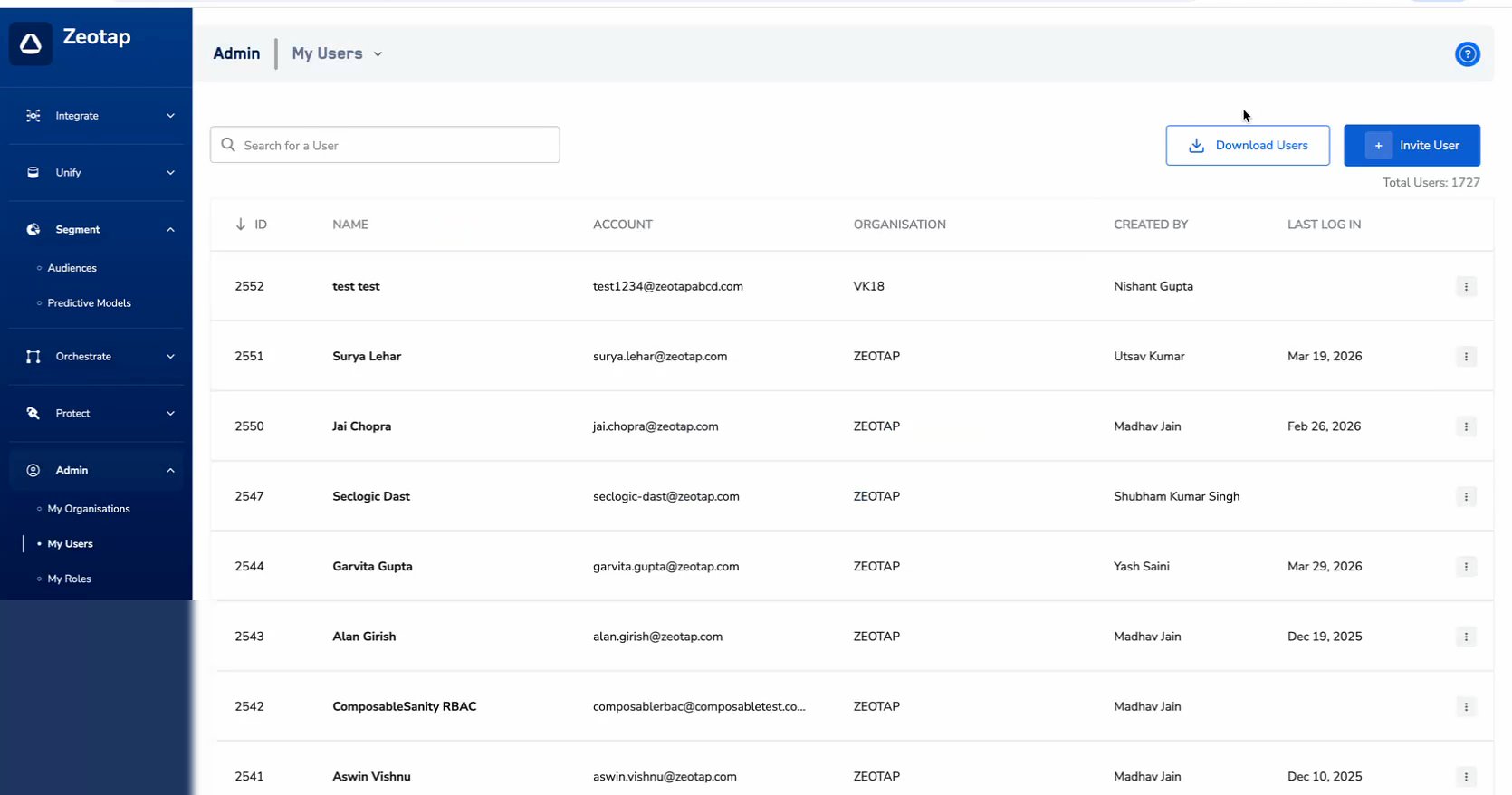
Navigate to **Admin > My Users**.
Click the **Download Users** button in the top-right area of the page.
 In the modal that appears, choose the export scope:
* **All Organizations** — Exports users from all organizations. Useful for global audits.
* **Specific Organization** — Exports users from a selected organization only. A searchable dropdown lets you pick the organization.
In the modal that appears, choose the export scope:
* **All Organizations** — Exports users from all organizations. Useful for global audits.
* **Specific Organization** — Exports users from a selected organization only. A searchable dropdown lets you pick the organization.
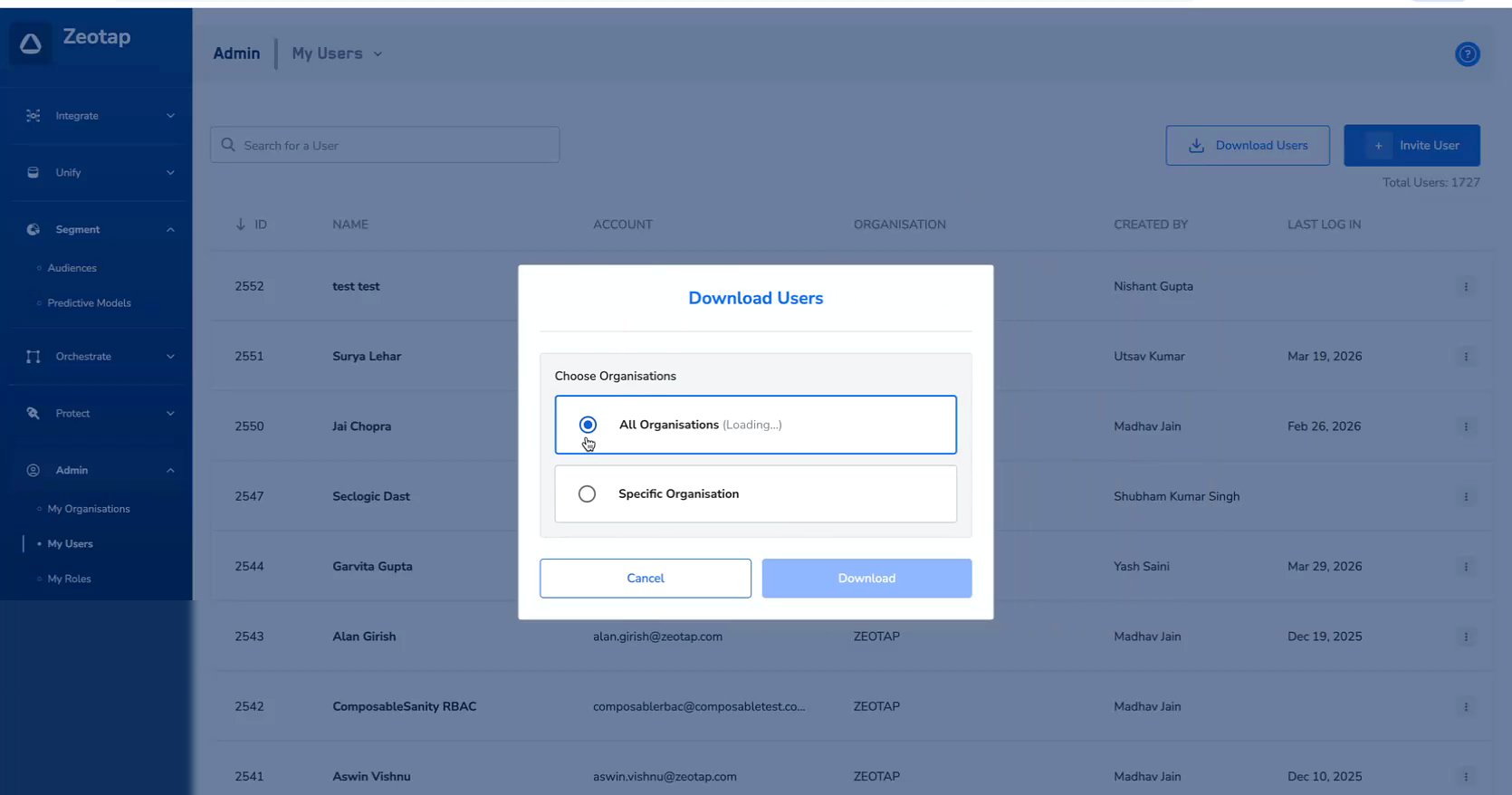 Click **Download** to generate and download the CSV file.
### Exported File
The exported file follows the naming convention `zeotap_users_export_YYYY-MM-DD (N).csv`.
#### Data Structure
Each row in the CSV represents a user. The columns cover identity fields and permission states:
| Column Group | Fields |
| -------------------------- | ---------------------------------------------------------------------------------------------------------------------- |
| **User Identity** | User Name, Email ID, Admin Portal Access, Last Login Date, Organization |
| **User Role** | Role Name |
| **Audience Permissions** | View Audience, Create/Edit/Move/Duplicate, Archive Audience, Download Audience, Activate Audience, Allow User Deletion |
| **Folder Permissions** | Create Folder, Create Sub Folder, Delete Folder |
| **Catalogue & Attributes** | Catalogue Admin, Calculated Attributes, View Catalogue |
Permission values are displayed as **TRUE** or **FALSE** for each user.
Use conditional formatting in your spreadsheet tool to highlight **TRUE** values in green and **FALSE** values in red for a quick visual audit of permission coverage across users.
### Best Practices
* **Schedule regular exports** — Download the user permissions CSV at a regular cadence (e.g., monthly) for compliance and audit purposes.
* **Compare over time** — Keep historical exports to track how permissions change over time and identify any unintended permission escalations.
* **Use Specific Organization scoping** — For multi-org deployments, export per organization to keep audit files focused and manageable.
* **Automate reviews** — Use spreadsheet formulas or scripts to flag users with unusual permission combinations (e.g., users with Delete permissions but not Create permissions).
Click **Download** to generate and download the CSV file.
### Exported File
The exported file follows the naming convention `zeotap_users_export_YYYY-MM-DD (N).csv`.
#### Data Structure
Each row in the CSV represents a user. The columns cover identity fields and permission states:
| Column Group | Fields |
| -------------------------- | ---------------------------------------------------------------------------------------------------------------------- |
| **User Identity** | User Name, Email ID, Admin Portal Access, Last Login Date, Organization |
| **User Role** | Role Name |
| **Audience Permissions** | View Audience, Create/Edit/Move/Duplicate, Archive Audience, Download Audience, Activate Audience, Allow User Deletion |
| **Folder Permissions** | Create Folder, Create Sub Folder, Delete Folder |
| **Catalogue & Attributes** | Catalogue Admin, Calculated Attributes, View Catalogue |
Permission values are displayed as **TRUE** or **FALSE** for each user.
Use conditional formatting in your spreadsheet tool to highlight **TRUE** values in green and **FALSE** values in red for a quick visual audit of permission coverage across users.
### Best Practices
* **Schedule regular exports** — Download the user permissions CSV at a regular cadence (e.g., monthly) for compliance and audit purposes.
* **Compare over time** — Keep historical exports to track how permissions change over time and identify any unintended permission escalations.
* **Use Specific Organization scoping** — For multi-org deployments, export per organization to keep audit files focused and manageable.
* **Automate reviews** — Use spreadsheet formulas or scripts to flag users with unusual permission combinations (e.g., users with Delete permissions but not Create permissions).